Installation
Prerequisites
- Linux (x86_64 or aarch64) with a desktop environment (X11 or Wayland), or macOS (arm64 or x86_64) — see macOS (M1) below for the macOS-specific install path
- Rust 1.88+ (MSRV) if installing from source
- Build dependencies for the full daemon (Linux only — macOS needs nothing
beyond Xcode Command Line Tools):
sudo apt install libudev-dev libwayland-dev libmpv-dev libpipewire-0.3-dev pkg-config - If
pkg-configcannot findlibudev, setPKG_CONFIG_PATH=/usr/lib/pkgconfig
Render backend
The software render backend (render_black, render_screensaver ladder stages)
is off by default. The full build below enables it. For a smaller build, omit
render and its libwayland-dev / libmpv-dev dependencies.
- Build: add
--features render—cargo build --release --features render - Dependencies:
libwayland-dev,libmpv-dev, andpkg-config - Without the feature, configs using render stages are rejected at startup with
E_RENDER_UNAVAILABLE; the daemon, CLI, and non-render sensors/displays still build and run normally.
Homebrew
The Legion Works tap publishes one formula per binary for macOS and Linuxbrew. Formulas are versioned with each release.
brew install legion-works/tap/dormantd
brew install legion-works/tap/dormantctl
brew install legion-works/tap/dormant-tray
Arch Linux (AUR)
dormant-bin installs pre-built x86_64 release binaries and the systemd user
units under /usr/lib/systemd/user/.
yay -S dormant-bin
From source
git clone https://github.com/legion-works/dormant.git
cd dormant
sudo apt install libudev-dev libwayland-dev libmpv-dev libpipewire-0.3-dev pkg-config
cargo build --release --features web-ui,render
install -Dm755 target/release/dormantd ~/.local/bin/dormantd
install -Dm755 target/release/dormantctl ~/.local/bin/dormantctl
Binaries land in ~/.local/bin/ — make sure this is on your PATH.
Tray applet
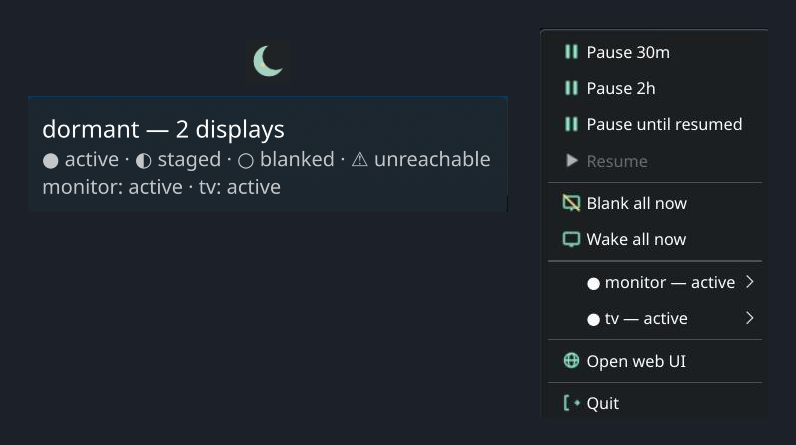
On Linux, dormant-tray is a KDE StatusNotifierItem applet. On macOS, it
is a native NSStatusItem menu-bar item. Both provide status, pause/resume,
and blank/wake controls through the daemon's Unix socket.
install -Dm755 target/release/dormant-tray ~/.local/bin/dormant-tray
See Tray autostart below to run it on every login.
From release
The cargo-dist pipeline publishes shell installers and tarballs for every binary. These URLs always resolve to the newest release; substitute download/vX.Y.Z for a specific one. Install on Linux x86_64 or aarch64:
Linux prebuilt binaries need glibc 2.39 or newer (Ubuntu 24.04, Debian 13, Fedora 40 and later). They are built on Ubuntu 24.04 because active wear sampling links against PipeWire 1.0 headers, which Ubuntu 22.04 does not ship.
They also need PipeWire's client library present at runtime:
sudo apt install libpipewire-0.3-0on Debian and Ubuntu, orpipewireon Fedora and Arch. Without it the daemon exits immediately witherror while loading shared libraries: libpipewire-0.3.so.0. This is the only extra runtime package — the release binaries are built without the render backend, so they do not link libmpv.On an older distribution, build from source or install from the AUR — both compile against your own system libraries. Check your glibc with
ldd --version.
curl --proto '=https' --tlsv1.2 -LsSf https://github.com/legion-works/dormant/releases/latest/download/dormantd-installer.sh | sh
curl --proto '=https' --tlsv1.2 -LsSf https://github.com/legion-works/dormant/releases/latest/download/dormantctl-installer.sh | sh
dormant-tray-installer.sh is also available in the same directory. Checksums are published alongside every artifact; verify with:
sha256sum -c dormantd-x86_64-unknown-linux-gnu.tar.xz.sha256
sha256sum -c dormantctl-x86_64-unknown-linux-gnu.tar.xz.sha256
Systemd user unit
dormant runs as a user service — it does not need root. The unit file
(app-dormant.service) is in the release tarball (under
dormantd-<triple>/app-dormant.service) and in the source tree at
crates/dormantd/systemd/app-dormant.service.
The AUR package installs the unit under /usr/lib/systemd/user/ already. Use
the manual paths below for source builds and release tarballs.
Install it:
mkdir -p ~/.config/systemd/user

# From source:
cp crates/dormantd/systemd/app-dormant.service ~/.config/systemd/user/

# From a release tarball:
tar -xf dormantd-x86_64-unknown-linux-gnu.tar.xz \
    dormantd-x86_64-unknown-linux-gnu/app-dormant.service
mv dormantd-x86_64-unknown-linux-gnu/app-dormant.service \
    ~/.config/systemd/user/app-dormant.service

# Then enable and start:
systemctl --user daemon-reload
systemctl --user enable --now app-dormant.service
Check status:
systemctl --user status app-dormant.service
journalctl --user -u app-dormant.service -f
Upgrading from dormant.service (dormant ≤0.11)
The unit was renamed to app-dormant.service because KDE's portal casting
identity lookup requires the app-<ApplicationID>-… systemd unit convention.
On an existing installation, migrate it explicitly:
systemctl --user disable --now dormant.service
cp crates/dormantd/systemd/app-dormant.service ~/.config/systemd/user/
systemctl --user daemon-reload
systemctl --user enable --now app-dormant.service
The old dormant.service name continues to run the daemon if retained, but
portal casting indicators may remain unnamed under that unit name.
Portal casting identity
The daemon release archive also contains dormant.desktop. Install it in the
user application directory so KDE and other portal backends can resolve the
daemon's display name when presenting an active wear-sampling session:
mkdir -p ~/.local/share/applications

# From source:
install -Dm644 crates/dormantd/share/dormant.desktop \
    ~/.local/share/applications/dormant.desktop

# From a release tarball:
tar -xf dormantd-x86_64-unknown-linux-gnu.tar.xz \
    dormantd-x86_64-unknown-linux-gnu/dormant.desktop
install -Dm644 dormantd-x86_64-unknown-linux-gnu/dormant.desktop \
    ~/.local/share/applications/dormant.desktop
The entry is marked NoDisplay=true; it is identity metadata, not a launcher
or an autostart entry. Refresh the desktop application database or log in
again if the portal backend cached the old application list.
The app-dormant.service name supplies the systemd application-unit identity;
the desktop entry supplies its display name and icon. Both are required for
portal casting indicators to show dormant consistently.
The unit runs as Type=notify, restarts on failure, and uses a 150-second engine-liveness watchdog. Reload with systemctl --user reload app-dormant.service. To stop:
systemctl --user stop app-dormant.service
When upgrading from a unit that used Type=simple, install the new
dormantd binary before copying or reloading the new unit. Then run
systemctl --user daemon-reload and systemctl --user restart app-dormant.service.
See Watchdog + last-known-good rollback.
Configuration file location
dormant reads config from these paths, first match wins:
--configCLI flag$DORMANT_CONFIGenvironment variable$XDG_CONFIG_HOME/dormant/config.toml(usually~/.config/dormant/config.toml)
MQTT credentials, HA tokens, and Samsung TV tokens go in a separate file with restricted permissions:
$XDG_CONFIG_HOME/dormant/credentials.toml
Set permissions to 600 — dormant will refuse to load a credentials file readable by others:
chmod 600 ~/.config/dormant/credentials.toml
Tray autostart
Linux (systemd)
Run dormant-tray on every graphical session with the provided user
unit — the same mechanism as the daemon. The unit file
(dormant-tray.service) ships in the release tarball under
dormant-tray-<triple>/systemd/dormant-tray.service and in the source
tree at crates/dormant-tray/systemd/dormant-tray.service.
mkdir -p ~/.config/systemd/user

# From source:
cp crates/dormant-tray/systemd/dormant-tray.service ~/.config/systemd/user/

# From a release tarball:
tar -xf dormant-tray-x86_64-unknown-linux-gnu.tar.xz \
    dormant-tray-x86_64-unknown-linux-gnu/systemd/dormant-tray.service
mv dormant-tray-x86_64-unknown-linux-gnu/systemd/dormant-tray.service \
    ~/.config/systemd/user/dormant-tray.service

# Then enable and start:
systemctl --user daemon-reload
systemctl --user enable --now dormant-tray
The unit uses ExecStart=%h/.local/bin/dormant-tray, so systemd expands
the path from your home directory at launch — no reliance on PATH. It
starts after app-dormant.service and restarts on failure. A plain XDG
.desktop autostart does not work here: the systemd autostart generator
resolves a relative Exec= against a minimal boot PATH that excludes
~/.local/bin, so no unit gets generated.
macOS (launchd)
dormantctl launchd install writes both checked-in LaunchAgent plists to
~/Library/LaunchAgents/: com.legionworks.dormant.plist for the daemon and
com.legionworks.dormant-tray.plist for the tray. It does not bootstrap or
start either job. Start them immediately, without waiting for the next login:
dormantctl launchd install
launchctl bootstrap gui/$(id -u) ~/Library/LaunchAgents/com.legionworks.dormant.plist
launchctl bootstrap gui/$(id -u) ~/Library/LaunchAgents/com.legionworks.dormant-tray.plist
The tray agent runs only in an Aqua session. It starts at login, restarts
after an unsuccessful exit, and throttles restarts to one per 10 seconds.
Its stdout and stderr logs are ~/Library/Logs/dormant/dormant-tray.log and
~/Library/Logs/dormant/dormant-tray.err.log.
To remove the managed plist files, first boot out any loaded jobs, then run:
launchctl bootout gui/$(id -u)/com.legionworks.dormant
launchctl bootout gui/$(id -u)/com.legionworks.dormant-tray
dormantctl launchd uninstall
dormantctl launchd uninstall removes the two files only. It does not boot
out loaded jobs, so launchd retains their last-loaded definitions until they
are explicitly booted out.
macOS (M1)
dormant runs natively on macOS (arm64 and x86_64), no root required. This milestone (M1) ships:
- DDC/CI display control (
dormantctl doctor ddcci) - The
macos-gamma-blackandmacos-display-sleepblank controllers - A CoreGraphics-based idle source
- Read-only diagnostics:
dormantctl doctor macos-idle,macos-display-sleep,macos-power
dormant-tray runs as a native NSStatusItem menu-bar item on macOS. See
Tray autostart: macOS (launchd) to install and start its
LaunchAgent with the daemon.
From release (macOS)
curl --proto '=https' --tlsv1.2 -LsSf https://github.com/legion-works/dormant/releases/latest/download/dormantd-installer.sh | sh
curl --proto '=https' --tlsv1.2 -LsSf https://github.com/legion-works/dormant/releases/latest/download/dormantctl-installer.sh | sh
Binaries land in ~/.local/bin/, same as Linux. The installer also prints
the next step — it deliberately does not run dormantctl launchd install
or launchctl bootstrap for you (that would start a background daemon
before you have configured it).
LaunchAgent (macOS)
dormant ships per-user LaunchAgents — the macOS analog of the systemd user
units above — as checked-in daemon and tray plists:
crates/dormantd/share/com.legionworks.dormant.plist and
crates/dormant-tray/share/com.legionworks.dormant-tray.plist.
dormantctl launchd install embeds byte-identical copies at build time.
Install it (idempotent, non-root — writes only under your home directory):
dormantctl launchd install
This atomically copies both plists to their canonical paths under
~/Library/LaunchAgents/, mode 0644. It does not start either agent —
bootstrap them explicitly:
launchctl bootstrap gui/$UID "$HOME/Library/LaunchAgents/com.legionworks.dormant.plist"
launchctl bootstrap gui/$UID "$HOME/Library/LaunchAgents/com.legionworks.dormant-tray.plist"
Check status and force an immediate (re)start:
launchctl print gui/$UID/com.legionworks.dormant
launchctl kickstart -k gui/$UID/com.legionworks.dormant
Reload config the same way as Linux — signal, not restart:
launchctl kill HUP gui/$UID/com.legionworks.dormant
Daemon logs land at ~/Library/Logs/dormant/dormantd.log (stdout) and
dormantd.err.log (stderr). Tray logs are
~/Library/Logs/dormant/dormant-tray.log (stdout) and
dormant-tray.err.log (stderr). Each LaunchAgent's ProgramArguments
creates that directory and redirects into it before exec-ing the binary,
so the shell never lingers as a supervisor.
To stop and remove:
launchctl bootout gui/$(id -u)/com.legionworks.dormant
launchctl bootout gui/$(id -u)/com.legionworks.dormant-tray
dormantctl launchd uninstall
launchd uninstall only removes the two canonical files. It does not boot
out a still-loaded label, so run bootout first or launchd will keep the
last-loaded definition in memory after the on-disk files are gone.
Lifecycle semantics (see the plist's own comments for the full rationale):
RunAtLoad=true+KeepAlive.SuccessfulExit=false: dormantd starts immediately on bootstrap/login and is relaunched whenever it exits, except a cleanexit 0.ThrottleInterval=10: launchd will not restart dormantd more than once every 10 seconds — the only restart-rate control here, this is a crash-loop rate limiter, not a liveness check.- No watchdog parity. Unlike the systemd unit's
WatchdogSec=150engine-liveness ping, launchd has no built-in mechanism to detect a dormantd that is running but wedged (hung without exiting). A wedged daemon on macOS is invisible to launchd and will not be restarted;dormantctl doctor exercise <display>and the emergency-wake path (see Troubleshooting) are the operator recourse there, independent of the supervisor. - Composition with boot-rollback. The crash-loop / last-known-good
rollback logic is entirely supervisor-agnostic —
it counts dormantd process starts sharing a config fingerprint within a
sliding window from its own state files, not from systemd or launchd.
So on macOS, launchd's 10-second
ThrottleIntervalpaces the restarts the same way systemd'sRestartSec=2does on Linux, and the crash-loop counter behind it still trips and rolls back to the last-known-good config after repeated failed starts — the supervisor differs, the rollback guarantee does not.