Introduction
dormant is a Rust daemon that blanks OLED PC monitors and TVs when presence sensors report an empty room, then wakes them on return. Sensors arrive through MQTT, Home Assistant WebSocket, or USB-serial mmWave radar. Displays use DDC/CI, KWin DPMS, Samsung Tizen, Home Assistant passthrough, or shell commands.
Why dormant?
OLED panels burn in. Static UI elements — taskbars, window decorations, desktop icons — degrade the panel over hundreds of hours. Dimming the display or turning it off when no one is watching extends panel life.
Built-in monitor proximity sensors protect one panel. dormant instead fuses room-level sensors across zones and controls every configured display, including TVs.
How it works at a high level
- Sensors report presence — a Zigbee mmWave radar over MQTT, a Home Assistant binary sensor, or a USB-LD2410 module.
- Zones fuse sensors with
any,all,quorum, orweightedlogic. A zone is "occupied" or "vacant". - Rules link zones to displays with timing parameters. Grace periods and minimum blank/wake times prevent thrash; user activity and manual pause can inhibit blanking.
- Displays receive blank/wake commands through an ordered controller chain with fallback and retry.
What dormant protects against
OLED panels degrade with static content. The effectiveness of each blank mode varies:
| Mode | OLED protection | Audio | Wake speed |
|---|---|---|---|
screen_off_audio_on | Full (panel off, electronics on) | Yes | Fast (~1s) |
power_off | Full (DPMS off, DDC power off) | No | Slower (monitor-dependent) |
brightness_zero | Partial (pixels still powered, but minimal emission) | Yes | Instant |
Use screen_off_audio_on for TVs where the controller can turn off the picture without powering down the set. Use power_off for PC monitors. brightness_zero is a near-black dim: the panel stays energized, while the source and its audio can continue running.
Fail-safe design
Unavailable means present, never absent. If a sensor stops reporting (broker down, USB unplugged, network loss), the zone treats it as present. dormant never blanks a display when it cannot confirm the room is empty. This is the single most important safety invariant in the codebase.
Panel-wear tracking, failure notifications, and watchdog + last-known-good rollback report or recover faults around this pipeline. They do not weaken the fail-safe presence rule.
Installation
Prerequisites
- Linux (x86_64 or aarch64) with a desktop environment (X11 or Wayland), or macOS (arm64 or x86_64) — see macOS (M1) below for the macOS-specific install path
- Rust 1.88+ (MSRV) if installing from source
- Build dependencies for the full daemon (Linux only — macOS needs nothing
beyond Xcode Command Line Tools):
sudo apt install libudev-dev libwayland-dev libmpv-dev libpipewire-0.3-dev pkg-config - If
pkg-configcannot findlibudev, setPKG_CONFIG_PATH=/usr/lib/pkgconfig
Render backend
The software render backend (render_black, render_screensaver ladder stages)
is off by default. The full build below enables it. For a smaller build, omit
render and its libwayland-dev / libmpv-dev dependencies.
- Build: add
--features render—cargo build --release --features render - Dependencies:
libwayland-dev,libmpv-dev, andpkg-config - Without the feature, configs using render stages are rejected at startup with
E_RENDER_UNAVAILABLE; the daemon, CLI, and non-render sensors/displays still build and run normally.
Homebrew
The Legion Works tap publishes one formula per binary for macOS and Linuxbrew. Formulas are versioned with each release.
brew install legion-works/tap/dormantd
brew install legion-works/tap/dormantctl
brew install legion-works/tap/dormant-tray
Arch Linux (AUR)
dormant-bin installs pre-built x86_64 release binaries and the systemd user
units under /usr/lib/systemd/user/.
yay -S dormant-bin
From source
git clone https://github.com/legion-works/dormant.git
cd dormant
sudo apt install libudev-dev libwayland-dev libmpv-dev libpipewire-0.3-dev pkg-config
cargo build --release --features web-ui,render
install -Dm755 target/release/dormantd ~/.local/bin/dormantd
install -Dm755 target/release/dormantctl ~/.local/bin/dormantctl
Binaries land in ~/.local/bin/ — make sure this is on your PATH.
Tray applet
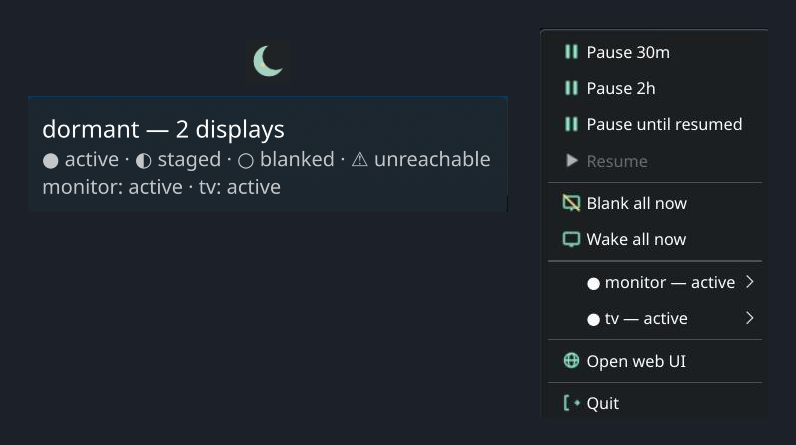
On Linux, dormant-tray is a KDE StatusNotifierItem applet. On macOS, it
is a native NSStatusItem menu-bar item. Both provide status, pause/resume,
and blank/wake controls through the daemon's Unix socket.
install -Dm755 target/release/dormant-tray ~/.local/bin/dormant-tray
See Tray autostart below to run it on every login.
From release
The cargo-dist pipeline publishes shell installers and tarballs for every binary. These URLs always resolve to the newest release; substitute download/vX.Y.Z for a specific one. Install on Linux x86_64 or aarch64:
Linux prebuilt binaries need glibc 2.39 or newer (Ubuntu 24.04, Debian 13, Fedora 40 and later). They are built on Ubuntu 24.04 because active wear sampling links against PipeWire 1.0 headers, which Ubuntu 22.04 does not ship.
They also need PipeWire's client library present at runtime:
sudo apt install libpipewire-0.3-0on Debian and Ubuntu, orpipewireon Fedora and Arch. Without it the daemon exits immediately witherror while loading shared libraries: libpipewire-0.3.so.0. This is the only extra runtime package — the release binaries are built without the render backend, so they do not link libmpv.On an older distribution, build from source or install from the AUR — both compile against your own system libraries. Check your glibc with
ldd --version.
curl --proto '=https' --tlsv1.2 -LsSf https://github.com/legion-works/dormant/releases/latest/download/dormantd-installer.sh | sh
curl --proto '=https' --tlsv1.2 -LsSf https://github.com/legion-works/dormant/releases/latest/download/dormantctl-installer.sh | sh
dormant-tray-installer.sh is also available in the same directory. Checksums are published alongside every artifact; verify with:
sha256sum -c dormantd-x86_64-unknown-linux-gnu.tar.xz.sha256
sha256sum -c dormantctl-x86_64-unknown-linux-gnu.tar.xz.sha256
Systemd user unit
dormant runs as a user service — it does not need root. The unit file
(app-dormant.service) is in the release tarball (under
dormantd-<triple>/app-dormant.service) and in the source tree at
crates/dormantd/systemd/app-dormant.service.
The AUR package installs the unit under /usr/lib/systemd/user/ already. Use
the manual paths below for source builds and release tarballs.
Install it:
mkdir -p ~/.config/systemd/user

# From source:
cp crates/dormantd/systemd/app-dormant.service ~/.config/systemd/user/

# From a release tarball:
tar -xf dormantd-x86_64-unknown-linux-gnu.tar.xz \
    dormantd-x86_64-unknown-linux-gnu/app-dormant.service
mv dormantd-x86_64-unknown-linux-gnu/app-dormant.service \
    ~/.config/systemd/user/app-dormant.service

# Then enable and start:
systemctl --user daemon-reload
systemctl --user enable --now app-dormant.service
Check status:
systemctl --user status app-dormant.service
journalctl --user -u app-dormant.service -f
Upgrading from dormant.service (dormant ≤0.11)
The unit was renamed to app-dormant.service because KDE's portal casting
identity lookup requires the app-<ApplicationID>-… systemd unit convention.
On an existing installation, migrate it explicitly:
systemctl --user disable --now dormant.service
cp crates/dormantd/systemd/app-dormant.service ~/.config/systemd/user/
systemctl --user daemon-reload
systemctl --user enable --now app-dormant.service
The old dormant.service name continues to run the daemon if retained, but
portal casting indicators may remain unnamed under that unit name.
Portal casting identity
The daemon release archive also contains dormant.desktop. Install it in the
user application directory so KDE and other portal backends can resolve the
daemon's display name when presenting an active wear-sampling session:
mkdir -p ~/.local/share/applications

# From source:
install -Dm644 crates/dormantd/share/dormant.desktop \
    ~/.local/share/applications/dormant.desktop

# From a release tarball:
tar -xf dormantd-x86_64-unknown-linux-gnu.tar.xz \
    dormantd-x86_64-unknown-linux-gnu/dormant.desktop
install -Dm644 dormantd-x86_64-unknown-linux-gnu/dormant.desktop \
    ~/.local/share/applications/dormant.desktop
The entry is marked NoDisplay=true; it is identity metadata, not a launcher
or an autostart entry. Refresh the desktop application database or log in
again if the portal backend cached the old application list.
The app-dormant.service name supplies the systemd application-unit identity;
the desktop entry supplies its display name and icon. Both are required for
portal casting indicators to show dormant consistently.
The unit runs as Type=notify, restarts on failure, and uses a 150-second engine-liveness watchdog. Reload with systemctl --user reload app-dormant.service. To stop:
systemctl --user stop app-dormant.service
When upgrading from a unit that used Type=simple, install the new
dormantd binary before copying or reloading the new unit. Then run
systemctl --user daemon-reload and systemctl --user restart app-dormant.service.
See Watchdog + last-known-good rollback.
Configuration file location
dormant reads config from these paths, first match wins:
--configCLI flag$DORMANT_CONFIGenvironment variable$XDG_CONFIG_HOME/dormant/config.toml(usually~/.config/dormant/config.toml)
MQTT credentials, HA tokens, and Samsung TV tokens go in a separate file with restricted permissions:
$XDG_CONFIG_HOME/dormant/credentials.toml
Set permissions to 600 — dormant will refuse to load a credentials file readable by others:
chmod 600 ~/.config/dormant/credentials.toml
Tray autostart
Linux (systemd)
Run dormant-tray on every graphical session with the provided user
unit — the same mechanism as the daemon. The unit file
(dormant-tray.service) ships in the release tarball under
dormant-tray-<triple>/systemd/dormant-tray.service and in the source
tree at crates/dormant-tray/systemd/dormant-tray.service.
mkdir -p ~/.config/systemd/user

# From source:
cp crates/dormant-tray/systemd/dormant-tray.service ~/.config/systemd/user/

# From a release tarball:
tar -xf dormant-tray-x86_64-unknown-linux-gnu.tar.xz \
    dormant-tray-x86_64-unknown-linux-gnu/systemd/dormant-tray.service
mv dormant-tray-x86_64-unknown-linux-gnu/systemd/dormant-tray.service \
    ~/.config/systemd/user/dormant-tray.service

# Then enable and start:
systemctl --user daemon-reload
systemctl --user enable --now dormant-tray
The unit uses ExecStart=%h/.local/bin/dormant-tray, so systemd expands
the path from your home directory at launch — no reliance on PATH. It
starts after app-dormant.service and restarts on failure. A plain XDG
.desktop autostart does not work here: the systemd autostart generator
resolves a relative Exec= against a minimal boot PATH that excludes
~/.local/bin, so no unit gets generated.
macOS (launchd)
dormantctl launchd install writes both checked-in LaunchAgent plists to
~/Library/LaunchAgents/: com.legionworks.dormant.plist for the daemon and
com.legionworks.dormant-tray.plist for the tray. It does not bootstrap or
start either job. Start them immediately, without waiting for the next login:
dormantctl launchd install
launchctl bootstrap gui/$(id -u) ~/Library/LaunchAgents/com.legionworks.dormant.plist
launchctl bootstrap gui/$(id -u) ~/Library/LaunchAgents/com.legionworks.dormant-tray.plist
The tray agent runs only in an Aqua session. It starts at login, restarts
after an unsuccessful exit, and throttles restarts to one per 10 seconds.
Its stdout and stderr logs are ~/Library/Logs/dormant/dormant-tray.log and
~/Library/Logs/dormant/dormant-tray.err.log.
To remove the managed plist files, first boot out any loaded jobs, then run:
launchctl bootout gui/$(id -u)/com.legionworks.dormant
launchctl bootout gui/$(id -u)/com.legionworks.dormant-tray
dormantctl launchd uninstall
dormantctl launchd uninstall removes the two files only. It does not boot
out loaded jobs, so launchd retains their last-loaded definitions until they
are explicitly booted out.
macOS (M1)
dormant runs natively on macOS (arm64 and x86_64), no root required. This milestone (M1) ships:
- DDC/CI display control (
dormantctl doctor ddcci) - The
macos-gamma-blackandmacos-display-sleepblank controllers - A CoreGraphics-based idle source
- Read-only diagnostics:
dormantctl doctor macos-idle,macos-display-sleep,macos-power
dormant-tray runs as a native NSStatusItem menu-bar item on macOS. See
Tray autostart: macOS (launchd) to install and start its
LaunchAgent with the daemon.
From release (macOS)
curl --proto '=https' --tlsv1.2 -LsSf https://github.com/legion-works/dormant/releases/latest/download/dormantd-installer.sh | sh
curl --proto '=https' --tlsv1.2 -LsSf https://github.com/legion-works/dormant/releases/latest/download/dormantctl-installer.sh | sh
Binaries land in ~/.local/bin/, same as Linux. The installer also prints
the next step — it deliberately does not run dormantctl launchd install
or launchctl bootstrap for you (that would start a background daemon
before you have configured it).
LaunchAgent (macOS)
dormant ships per-user LaunchAgents — the macOS analog of the systemd user
units above — as checked-in daemon and tray plists:
crates/dormantd/share/com.legionworks.dormant.plist and
crates/dormant-tray/share/com.legionworks.dormant-tray.plist.
dormantctl launchd install embeds byte-identical copies at build time.
Install it (idempotent, non-root — writes only under your home directory):
dormantctl launchd install
This atomically copies both plists to their canonical paths under
~/Library/LaunchAgents/, mode 0644. It does not start either agent —
bootstrap them explicitly:
launchctl bootstrap gui/$UID "$HOME/Library/LaunchAgents/com.legionworks.dormant.plist"
launchctl bootstrap gui/$UID "$HOME/Library/LaunchAgents/com.legionworks.dormant-tray.plist"
Check status and force an immediate (re)start:
launchctl print gui/$UID/com.legionworks.dormant
launchctl kickstart -k gui/$UID/com.legionworks.dormant
Reload config the same way as Linux — signal, not restart:
launchctl kill HUP gui/$UID/com.legionworks.dormant
Daemon logs land at ~/Library/Logs/dormant/dormantd.log (stdout) and
dormantd.err.log (stderr). Tray logs are
~/Library/Logs/dormant/dormant-tray.log (stdout) and
dormant-tray.err.log (stderr). Each LaunchAgent's ProgramArguments
creates that directory and redirects into it before exec-ing the binary,
so the shell never lingers as a supervisor.
To stop and remove:
launchctl bootout gui/$(id -u)/com.legionworks.dormant
launchctl bootout gui/$(id -u)/com.legionworks.dormant-tray
dormantctl launchd uninstall
launchd uninstall only removes the two canonical files. It does not boot
out a still-loaded label, so run bootout first or launchd will keep the
last-loaded definition in memory after the on-disk files are gone.
Lifecycle semantics (see the plist's own comments for the full rationale):
RunAtLoad=true+KeepAlive.SuccessfulExit=false: dormantd starts immediately on bootstrap/login and is relaunched whenever it exits, except a cleanexit 0.ThrottleInterval=10: launchd will not restart dormantd more than once every 10 seconds — the only restart-rate control here, this is a crash-loop rate limiter, not a liveness check.- No watchdog parity. Unlike the systemd unit's
WatchdogSec=150engine-liveness ping, launchd has no built-in mechanism to detect a dormantd that is running but wedged (hung without exiting). A wedged daemon on macOS is invisible to launchd and will not be restarted;dormantctl doctor exercise <display>and the emergency-wake path (see Troubleshooting) are the operator recourse there, independent of the supervisor. - Composition with boot-rollback. The crash-loop / last-known-good
rollback logic is entirely supervisor-agnostic —
it counts dormantd process starts sharing a config fingerprint within a
sliding window from its own state files, not from systemd or launchd.
So on macOS, launchd's 10-second
ThrottleIntervalpaces the restarts the same way systemd'sRestartSec=2does on Linux, and the crash-loop counter behind it still trips and rolls back to the last-known-good config after repeated failed starts — the supervisor differs, the rollback guarantee does not.
Configuration
dormant configuration is a TOML file. Optional keys list their defaults here; required keys are marked required. Unknown keys are rejected at startup (strict mode) or warned about (warn mode — default).
Schema version
config_version = 1
Required. Must be 1. This gates backward compatibility — bump when making breaking schema changes.
[daemon] — daemon-level settings
| Key | Type | Default | Description |
|---|---|---|---|
startup_holdoff | duration | "30s" | Wait after startup before acting (allows sensors to stabilize) |
stale_sensor_timeout | duration | "5m" | How long a sensor can go silent before considered stale |
log_level | string | "info" | Tracing log level: "trace", "debug", "info", "warn", "error" |
socket_path | path | auto | Unix-domain socket for dormantctl IPC (defaults to XDG_RUNTIME_DIR) |
idle_time_unit | string | "auto" | How to interpret screensaver idle values: "auto", "ms", "s". KDE returns ms despite the spec saying seconds — auto detects the unit at runtime |
idle_source | string | "auto" | User-activity source: "auto", "wayland", "dbus", or "macos" (CoreGraphics idle time, macOS builds only) |
macos_idle_frozen_polls | integer | 3 | macOS only: consecutive identical-looking idle-clock polls before a reading is treated as frozen (defensive against a stuck clock) |
macos_idle_sanity_cap | duration | "24h" | macOS only: idle readings above this are treated as bogus, not real idle time (must be > 0) |
macos_idle_startup_grace | duration | "15s" | macOS only: idle readings are untrusted for this long after daemon startup (must be > 0) |
reload_debounce | duration | "500ms" | Coalesces rapid config-file changes into a single reload |
web_port | integer | unset | Web UI port; unset disables the server even in a web-ui build |
web_bind | IP address | "127.0.0.1" | Web UI bind address |
web_allow_nonloopback | boolean | false | Required before web_bind may use a non-loopback address |
entity_crud_enabled | boolean | true | Allow web creation/deletion of sensors, zones, displays, and rules |
pairing_enabled | boolean | true | Allow the web Samsung pairing wizard |
pair_timeout | duration | "120s" | Pairing timeout; valid range 30s–300s |
[sensors.<id>] — sensor definitions
Each sensor has a user-chosen id (e.g., desk). The type field selects the source.
Common fields on all sensor types:
| Key | Type | Default | Description |
|---|---|---|---|
kind | string | "presence" | Sensor semantics: "presence" (binary occupied/vacant) or "motion" (transient event) |
hold_time | duration | none | Per-sensor override: how long occupancy persists after the last trigger |
stale_timeout | duration | none | Per-sensor override: how long before no data means unavailable |
type = "mqtt"
Connects to an MQTT broker and subscribes to a topic.
| Key | Type | Required | Description |
|---|---|---|---|
broker_url | string | yes | MQTT broker URL (e.g., tcp://localhost:1883) |
topic | string | yes | MQTT topic to subscribe to |
field | string | "/occupancy" | JSON pointer into the payload (RFC 6901) |
payload_on | string | none | Override for the "on" payload value (default: JSON true) |
payload_off | string | none | Override for the "off" payload value (default: JSON false) |
availability_topic | string | <topic>/availability | Override the derived availability/LWT topic |
availability_payload_online | string | "online" | Payload meaning the device is reachable |
availability_payload_offline | string | "offline" | Payload meaning the device is unreachable |
If your broker requires authentication, add a [mqtt] section to your credentials file:
# credentials.toml
[mqtt."tcp://mqtt.local:1883"]
username = "your-username"
password = "your-password"
The credentials key must match the sensor's broker_url exactly. A mqtt:// / tcp:// mismatch or a trailing difference causes an anonymous connection attempt, which an authenticated broker rejects.
Retained state values are accepted on initial subscribe and reconnect. See
Retained values and availability
before setting zones.<id>.unavailable_policy = "absent" on an MQTT-backed
zone.
Example:
[sensors.desk]
type = "mqtt"
broker_url = "tcp://mqtt.local:1883"
topic = "zigbee2mqtt/desk-sensor"
type = "ha"
Connects to Home Assistant via WebSocket and subscribes to an entity state.
| Key | Type | Required | Description |
|---|---|---|---|
url | string | yes | HA WebSocket URL (e.g., ws://ha.local:8123/api/websocket) |
entity | string | yes | Entity ID to track (e.g., binary_sensor.couch_presence) |
The HA long-lived access token goes in the credentials file, not in the main config:
# credentials.toml
ha_token = "eyJ..."
type = "usb-ld2410"
Reads presence data from an HLK-LD2410 mmWave radar module over USB-serial.
| Key | Type | Required | Description |
|---|---|---|---|
port | string | yes | Serial port path (e.g., /dev/ttyUSB0) |
baud | integer | 256000 | Baud rate |
Example:
[sensors.radar]
type = "usb-ld2410"
port = "/dev/ttyUSB0"
[zones.<id>] — zone definitions
A zone fuses one or more sensor references into a single presence signal. Members can be sensor IDs or nested zones ("zone:<id>").
| Key | Type | Required | Description |
|---|---|---|---|
mode | string | yes | Fusion mode: "any", "all", "quorum", "weighted" |
members | []string | yes | Sensor/zone IDs. Prefix "zone:" for nested zones |
quorum | integer | conditional | Required member count for "quorum" mode |
threshold | float | conditional | Threshold fraction (0.0–1.0) for "weighted" mode |
weights | table | optional | Per-member float weights for "weighted" mode |
unavailable_policy | string | "present" | How to treat unavailable members: "present" (fail-safe) or "absent" |
Zone modes
any— occupied if any member reports occupied.all— occupied only if every member reports occupied.quorum— occupied if at least N members report occupied (requiresquorumkey).weighted— occupied if the weighted sum of occupied members meets a threshold (requiresthresholdandweightskeys).
Unavailable policy
When a sensor stops reporting (broker down, USB unplugged), it becomes unavailable. The zone's unavailable_policy decides what to do:
present(default, fail-safe) — treat unavailable sensors as occupied. The room is never blanked unless all sensors confirm vacancy.absent— treat unavailable sensors as vacant. Only use this when you are certain a sensor failure is acceptable — a sensor that goes offline will trigger a blank.
[displays.<id>] — display definitions
Each display has a user-chosen id. The controllers list is an ordered fallback chain.
| Key | Type | Required | Description |
|---|---|---|---|
controllers | []string | yes | Ordered list of controller names to try |
blank_mode | string | yes | Primary blank mode: "screen_off_audio_on", "power_off", "brightness_zero" |
degraded_mode | string | no | Fallback mode if primary is unsupported |
output | string | conditional | Output selector: KWin output name (e.g., "DP-1", Linux kwin-dpms); "cg:<uuid>" CoreGraphics display UUID (macOS macos-gamma-black, required — see Displays); absent or "all" for macos-display-sleep (no per-display selector) |
ddc_display | string | conditional | DDC/CI display identifier |
host | string | conditional | Hostname/IP for network-controllable displays |
wol_mac | string | conditional | MAC address for Wake-on-LAN |
blank_command | string | conditional | Shell command to blank (for "command" controller) |
wake_command | string | conditional | Shell command to wake (for "command" controller) |
modes | []string | conditional | Supported modes for "command" or "ha-passthrough" |
ha_url | string | conditional | HA URL for "ha-passthrough" |
blank_service | string | conditional | HA service to call for blanking |
blank_data | any | conditional | HA service data for blanking (TOML value) |
wake_service | string | conditional | HA service to call for waking |
wake_data | any | conditional | HA service data for waking (TOML value) |
command_timeout | duration | "10s" | Timeout for a single blank/wake command |
restore_brightness | integer | 80 | DDC/CI brightness restored on wake (1–100) |
samsung_restore_backlight | integer | 50 | Samsung IP Control G2 backlight restored when no saved value exists (1–50) |
treat_unreachable_as_blanked | boolean | true | If controller is unreachable, assume display is blanked (fail-safe) |
panel_type | string | "unknown" | Panel classification recorded by panel-wear tracking: "woled", "qd-oled", or "unknown" |
compositor_output | string | unset | Compositor output name the active sampler observes (e.g. "HDMI-A-1"). Opts a remote-only display into active wear sampling; separate from the kwin-dpms output key, which names the local render target. See Active wear sampling |
sampling | table | unset | Per-display [displays.<id>.sampling] source-gate declaration for active sampling. See Active wear sampling |
Manual-only displays
A display in [displays] referenced by no rule is manual-only: the
daemon builds it and it responds to dormantctl blank / dormantctl wake, the
web UI, and the tray app, but no zone or rule ever auto-blanks or auto-wakes it.
A ladder on a rule-less display is rejected at validation time with error
E_CONFIG_INVALID — a ladder is an auto-escalation that requires a rule to
drive it. Use blank_mode (or blank_mode + degraded_mode) for
manual-only displays.
Manual-only phase survives a config reload: if you blanked a manual-only
display via dormantctl blank and then edit the config, it stays blanked
(not defensive-woken). Across a full daemon restart (not reload) there
is no persisted state, so a manual-only display starts active.
dormantctl blank — soft and hard modes (issue #124)
dormantctl blank <display> has two modes. The default is soft: the
daemon walks the display's configured render/stage/controller blank ladder
from its first stage and never hard-powers the panel. Pass --hard to
issue the operator-override PowerOff (hard mode), the same path the
tray's "Force blank" button and the web UI's "Force blank" button take.
# Safe: walks the ladder from its first stage.  No prompt.
dormantctl blank main

# Operator override: prompts on stdin for 'y' or 'Y' before issuing
# the primary PowerOff.  Shared panels will affect every connected
# machine.  Refuses to run when stdin is not a TTY.
dormantctl blank main --hard

# Bypass the prompt for CI / scripts.
dormantctl blank main --hard --yes

# `--yes` without `--hard` is rejected by clap; the safe-soft path is
# always the default and never prompts.
The two modes are deliberately split at the IPC boundary (issue #124 — a
forced PowerOff on a shared panel can hard-power the USB hub and starve a
downstream sensor). Legacy dormantctl builds that predate the split
send {"req":"blank","display":"x"} with no mode field, which the daemon
defaults to soft (safety-first). The tray and web UI always send hard
explicitly (with a confirm dialog) and are unaffected by the new default.
Example — a Samsung Tizen TV controlled by hand, with optional source-gated active sampling (see Active wear sampling):
[displays.tv]
controllers = ["samsung-tizen"]
host = "10.1.1.7"
blank_mode = "screen_off_audio_on"
compositor_output = "HDMI-A-1"

[displays.tv.sampling]
expected_source = "HDMI4"
source_poll_interval = "15s"

[wear.active_sampling]
enabled = true
sampled_displays = ["monitor", "tv"]
compositor_output and the [displays.tv.sampling] table are optional — omit
them for a manual-only TV with no wear sampling. expected_source is
required once compositor_output is set, so the source gate can tell the
TV's HDMI input from another source.
Escalation ladder
Instead of blank_mode and degraded_mode, a display can define an ordered
ladder of stages. Each stage is tried in order; if one fails, the next one
runs. A stage with a dwell duration ("dwell stage") is held for that long
before the ladder advances. The last stage (the terminal stage) has no time
limit — the ladder stays there until an external event (sensor, user wake)
moves it.
blank_mode and ladder are mutually exclusive — a config containing both
is rejected at startup.
Ladder form (array of tables)
[displays.main]
controllers = ["ddcci", "kwin-dpms"]
output = "DP-1"
ladder = [
  { kind = "render_black", dwell = "30s" },   # audio-safe black overlay
  { kind = "power_off" },                       # terminal: true panel-off
]
Stage kinds
| Kind | Description |
|---|---|
power_off | Controller power-off mode |
screen_off_audio_on | Controller screen-off-audio-on mode |
brightness_zero | Controller brightness-zero mode |
render_black | Software fullscreen black overlay (render backend) |
render_screensaver | Software screensaver (render backend; requires screensaver config) |
dwell
An optional humantime duration
(e.g., "30s", "5m") the ladder stays at this stage before advancing.
Omitting dwell (or setting it to None) makes the stage terminal — the
ladder stops here and waits for an external event.
Every non-terminal stage must have a dwell; validation rejects ladders
that would skip past a dwell-less intermediate stage.
Render stages
render_black and render_screensaver use the software render backend, which
is off by default. Build dormant with --features render to enable it;
configs containing a render stage are rejected at startup with error
E_RENDER_UNAVAILABLE when the feature is absent.
Render stages require:
outputset on the display (the Wayland output connector name, e.g."DP-1").- At least one local controller (
kwin-dpms,ddcci, orcommand) in the display'scontrollerslist — render stages cannot run on a remote-only display (samsung-tizen/ha-passthroughalone).
render_screensaver additionally requires a [displays.<id>.screensaver]
section with at least one image source (a path or urls).
Screensaver configuration
[displays.my-display.screensaver]
trigger = "vacancy"     # only value supported
audio = false           # default: false (muted)

[[displays.my-display.screensaver.source]]
path = "/home/user/Pictures/screensaver"
recurse = false         # default: false
shuffle = true          # mutually exclusive with `order`
image_duration = "8s"   # per-item duration override

[[displays.my-display.screensaver.source]]
urls = ["https://example.com/background.jpg"]
 order = "sequential"    # or "wear-even"; mutually exclusive with `shuffle`
 wear_tag = "landscape"  # optional source-level wear label
| Key | Type | Required | Default | Description |
|---|---|---|---|---|
trigger | string | no | "vacancy" | Trigger for the screensaver. Only "vacancy" is supported (the ladder itself is vacancy-driven). |
audio | boolean | no | false | Whether audio playback is enabled. false mutes the player at init. |
scale_mode | string | no | "fill" | How source frames are scaled onto the output rectangle. One of "fill", "fit", "stretch", "center". See Scale mode below. |
transition | string | no | "crossfade" | How consecutive playlist items transition. "crossfade" blends successive frames with a per-pixel u8 lerp; "none" cuts immediately (the pre-feature behaviour). |
transition_duration | duration | no | "1s" | Length of the crossfade blend (ignored when transition = "none"). Bounded to 100ms..=10s. |
shift_px | integer | no | 2 | Pixel-shift distance on the screensaver surface. 0 disables pixel shift. |
shift_interval | duration | no | "120s" | Time between screensaver shifts; minimum 10s. |
wear_temperature | number | no | 0.05 | Temperature for wear-even scoring, range 0.0..=1.0. |
shift_heat_bias | number | no | 0.25 | Bias toward cooler regions for existing pixel-shift offsets, range 0.0..=1.0. |
[[…source]] | array | yes | — | Ordered list of media sources for the playlist. |
Each source supports:
| Key | Type | Required | Default | Description |
|---|---|---|---|---|
path | string | conditional | — | Local directory of images / video files. Mutually exclusive with urls. |
urls | []string | conditional | [] | Remote URLs. Mutually exclusive with path. |
recurse | boolean | no | false | Scan path recursively for media files. |
shuffle | boolean | no | false | Shuffle items from this source (Fisher-Yates, seeded per restart). Mutually exclusive with order. |
order | string | no | — | Ordering strategy: "sequential" or "wear-even". Mutually exclusive with shuffle; missing luma grids fail open to the configured order. |
wear_tag | string | no | — | Source-level label copied to each item for wear attribution. |
image_duration | duration | no | "8s" | Per-image display duration override (must be > 0). |
Pixel shift applies only to render_screensaver. The render_black surface
is a uniform black field and never shifts. Defaults are 2 px every 2 minutes;
set displays.<id>.screensaver.shift_px = 0 to disable it.
Transitions
When transition = "crossfade" (the default), successive playlist items
blend with a per-pixel u8 lerp over transition_duration. The blend is
driven by a calloop timer on the Wayland thread; measured blend cost
is ≈0.9 ms/frame at 3072×1728 — negligible against any reasonable
frame budget. Set transition_duration between 100ms and 10s;
the validator rejects anything outside that range.
transition = "none" keeps the legacy hard-cut behaviour (byte-identical
to pre-M3) and is useful for benchmarks or operators who prefer the
instantaneous switch. When transition = "none", the transition_duration
field is ignored.
Playlist assembly: The playlist is built at startup and on every config
reload — file-system scanning runs off the Wayland thread. Changes to the
source directories or screensaver config require a reload (SIGHUP or
dormantctl reload) to take effect.
Feature gate: render_screensaver requires the render build feature.
To use the screensaver, the display's ladder must include a render_screensaver
stage, typically as the terminal stage after controller attempts have failed:
[displays.my-display]
controllers = ["ddcci", "command"]
output = "DP-1"
ladder = [
  { kind = "power_off", dwell = "30s" },
  { kind = "render_black", dwell = "5m" },
  { kind = "render_screensaver" },
]
Scale mode
The scale_mode key controls how source frames are mapped onto the rendered
output rectangle. Four modes are recognised; the default is fill, matching
the OS-screensaver norm (no black bars, regardless of source aspect ratio).
| Mode | What you see | mpv mapping |
|---|---|---|
"fill" (default) | Crop-to-fill: the source is zoomed so it covers the entire output rectangle; off-axis is cropped. No black bars. | panscan=1.0, keepaspect=yes |
"fit" | Aspect-fit letterbox: the source is scaled to fit inside the output rectangle while preserving its aspect ratio; black bars fill the gap. This was the legacy behaviour before scale_mode was added. | keepaspect=yes, panscan=0.0 |
"stretch" | Stretch: the source is scaled to exactly fill the output rectangle, distorting aspect ratio. No black bars, but proportions may look wrong; useful only when source aspect matches the display. | keepaspect=no |
"center" | 1:1 centre: the source is shown at native pixel dimensions (no scaling), centred in the output rectangle. Black bars fill the gap. | video-unscaled=yes, keepaspect=yes |
Validation rejects any unknown value with an E_SCREENSAVER_SOURCE-class
error naming the allowed set. The four modes were empirically verified to
take effect under MPV_RENDER_API_TYPE_SW (the libmpv SW render context
used by the screensaver) — the property values flow through to mpv and
influence the scaling at frame-blit time.
Validation rejects:
- A
render_screensaverstage without ascreensaversection. - A
screensaversection with no sources, or sources with neitherpathnorurls. - A source with both
pathandurlsset. - A source with both
shuffleandorderset. - An
ordervalue other than"sequential"or"wear-even". - A
triggervalue other than"vacancy". - A
scale_modevalue other than"fill","fit","stretch", or"center". - An
image_durationof zero.
Backward compatibility
Configs that use blank_mode (and optionally degraded_mode) — the pre-ladder
style — continue to work unchanged. Internally, blank_mode is desugared to a
single-stage ladder ({ kind = "<blank_mode>" }) with no dwell.
blank_mode + ladder together is rejected. degraded_mode + ladder is
also rejected (the ladder itself chains fallbacks).
[displays.<id>.sampling] — source-gated active sampling
An optional subtable that opts a remote-only display (today only
samsung-tizen) into active wear sampling and declares the source gate
the sampler checks before every capture. A display carrying
compositor_output without this table — or with expected_source unset —
is rejected at validation time. See Active wear sampling
for the consent binding, source-gate states, fallback, and recovery path.
| Key | Type | Default | Description |
|---|---|---|---|
expected_source | string | unset | Input source label the TV must report for a capture to count. Matched exactly and case-sensitively against the Samsung IP Control read; required when compositor_output is set |
source_poll_interval | duration | "15s" | Cadence for the Samsung IP Control source read. Valid range is 5s–5m (inclusive) |
stream_mode | string | unset | Per-display override of [wear.active_sampling] stream_mode: "warm" or "per-tick". When unset, the display inherits the wear section's stream mode |
[rules.<id>] — rule definitions
A rule links a zone to one or more displays with timing parameters.
| Key | Type | Required | Description |
|---|---|---|---|
zone | string | yes | Zone ID whose state drives this rule |
displays | []string | yes | Display IDs to control |
grace_period | duration | "60s" | Zone must be stable for this long before acting |
min_blank_time | duration | "10s" | Minimum time a display stays blanked before waking |
min_wake_time | duration | "10s" | Minimum time a display stays awake before blanking |
inhibitors | []string | [] | Named inhibitors: "user-activity", "manual-pause", "audio-playback", "call" |
activity_idle_threshold | duration | "2m" | How long without input before user-activity inhibitor considers user idle |
activity_poll_interval | duration | "5s" | How often to poll activity state |
wake_retries | integer | 3 | Number of wake retries before escalating |
wake_retry_backoff | duration | "2s" | Backoff before the first wake retry |
wake_retry_interval | duration | "60s" | Interval between successive wake retries |
input_wake_hold | duration | "120s" | How long to hold a display awake after an input-wake in a vacant room; "0s" disables |
"manual-pause" is accepted in this list but is a deliberate no-op: it is
never mapped to an inhibitor check, so listing it changes nothing. Manual
pause is a real, separate mechanism — dormantctl pause/resume, the web
UI's pause/resume action, or POST/GET /api/pause//api/resume — which
sets the display's Overlays.paused state directly and freezes the blank
path independently of inhibitors.
"user-activity" reads raw input idle. On Wayland compositors that offer
ext_idle_notifier_v1 version 2, dormant uses the input-idle notification,
which ignores application idle inhibitors — a browser tab holding a
WebRTC or video inhibitor cannot hold a blank on a vacant room. On v1-only
compositors the legacy notification is used instead, and any application
inhibitor blocks the idle signal; if displays never blank there, check
inhibitors with your compositor's tooling and clear the offending app. Media
that should hold a blank belongs to the "audio-playback"/"call" kinds
below, not to compositor inhibitors.
"audio-playback" and "call" are backed by the PipeWire poller described
in the [audio] section below; a rule only reacts to a kind it lists here.
Recommendation: one rule per display when using inhibitors. Two rules that both target the same display each track and publish their OWN inhibitor state for it, and whichever rule's update lands second silently overwrites the first's effective value at the display level — a pre-existing limitation (per-display combination across rules does not exist), not fixed by this feature. This feature raises the odds of hitting it, since inhibitors are its whole point and a movie rule and a work rule sharing one TV is a realistic config. Give each inhibitor-using display exactly one rule.
input_wake_hold — hold input-woken displays awake
When a render-surface overlay blanks a display in a vacant room, keyboard or mouse input wakes the display so the operator can work. Without a hold, the display immediately re-enters the normal grace-then-blank countdown: every keystroke restarts the cycle, and the display blanks again after the grace period elapses — a blank → type → wake → re-blank loop (issue #125).
input_wake_hold overrides this: after a render-surface input wake, the
display is held awake for the configured duration regardless of zone state.
When the hold expires the normal grace path runs from scratch — the hold
never triggers a direct blank. Set to "0s" to disable the hold and
restore the immediate-grace behaviour. Presence returning during the hold
clears it so the display stays awake normally as long as the room is
occupied.
[wear] — panel-wear tracking
Panel-wear tracking is enabled by default. It records brightness-weighted on-hours and exposes them through the web UI; it does not change blank/wake timing.
| Key | Type | Default | Description |
|---|---|---|---|
enabled | boolean | true | Enable the tracker and ledger I/O |
sample_interval | duration | "60s" | Panel-state sampling interval |
persist_interval | duration | "5m" | Ledger write interval |
read_timeout | duration | "2s" | Budget for one panel read |
grid_rows | integer | 9 | Logical ledger rows; v1 attribution is uniform |
grid_cols | integer | 16 | Logical ledger columns; v1 attribution is uniform |
fallback_brightness | float | 0.5 | Brightness fraction used when readback fails |
screensaver_factor | float | 0.35 | Fixed attribution factor during render_screensaver |
short_cycle_dwell | duration | "10m" | Blanked dwell that counts as a long rest window |
advisory_after | duration | "96h" | Time without a long rest window before the advisory appears |
See Panel-wear tracking for ledger location and limits.
[wear.active_sampling] — compositor sampling
Active sampling is opt-in (enabled = false) and applies to one or more
configured displays on Linux/KDE Wayland. It uses the wear.sample_interval
cadence (default 60s); there is no separate frame cadence. See Active wear
sampling for consent, revocation, fallback, and
single-frame semantics.
config_version = 1 accepts either sampled_display (legacy singular) or
sampled_displays (canonical plural). Supplying both keys is a parse error
so the operator's intent is unambiguous. Each id in the plural list must be
distinct and must not collide after the on-disk name is sanitized
([a-z0-9._-], 64 chars max) — the daemon writes per-display consent
records to screencast-consent-<sanitized>.json.
Each id in sampled_displays drives an independent sampler with its own
ScreenCast consent record, PipeWire stream, and lifecycle status. Consent
records are per-display files named screencast-consent-<sanitized>.json. On
the first boot after upgrading from a singular sampled_display config, the
legacy screencast-consent.json is copied to the per-display record for that
display; after that one-way copy the per-display file is authoritative and the
legacy file is never read again. dormantctl wear enable-sampling and
disable-sampling take --display <id> to pick a sampler; the flag is
required when more than one display is selected and optional when exactly one
is. See Active wear sampling for the per-display
CLI, HTTP, doctor, and web UI surface.
| Key | Type | Default | Description |
|---|---|---|---|
enabled | boolean | false | Enable the explicit ScreenCast consent flow |
sampled_display | string | unset | Legacy singular form; one configured wear-tracked display, required when enabled and the plural list is absent |
sampled_displays | string list | unset | Canonical plural form; configured wear-tracked displays, required when enabled and the singular form is absent |
stream_mode | string | "warm" | Paused stream lifecycle: "warm" or "per-tick" |
capture_timeout | duration | "2s" | Capture budget; 1s–30s, and at most half the sample interval |
failure_threshold | integer | 5 | Consecutive capture failures before circuit open |
circuit_reset_after | duration | "5m" | Open-circuit retry delay |
[notifications] — failure notifications
| Key | Type | Default | Description |
|---|---|---|---|
enabled | boolean | true | Enable desktop notifications over the session D-Bus |
wake_attempt_threshold | integer | 3 | Consecutive wake failures before notification; minimum 1 |
cooldown | duration | "15m" | Minimum interval between repeat notices per display; minimum 1m |
notify_recovery | boolean | true | Notify when a previously failing display succeeds |
This section gates desktop notifications only. The tray failure state and web failure banner remain active. See Failure notifications.
[watchdog] — watchdog + last-known-good rollback
| Key | Type | Default | Description |
|---|---|---|---|
lkg_enabled | boolean | true | Save a last-known-good config after a healthy stability window |
lkg_rollback_enabled | boolean | true | Allow counted crash-loop rollback |
stability_window | duration | "5m" | Healthy runtime before LKG promotion; minimum 30s |
The systemd watchdog interval comes from the unit, not this table. See Watchdog + last-known-good rollback.
[coordination] — multi-machine shared-display coordination
Self-activating: polls ownership only when at least one display has
scope = "shared". There is no enabled key — switching is a direct local
DDC write with no network protocol, pairing, or claim transport.
| Key | Type | Default | Description |
|---|---|---|---|
poll_interval | duration | "2s" | Shared-display ownership polling cadence; minimum "1s". |
state_poll_interval | duration | unset | Panel-state (brightness/power) refresh cadence for DisplaySnapshot cosmetics. When unset, defaults to max(30s, poll_interval); when set, must be >= poll_interval. |
loss_confirmations | integer | 3 | Consecutive agreeing VCP 0x60 readings required before a poll-observed verdict flips — symmetric, so it debounces both loss (true → false) and gain (false → true); a verified local pull commits ownership immediately and does not wait. Range 1..=10. Defends against garbled cross-machine DDC reads — see Multi-machine KVM switching. Latency: with the default poll_interval = 2s, a genuine input switch takes ~6 s to commit; during that window the old owner may still blank while the new owner eagerly wakes. Limits: the debounce reduces but does not eliminate false losses — if collisions return the same wrong code N times in a row, a false loss can still commit; N=3 is ~3× less likely than N=1, not zero. Setting loss_confirmations = 1 commits loss on the next reading but is flap-susceptible. |
reprobe_failure_threshold | integer | 3 | Consecutive failed input-source reads before the daemon attempts on-demand DDC/controller healing; range 1..=10. |
reprobe_interval | duration | "30s" | Floor between healing attempts after sustained read failures; must be >= poll_interval and <= "120s". Failed attempts use bounded backoff (30s → 60s → 120s), capped at 120s; a successful read resets the next delay to this floor while retaining the last-attempt timestamp so flap boundaries remain rate-limited. |
activity_follow | boolean | false | When true, a genuine local activity edge pulls a shared display to this machine. |
arm_after | duration | "7s" | Grace window after a local arm before the pull commits. |
cooldown | duration | "3s" | Minimum interval between successive activity-driven pulls; hotkey/CLI/web bypass this. |
See Multi-machine KVM switching for setup and hook semantics.
[audio] — PipeWire audio- and call-aware blanking
Global (not per-rule) settings for the pw-dump-polling audio inhibitor.
Stream classification is a system-wide fact about one PipeWire instance, so
this section is global; rules opt into it by listing "audio-playback"
and/or "call" in their own inhibitors. The poller polls
pw_dump_command on an interval, classifies the running PipeWire graph, and
asserts/deasserts each kind independently — the screen stays awake while
ANY declared kind (user activity, audio playback, or a call) is active.
Corked, paused, idle, and suspended streams never inhibit — only a
"running" stream does. Deassertion is immediate on the poll after activity
stops; assertion (other than at daemon/generation startup, where an
already-running stream is trusted immediately) waits for min_active of
continuous activity, so a short notification chime does not hold a display
awake.
Failure modes (missing pw-dump binary, a timeout, malformed output, or the
poller's internal circuit breaker tripping after repeated unreapable
subprocesses) always fail toward blanking: both kinds are published
false, never toward holding the screen on indefinitely. A single failed
poll is tolerated without changing state (jitter allowance); two
consecutive failures deassert both kinds.
| Key | Type | Default | Description |
|---|---|---|---|
poll_interval | duration | "5s" | How often to invoke pw_dump_command; minimum 1s |
min_active | duration | "3s" | Continuous stream activity required before asserting (deassertion is immediate); must not exceed 10 × poll_interval |
call_roles | []string | ["Communication"] | media.role values that mean "this running stream is a call" |
playback_roles | []string | unset | Optional narrowing filter for "audio-playback": unset means every non-call running output stream inhibits; when set, only listed roles do. An explicitly empty list ([]) is rejected — it would silently disable playback inhibition |
capture_is_call | boolean | false | Whether a running INPUT stream (an open microphone) counts as a call — see the warning below |
pw_dump_command | string | "pw-dump" | Override invocation, split on whitespace with no shell and no quoting (paths with spaces are unsupported); primarily the test/fake-script seam |
Warning:
capture_is_callfalse positives. PipeWire input nodes commonly sit in the"running"state for hours under ordinary setups — an idling Discord/Teams call, an OBS microphone source, a wake-word assistant, or a browser tab holding a granted mic permission. Enablingcapture_is_calltreats all of these as an active call and can hold a display awake indefinitely. It defaults tofalse(call detection is role-based viacall_rolesout of the box); enable it only if you understand your system's microphone-node behavior.
The poller never touches the wake path (wake is never gated by any inhibitor) and its task lives and dies with its config generation, exactly like the user-activity inhibitor.
[credentials] — credentials file
Stored in a separate file (credentials.toml) with 600 permissions.
| Key | Type | Description |
|---|---|---|
ha_token | string | Home Assistant long-lived access token |
samsung.<host> | string | Samsung TV token, one per host key |
Example:
ha_token = "eyJ..."

[samsung]
"192.168.1.50" = "eyJ..."
Config editor (web UI)
When the web UI is enabled (see Web UI), the Settings tab on the Config page provides a form-based editor for live config changes without editing the TOML file directly.
Editable fields: leaf values, whole arrays, and a limited set of optional
keys. The form can create and delete sensors, zones, displays, and rules when
daemon.entity_crud_enabled = true (the default). Existing entity type
values, blank_data, and wake_data are locked. Display command strings stay
file-only; the browser creation path never accepts daemon-executed shell
commands.
Backups: every apply creates a timestamped backup of the previous config in <config-dir>/backups/config.toml.<rfc3339>.<rand>, keeping at most 5 newest copies. The directory is created with mode 0o700.
See the Web UI page for the full editor workflow, outcome banners, conflict handling, and unsaved-changes guard.
Cookbook: multi-zone household
Desk monitor blanks when you leave the room. Living room TV blanks when no motion for 5 minutes. Kitchen display stays awake while any movement in the open-plan area. Hallway light-weight sensor provides backup.
config_version = 1

# ── Sensors ──

[sensors.desk_radar]
type = "usb-ld2410"
port = "/dev/ttyUSB0"

[sensors.living_motion]
type = "mqtt"
broker_url = "tcp://mqtt.local:1883"
topic = "zigbee2mqtt/living-room-sensor"
hold_time = "5m"
kind = "motion"

[sensors.kitchen_presence]
type = "mqtt"
broker_url = "tcp://mqtt.local:1883"
topic = "zigbee2mqtt/kitchen-sensor"
kind = "presence"

[sensors.hallway]
type = "ha"
url = "ws://ha.local:8123/api/websocket"
entity = "binary_sensor.hallway_occupancy"

# ── Zones ──

[zones.desk]
mode = "any"
members = ["desk_radar"]

[zones.living_room]
mode = "all"
members = ["living_motion"]

[zones.open_plan]
mode = "any"
# Treat hallway as backup — if kitchen sensor goes stale, still don't blank
members = ["kitchen_presence", "hallway"]

# ── Displays ──

[displays.desk_monitor]
controllers = ["ddcci"]
blank_mode = "power_off"

[displays.living_tv]
controllers = ["samsung-tizen"]
blank_mode = "screen_off_audio_on"
host = "192.168.1.50"
wol_mac = "00:11:22:33:44:55"

[displays.kitchen_display]
controllers = ["command"]
blank_mode = "power_off"
blank_command = "/usr/bin/xset dpms force off"
wake_command = "/usr/bin/xset dpms force on"
modes = ["power_off"]

# ── Rules ──

[rules.desk_blank]
zone = "desk"
displays = ["desk_monitor"]
grace_period = "30s"
inhibitors = ["user-activity", "manual-pause", "audio-playback", "call"]

[rules.living_blank]
zone = "living_room"
displays = ["living_tv"]
grace_period = "5m"
min_blank_time = "60s"

[rules.kitchen_blank]
zone = "open_plan"
displays = ["kitchen_display"]
grace_period = "2m"
Multi-machine KVM switching
What this gives you. Two machines, one OLED: pull the panel to whichever
one you are using with a hotkey, the tray, the CLI, or the web — no pairing,
no network protocol. Each machine writes its own input code directly over its
DDC bus; ownership is observed from VCP 0x60 polling, not negotiated.
When to use it. You have one good panel connected to two machines (or one machine and one console) and would rather not buy a KVM. Not for you if you have a real KVM or a dedicated video matrix with stable EDID-controlled switching, or if either machine lacks a DDC/CI-capable output.
Quick setup. Add scope = "shared", shared_input_code, and
shared_input_write_code to both ends; add shared_peer_input_code for push
support. Verify each machine can read and write VCP 0x60:
dormantctl doctor ddcci
One physical monitor can serve two dormant instances through a KVM or a
multi-input panel. Mark that display shared on both machines and give each
machine its own input-source code. Selection is a direct local DDC write —
there is no network protocol, no peer transport, no pairing, no crypto.
Set up a shared display
-
Find the read-back code for each machine. Select the machine's input on the panel, then run:
ddcutil --bus <N> getvcp 60
dormantctl doctor ddcci
Record the
0x60value on that machine — this is the READ code, what the panel reports when this input is active. Switch the monitor to the other input and repeat there.Next, verify the write code. Most panels use the same value for both read and write, but some (e.g. certain AOC AGON models) accept a different code on
setvcp 60than they report ongetvcp 60. Test it:# Stop dormantd and any other ddcutil users first, then: ddcutil setvcp 60 0x0f --bus <N> # try the read-back value ddcutil getvcp 60 --bus <N> # did it switch?If the write fails silently (the panel stays on the old input), probe the codes advertised in
ddcutil capabilities --bus <N>for the VCP 60 feature — the panel may list an "Unrecognized value" that is actually the working write code. Try each candidate; confirm with a physical check. Record the working write value asshared_input_write_code. -
Mark the same physical display shared in both configurations. Each machine uses its own code:
[displays.shared_oled]
controllers = ["ddcci"]
blank_mode = "power_off"
scope = "shared"
shared_input_code = 0x0f       # what getvcp 60 reports for this input
shared_input_write_code = 0x15 # what setvcp 60 needs (omit if same)
If the peer machine sits on a different input, also configure its codes so push works:
shared_peer_input_code = 0x10       # what getvcp 60 reports for the peer's input
shared_peer_input_write_code = 0x15 # what setvcp 60 needs for the peer (omit if same)
How switching works
There is no network pairing, no mDNS discovery, no cryptographic handshake, and no cross-host protocol. Every switch is a direct local DDC write on the acting machine's own bus — the machine writes an input code and the panel moves.
PULL — write my input code
dormantctl switch <display>, the tray hotkey, the tray "Switch to here"
menu item, the web UI "Switch to here" button, and a local activity edge
(when activity_follow is on) all pull: they write the acting machine's
own shared_input_write_code to the panel's VCP 0x60.
Pulls are always safe: the acting machine is awake, its output is driving signal, and the write lands.
# Pull the panel to this machine (write my input code)
dormantctl switch shared_oled
# Push the panel to the peer (write the peer's code; requires shared_peer_input_write_code)
dormantctl switch shared_oled --to-peer
PUSH — write the peer's input code
dormantctl switch <display> --to-peer and the web UI "Send to peer" button
push: they write the peer's code. This path exists only when
shared_peer_input_write_code is configured on the display; without it the
CLI returns "not configured" and the web affordance is absent.
Push is deliberately minimal — no wake, no retry. If the peer's output is not driving signal, the write is ACKed by the DDC bus but the panel silently ignores it (see Signal-presence law). Push is for the common case: both machines are awake and the operator wants to switch away without reaching the other keyboard.
Semantic read/write aliases
shared_input_code is what the panel reports at VCP 0x60 when this
input is active; shared_input_write_code is what you write to select
it. On the maintainer's AOC AG326UZD these differ: write 0x15, read back
0x10. A write is verified against the READ alias — a mismatch is a
write_input_source failure.
shared_peer_input_code and shared_peer_input_write_code are the peer-side
pair. When the peer READ alias is absent, the push verification degrades to
"changed away from my code" and the daemon logs kvm_push_verification_degraded.
Ownership — an observation, not authority
Each machine reads its own VCP 0x60 every poll_interval (default 2s).
Ownership is a local observation of what the panel reports — the daemon
never broadcasts "I own the panel" to a peer, and nothing consults ownership
before writing.
Ownership gain and loss are debounced differently depending on the path:
- Gain observed by the poll follows the same
loss_confirmations(default3) consecutive agreeing reads as loss — a single "mine" reading does not immediately commit ownership. This defends against cross-machine DDC collisions returning the same wrong code N times (issue #134). - Gain from a verified local pull (
dormantctl switch, tray, web, hotkey, activity follow) callsmark_owned_immediateafter the write-verification readback confirms the panel moved — the machine has first-hand proof of ownership, so the poll's debounce is bypassed. There is no ~7.5 s wake lag on the acquiring side (coordination.rs:305,direct_switch.rs:258). - Loss is always debounced through
loss_confirmationsconsecutive "not mine" reads. With defaults a loss takes ~6 seconds to commit (2s× 3). During that window the old owner still believes it owns the panel and may issue a blank that can land on top of the new owner's wake. Lowerloss_confirmationstoward1to shrink the window at the cost of flap-susceptibility.
A read whose observed code is neither the local nor the peer input code is
treated as a transport failure — the prior verdict is held and the debounce
counter is not incremented. Only observations that classify as Local,
Peer, or a definite debounce-influencing pattern reach the state machine
(coordination_poll.rs:124-137, issue #138 part B). A read failure also
holds the prior verdict.
Convergence, not mutual exclusion
There is no cross-host lock. Two genuinely simultaneous activity edges on different machines both write once and the panel settles to whichever write arrived last; both fire acquire hooks, and the loser self-corrects on its next poll. Guaranteed by design and test-proven: at most one write per admitted local edge, zero poll-caused writes, no sustained ping-pong. The rare double-flip is the accepted cost of a lock-free design — do not expect serialization we don't provide.
Not the TV wear-sampling source gate
Multi-machine switching and Samsung TV source gating both read a "source", but they are different mechanisms solving different problems:
- This chapter reads VCP
0x60over DDC/CI to observe which machine owns a shared panel, and writes the input code to pull the panel between machines. It is a soft-KVM ownership switch. - Active wear sampling reads Samsung IP
Control (
inputSourceControl) to gate whether the TV is showing the HDMI input the sampler expects before counting a captured frame as wear. It never switches the TV's input and never writes anything; it is wear- attribution safety so a TV on Netflix does not accrue local-frame wear.
The two never interact: the DDC ownership poll is local to each machine's own
bus, and the wear-sampling source gate is a read-only check against the TV's
reported input. A samsung-tizen display carrying [displays.<id>.sampling]
gets the wear gate regardless of whether any display is scope = "shared".
Activity follow
When coordination.activity_follow = true (default false), a genuine
local activity edge — keyboard, mouse, or tablet input — pulls the shared
display to this machine after arm_after idle (default 7s). The jiggler
and ignored-device filter mean an ignored device produces no edge.
coordination.cooldown (default 3s) suppresses only activity-driven
pulls. Hotkeys, CLI switches, tray actions, and web buttons deliberately
bypass cooldown — an explicit operator action is never swallowed.
Activity follow has a warm-up: a pull only fires if the input source was not already local (the display is either showing the peer or an unknown source).
Hooks
Each shared display can declare action slots. Actions in a slot run in declaration order. A hook action is either a command (argv array, no shell) or an MQTT publish (QoS 1, non-retained).
Hook slots and their timing
| Slot | Direction | When it fires |
|---|---|---|
before_acquire | Pull (acquire) | BEFORE the local DDC write. Blocking — a failure aborts the pull. This is the initiator's wake-and-verify slot. |
after_acquire | Pull (acquire) | AFTER a successful pull. Fire-and-forget — the pull already completed. |
before_release | Push (release) | BEFORE the peer DDC write. Blocking — a failure aborts the push. Use for USB-switch or KVMP transitions. |
after_release | Push (release) | AFTER a successful or failed push write. Fire-and-forget. |
on_observed_loss | Poll (loss) | AFTER the poller commits an ownership loss. Fire-and-forget — the poll path has no write authority and must never trigger a corrective DDC write or retry. |
Hook causality — who gets advance notice
The initiating machine gets real before_acquire / after_acquire
timing — blocking, local, before its own write.
The machine that loses the panel to a peer's pull gets no advance
notice — it learns from its own poll afterward and fires the
on_observed_loss after-only slot. before_release never fires post-hoc.
Hook environment
Hook commands run in a deliberately minimal environment — the daemon's build environment and unrelated secrets must not leak into a hook child.
Every hook command receives:
| Variable | Source | Meaning |
|---|---|---|
PATH | hard-coded | /usr/local/sbin:/usr/local/bin:/usr/sbin:/usr/bin:/sbin:/bin — the daemon's PATH is never inherited |
HOME | daemon | Inherited so ~ resolution works |
WAYLAND_DISPLAY | daemon (if set) | Wayland compositor socket |
XDG_RUNTIME_DIR | daemon (if set) | Per-user runtime directory |
DISPLAY | daemon (if set) | X11 display (XWayland) |
XDG_SESSION_TYPE | daemon (if set) | wayland or x11 |
DBUS_SESSION_BUS_ADDRESS | daemon (if set) | User D-Bus session bus |
DORMANT_DISPLAY | context | Config display id |
DORMANT_DISPLAY_IDENTITY | context | Claim identity (manufacturer:model[:serial]) |
DORMANT_DIRECTION | context | acquire or release or observed_loss |
DORMANT_PHASE | context | before or after |
DORMANT_PEER | context | Peer's instance id (not display name) |
DORMANT_FALLBACK | context | 0 or 1 — whether this slot is firing on the fallback path |
DORMANT_ABORTED | context | 0 or 1 — whether this is a write-failure compensation channel |
Nothing else is inherited. If the daemon does not have a session var (e.g.
WAYLAND_DISPLAY on a non-Wayland session), it is simply absent from the
child — no empty-string injection.
A blocking = true before_acquire hook is an abort gate. If the hook
fails for any reason (non-zero exit, timeout, spawn failure, missing binary),
the switch is cancelled and claim_acquire_aborted is logged. An
environmentally-broken hook is therefore a correctness risk — verify your
hook commands run successfully under the hook environment before deploying.
See Signal-presence law for why the
before_acquire wake-and-verify slot is load-bearing.
Scheduling and idempotence
The blocking default is phase-dependent: before_* slots default to
blocking, after_* slots default to fire-and-forget
(hooks.rs::default_blocking_for). on_observed_loss is an after_* slot
and therefore defaults to non-blocking. Entries declared blocking = true run
to completion and block the next phase; non-blocking entries are spawned and
the phase continues immediately. Hooks are bounded by their per-entry timeout (default 5s),
not cancellable mid-run. Hook commands must be idempotent — check
DORMANT_DIRECTION and DORMANT_PHASE in the environment to decide whether
to act or skip.
macOS DDC/CI power-off hazard
A power_off blank on a shared macOS DDC/CI panel can be unrecoverable:
the USB-C link and the panel's USB hub drop on standby, VCP writes go
to a dead device, and recovery requires physically power-cycling the
monitor. The full mechanism, the observed behavior on the maintainer's
AOC AGON AG326UZD, and the explicit acknowledgement escape hatch
(displays.<id>.power_off_opt_in = true) live in
Displays → macOS shared-DDC/CI power-off hazard.
Read that section before using controllers = ["ddcci"] with
blank_mode = "power_off" on a shared display from a macOS host.
Dormant emits a load-time semantic warning and a dormantctl doctor
failure for every hazardous display — the opt-in silences both, it does
not add recovery.
Signal-presence law
A monitor will not switch VCP 0x60 to an input that has no live video
signal. This was verified on the AOC AGON AG326UZD with both a Linux
desktop (DisplayPort) and a macOS machine (DisplayPort). The panel ACKed
setvcp 60 writes to a dark input, reported them as successful, but
readback confirmed VCP 0x60 stayed on the active input.
This is why push fails safe and why the daemon does not try to wake a peer:
a machine whose output is dark cannot receive a panel pull. The initiating
machine's own before_acquire hooks (wake the output, verify signal) are the
only path to a working switch.
Linux permissions
The activity-follow path reads keyboard and mouse events. On Linux, the default input source is the Wayland compositor's idle-notifier protocol or the D-Bus screensaver idle time — neither requires elevated permissions.
When [input_filter] ignore_devices is configured, the daemon opens evdev
/dev/input/event* nodes through the compositor's seat to filter out
named devices. The opener needs read access to those nodes, which typically
means the user running dormantd must be in the input group, or the
system's uaccess / logind ACL must grant the active seat access.
Verify the backend with:
dormantctl doctor input-filter
The probe confirms that /dev/input/event* nodes are readable and reports
which devices match the configured ignore_devices globs. If the probe fails
with "permission denied", add the user to the input group and re-login.
macOS Accessibility
On macOS, the tray hotkey (Carbon RegisterEventHotKey) requests no
Accessibility permissions. The macOS CGEvent tap (the input-filter backend
for activity follow on macOS) does require Accessibility permissions.
InputWake validation
When an activity-driven pull fires and the render sink is the active stage, the daemon waits for the first real input event from the new owner — the InputWake. This proves the input source actually reached the panel and that the display is now showing the active framebuffer.
The validator is a 500 ms bounded window: if a valid edge arrives, the pull completes immediately; if the window expires, the pull still completes — the validator is a best-effort proof, not a gate.
[coordination] reference
Coordination is opt-in — it activates only when at least one display has
scope = "shared". There is no enabled key; the section's presence (or
any key within it) has no effect without a shared display.
| Key | Type | Default | Description |
|---|---|---|---|
poll_interval | duration | "2s" | Shared-display ownership poll cadence (VCP 0x60); minimum "1s". |
state_poll_interval | duration | unset | Panel-state (brightness/power) refresh cadence for DisplaySnapshot cosmetics. When unset, defaults to max(30s, poll_interval); when set, must be >= poll_interval. Ownership still polls at poll_interval; only panel state refreshes here, to cut per-transaction i2c traffic. |
loss_confirmations | integer | 3 | Consecutive agreeing VCP 0x60 readings required before the cached ownership verdict flips — symmetric for gain and loss. Defends against garbled reads from concurrent cross-machine DDC traffic (issue #134). Validated 1..=10. A verified local pull marks ownership immediately (the machine has first-hand proof), so loss_confirmations only governs the poll-observed transitions. |
activity_follow | boolean | false | When true, a genuine local activity edge (keyboard, mouse, tablet) pulls a shared display to this machine after arm_after idle. |
arm_after | duration | "7s" | Grace window after receiving a local arm before the pull commits (only meaningful when activity_follow = true). |
cooldown | duration | "3s" | Minimum interval between successive activity-driven pulls. Hotkeys, CLI, tray, and web bypass this — an explicit operator action is never swallowed. |
Example: shared display with hooks
[displays.shared_oled]
controllers = ["ddcci"]
blank_mode = "power_off"
scope = "shared"
shared_input_code = 0x0f
shared_input_write_code = 0x15
shared_peer_input_code = 0x10
shared_peer_input_write_code = 0x15

[displays.shared_oled.hooks]
before_acquire = [
  # Wake the machine's video output so the panel will accept the switch.
  { command = ["xset", "dpms", "force", "on"], timeout = "5s", blocking = true },
]
after_acquire = [
  { command = ["notify-send", "panel acquired"], timeout = "5s", blocking = false },
]
before_release = [
  # Switch the USB peripheral hub to the peer before releasing the panel.
  { mqtt = { topic = "usbswitch/set", payload = "mac" }, timeout = "5s", blocking = true },
]
on_observed_loss = [
  # The poller detected a peer pull — this machine lost the panel.
  { command = ["notify-send", "panel released to peer"], timeout = "5s", blocking = false },
]
Limits and failure behavior
- VCP
0x60reports the main window only. PIP/PBP can show another source while readback still names the main input; do not use shared coordination to automate a PIP layout. - If a third monitor input is selected, both configured machines are non-owners until one of their configured inputs returns.
- A DDC read error holds the last ownership verdict. At cold start or after a stale observation, ownership stays conservative. An unknown zone acquiring ownership does not wake the panel.
- Two daemons polling the same physical panel will see occasional
successful-but-wrong reads on each other's bus traffic. The
loss_confirmationsdebounce holds the prior verdict on a stray "not mine" reading;coord_poll_disagreement(when consecutive observations disagree),coord_ownership_loss_deferred(when the pending loss counter is below the threshold), andcoord_ownership_gain_deferred(when the pending gain counter is in flight — the symmetric counterpart to the loss-deferred signal) are emitted as literal anchors so the operator can see the bus is dirty without parsing the verdict cache. - The debounce reduces but does not eliminate false losses. If cross-machine
DDC collisions return the same wrong code N times in a row, a false loss can
still commit — N=3 makes a false loss ~3× less likely than N=1, not
impossible. The
coord_poll_disagreementsignal only fires when consecutive observations differ; identical wrong readings sail through the debounce. dormantctl doctorcan reportinput_source=skippedwhen a controller has no usable input-source readback, orinput_source=unreadablewhen a read was attempted and failed. Fix that before relying on a shared display.
Web UI network surface
The only remote control surface is the web UI. Under default configuration
the web server binds 127.0.0.1 only. Binding a non-loopback address is
rejected at startup unless daemon.web_allow_nonloopback is explicitly set
to true.
If web_allow_nonloopback = true is set, the following unauthenticated
endpoints become reachable from the LAN:
POST /api/switch— switch display inputPOST /api/push— push the panel to the peer (write the peer input code; requiresshared_peer_input_write_code)POST /api/blank— blank the panelPOST /api/wake— wake the panelPOST /api/pause/POST /api/resume— pause or resume rule processingPOST /api/emergency-wake— immediate global wakePOST /api/reload— reload config from diskPOST /api/config/apply— write a new configPOST /api/doctor/POST /api/doctor/exercise/:display— run probesPOST /api/pair/samsung— pair with a Samsung TV
The blank, switch, pause, and resume routes fire operator-configured hooks that run arbitrary commands (including MQTT publishes) — a wider surface than "someone can flip my monitor input." The web UI has no authentication layer of its own; it relies entirely on the loopback bind for access control. Opening the bind to the LAN removes the only barrier.
Operator migration — coordination.enabled removed
The coordination.enabled key was removed from the config schema. Prior to
the direct-write pivot this key controlled mDNS discovery, instance pairing,
and the claim protocol — all now deleted. Existing configs that set
enabled will fail strict unknown-key validation until the key is deleted
from the TOML file.
# To fix: remove the stale key from your config.
# Run validate to confirm:
dormantctl validate
If your config also carried any of the other removed coordination keys, delete those too — they no longer exist in the schema:
# All of these are gone. Delete any that appear under [coordination]:
#   enabled                 pairing_port            pairing_window
#   pairing_bind_address    claim_port              claim_bind_address
#   claim_advertise_mdns    activity_claim          owner_idle_window
#   armed_window            claim_timeout           release_deadline_cap
The six keys that survive are poll_interval, state_poll_interval,
loss_confirmations, activity_follow, arm_after, and cooldown.
Sensors
What this gives you. Three sensor inputs (MQTT, Home Assistant WebSocket,
USB-LD2410) with a uniform [sensors.<id>] config shape and a uniform doctor
probe per type.
When to use it. Wiring the first presence source into a config. Choose MQTT for an ESP32 or Zigbee sensor, HA WebSocket for a sensor already in Home Assistant, or USB for a direct-attached HLK-LD2410 radar.
Quick setup. Pick the type, drop in one block, hot-reload:
[sensors.desk]
type = "mqtt"
broker_url = "tcp://localhost:1883"
topic = "ld2410c-desk/binary_sensor/desk_presence_desk_seated/state"
dormantctl reload && dormantctl status
The sensor appears in dormantctl status as unavailable until its first
event — the default zone policy treats unavailable as present, so the display
stays on.
dormant ingests presence from MQTT, Home Assistant WebSocket, and USB-serial sources. This page covers setup and the dormantctl doctor check for each.
Two ways to wire the LD2410C
The HLK-LD2410C mmWave radar is a plain serial device. Connect it through either topology below; each needs one config block.
| Topology | dormant type | Path | When it wins |
|---|---|---|---|
| Radar on an ESP32 → WiFi → MQTT | mqtt | Radar → ESP32 (ESPHome) → WiFi → broker → dormant | Sensor placed anywhere with power; tuned live from Home Assistant; one radar can feed many consumers. Appears in HA natively over the ESPHome API. |
| Radar direct to the host | usb-ld2410 | Radar → USB-serial adapter → dormant | Sensor at the machine it guards: no WiFi, no broker, lowest latency. The ESP is not needed; dormant reads the raw UART frames itself. |
Ready-to-flash ESPHome configs for the MQTT topology live in examples/esphome/: start with 02-standard-desk.yaml for near/far distance zones, per-gate sensitivity thresholds (g0–g8 move/still), an energy-gated desk_seated template that bypasses the LD2410C's presence-flag quirks, and a tunable still-energy floor. The USB topology needs only a type = "usb-ld2410" sensor block (see below) and a ~$2 adapter.
Both are fail-safe symmetric: broker loss (MQTT, via the retained LWT) and USB unplug both mark the sensor unavailable, which the default zone policy treats as present — dormant never blanks a room it can't see, whichever transport drops.
2D zones need different silicon. The LD2410C reports one target along a single axis (distance), so it does 1D near/far zones only. True X/Y polygon zones (as on the Everything Presence Pro) need a multi-target radar like the LD2450, which wires to the same ESP32 identically — swap the module, keep the board and config shape.
LD2410C tuning and hardware quirks
The LD2410C divides its detection space into 9 gates. Each defaults to a 75 cm radial slice, and each gate has independent moving and static energy thresholds (0–100; lower = more sensitive). A target is reported only when the measured energy exceeds that gate's threshold.
| Gate | Approx. range | Default move | Default still | Notes |
|---|---|---|---|---|
| 0 | 0–75 cm | 50 | 0 | Still threshold not hardware-settable per HLK datasheet; any value written is ignored. |
| 1 | 75–150 cm | 50 | 0 | Still threshold not hardware-settable, same as gate 0. |
| 2 | 150–225 cm | 40 | 40 | |
| 3 | 225–300 cm | 30 | 40 | |
| 4 | 300–375 cm | 20 | 30 | |
| 5 | 375–450 cm | 15 | 30 | |
| 6 | 450–525 cm | 15 | 20 | |
| 7 | 525–600 cm | 15 | 20 | |
| 8 | 600–675 cm | 15 | 20 |
Gate 0/1 limitation. A person sitting still within ~150 cm of the sensor cannot be detected as a still target — gate 0 and 1 have no settable static sensitivity, and their moving thresholds (50) are the highest of any gate. A desk-mounted sensor is therefore the worst case: the occupant sits in the gates with no static detection and the strictest moving threshold.
Mounting guidance. Position the sensor so the monitored position falls in gates 2–5 (150 cm to 450 cm), where both moving and static thresholds are available and defaults are already lower. If the sensor must be close to the occupant, lower the gate 0/1 moving thresholds and use the energy-gated desk_seated template (in the example YAML) instead of the LD2410C's native presence flags — the template keys off the raw still-energy level, which rises reliably even when the flags stay absent.
Re-arm quirk. Multiple HA-community reports describe the LD2410C still-presence flag requiring a moving trigger to re-latch after it clears — still-energy above the gate threshold alone does not always re-arm has_still_target. The energy-gated desk_seated template avoids this flag and reads the energy level directly, so it is immune to the re-arm quirk.
Staleness. Binary sensors publish occupancy on-change only, so a long still period (occupant seated, no movement) silences the state topic until dormant's sensors.<id>.stale_timeout fires and the sensor reads unavailable. The fail-safe (default zone policy = "present") keeps the display on, but occupancy-driven wake-on-return is lost until the next MQTT edge. The example YAML therefore ships a 5-minute heartbeat: an interval block re-publishes the current desk_seated state (retained) even when unchanged, so topic silence again means "device gone" rather than "occupant still". Set stale_timeout to a bit over one heartbeat (e.g. "6m") and the sensor only goes unavailable when the ESP genuinely drops off the network. When the sensor's broker publishes a retain-able LWT (see Retained values and availability below), an explicit online availability frame outranks topic silence: a sensor with a healthy LWT stays Present across minutes of unchanged occupancy, and only goes Unavailable on offline / broker failure. The stale_timeout then becomes a backstop for sensors without an LWT topic.
Setting per-gate thresholds is necessary but not sufficient to fix close-range seated detection on its own — the gate 0/1 hardware limit and the re-arm quirk remain. The energy-gated template is the primary mitigation; per-gate thresholds fine-tune the radar for the gate range where the occupant actually sits.
Calibrating the floor and gates. The most reliable tuning method is a marked-scenario data run: record still-energy values for each scenario (away, seated, standing, couch, walking) with the sensor in its final position. Compare the per-scenario distributions and set the still-energy floor between the worst-seated-still measurement and the best-absent measurement, leaving margin on both sides. When a couch or sofa sits behind the desk, prefer cutting the max still gate over raising the floor — stopping the radar from reporting targets beyond the desk in-hardware prevents false presence at the source and stabilizes the reported detection distance against far-wall echoes.
Switching an existing sensor over to desk_seated. The template publishes on its
own MQTT topic, so an existing [sensors.*] block keeps reading the old
distance-gated entity until you repoint it. After reflashing, confirm the new
topic is live and then update the config:
# 1. confirm the ESP is publishing the new entity
mosquitto_sub -h <broker> -v -t 'ld2410c-desk/binary_sensor/#' -W 5

# 2. point the sensor at it (topic slug follows the entity name)
#    topic = "ld2410c-desk/binary_sensor/desk_presence_desk_seated/state"

# 3. hot-reload — no daemon restart needed
dormantctl reload && dormantctl status
Verify the slug from the mosquitto_sub output rather than assuming it: ESPHome
derives it from the entity name, so a renamed template changes the topic.
Keeping the old desk_near subscription is also valid — both entities publish
independently, and desk_near remains the better signal for the far zone.
MQTT
dormant connects as an MQTT client (using rumqttc, pure Rust, no system dependency). It subscribes to one topic per sensor and reads a JSON pointer into each payload.
Broker compatibility
Any MQTT 3.1.1 broker works: Mosquitto, EMQX, HiveMQ, Zigbee2MQTT built-in broker, Home Assistant MQTT add-on.
Payload format
By default, dormant reads the /occupancy JSON pointer. For a Zigbee2MQTT sensor, the payload looks like:
{
  "occupancy": true,
  "illumination": 245,
  "no_occupancy_since": 15
}
If your sensor publishes a different field, set field (e.g., field = "/presence"). If payloads are not JSON (raw ON/OFF text), set payload_on = "ON" and payload_off = "OFF" — these override the default JSON boolean interpretation.
For an authenticated broker, keep credentials out of config.toml:
# ~/.config/dormant/credentials.toml
[mqtt."tcp://localhost:1883"]
username = "dormant"
password = "secret"
The table key must match sensors.<id>.broker_url exactly.
Retained values and availability
MQTT retained values are dispatched like live publishes on initial subscribe and reconnect. This gives an on-change sensor a state immediately after daemon restart instead of leaving it unavailable until the next physical edge.
MQTT retained values carry no timestamp. dormant starts the sensor's sensors.<id>.stale_timeout clock when it receives one, even if the retained value is old. A stale retained present or absent value can therefore remain authoritative until that timeout expires (or daemon.stale_sensor_timeout, default 5m, when no per-sensor override is set).
For an on-change-only Zigbee2MQTT sensor, enable retained state on the device. Without it, the broker has no current occupancy value to send after a restart.
- Open the Zigbee2MQTT web UI → Devices → select the sensor.
- Open its Settings tab and enable Retain (some Z2M versions list it under "Advanced").
- Or set it directly over MQTT: publish to
zigbee2mqtt/bridge/request/device/optionswith payload{"id": "<friendly_name>", "options": {"retain": true}}.
- Or set it directly over MQTT: publish to
- Restart dormant (or wait for its next broker reconnect) and confirm the sensor shows its real state without needing a fresh physical trigger.
By default dormant derives <topic>/availability and expects "online" / "offline". Override these per sensor for a different LWT convention:
| Key | Type | Default | Description |
|---|---|---|---|
sensors.<id>.availability_topic | string | <topic>/availability | Override the derived availability topic |
sensors.<id>.availability_payload_online | string | "online" | Payload meaning the device is reachable |
sensors.<id>.availability_payload_offline | string | "offline" | Payload meaning the device is unreachable; emits Unavailable |
[sensors.desk]
type = "mqtt"
broker_url = "tcp://localhost:1883"
topic = "tele/desk/SENSOR"
field = "/PIR"
availability_topic = "tele/desk/LWT"
availability_payload_online = "Online"
availability_payload_offline = "Offline"
The online/offline payloads must be non-empty and different. Sensors sharing one resolved availability topic on a broker must use the same payload pair. An unknown payload logs one warning per (topic, sensor) pair and is ignored.
How availability gates the stale timeout (issue #136). A matching
online payload is the source's reachability claim: dormant records it in
the rules engine's availability_online set, and the stale-sensor sweep
leaves the sensor alone on state-topic silence. This lets a seated
occupant (no motion, no occupancy re-publish) keep the screen on for
minutes without a fresh state edge. The claim is deliberately NOT a
presence refresh — last_seen still advances on real wall-clock time,
so a later broker failure is detectable. A matching offline payload
(LWT) immediately demotes the sensor to Unavailable and clears the
claim, and a broker disconnect emits Unavailable for every owned
sensor (which also clears the claim), so a dead connection can never
preserve stale presence forever. Sensors WITHOUT an availability topic
keep the pre-#136 behavior exactly: silence past stale_timeout marks
them Unavailable. Keep the 6-minute stale_timeout guidance for
sensors whose bridge does not publish LWT.
Every sensor starts unavailable. The snapshot's reported diagnostic records whether that sensor has delivered any event since daemon start. The web dashboard marks unavailable sensors with reported == false as "no data since start." The bit survives reload when the sensor binding is unchanged and resets when that binding changes.
Stale retained-vacant risk
Consider a single-sensor zone whose broker holds an old vacant value while someone sits motionless in the room:
t = 0— the daemon starts, subscribes, and immediately receives the retainedvacantvalue. This is a realAbsentoccupancy event to the rules engine — retained-vacant on the occupancy topic bypassesunavailable_policyentirely; it isn't an availability signal.- With default timings (
grace_period = 60s,startup_holdoff = 30s), the grace countdown starts att = 0. Because grace (60 s) outlasts holdoff (30 s), holdoff has already elapsed by the time grace expires, so nothing else gates the blank. t ≈ 60s— grace expires and the display blanks, even though the occupant is still there, motionless. The stale retainedvacantwas never corrected by any real edge.- The display wakes on the occupant's very next detected movement — the wake path is never gated by grace or holdoff.
With default timing, the display can blank about 60 seconds after restart despite the occupant. dormant cannot distinguish the old retained value from a fresh publish. The next detected presence edge wakes the display.
Do not set
zones.<id>.unavailable_policy = "absent"for an MQTT sensor until you have verified that its bridge republishes occupancy when availability returns. Anofflinepayload maps the sensor toUnavailable; under the"absent"policy that can blank the screen. If the bridge does not republish occupancy on recovery, only a later state publish can wake it. The default"present"policy keeps the display on. dormant logsunavailable_absent_mqttfor this combination but does not reject it.
Doctor check
dormantctl doctor mqtt
Verifies: broker reachability, topic subscription, payload parsing (last received value). If the check fails, verify the broker URL, topic spelling, and network connectivity.
Home Assistant WebSocket
Connects to the HA WebSocket API and subscribes to entity state changes. Requires a long-lived access token in the credentials file.
Setup
- Create a long-lived access token in HA: Settings → People → your user → Long-Lived Access Tokens.
- Store it in
~/.config/dormant/credentials.toml:ha_token = "eyJ..." - Set file permissions:
chmod 600 ~/.config/dormant/credentials.toml
Entity types
Any binary sensor entity works: door sensors, motion sensors, mmWave presence sensors. The entity must report a state convertible to occupied/vacant. dormant interprets "on"/true as occupied and "off"/false as vacant.
Doctor check
dormantctl doctor ha
Verifies: WebSocket connection, authentication, entity subscription, last known state. If authentication fails (E_HA_AUTH), check the token and credentials file permissions. If the entity is unknown, verify the entity ID spelling and that the entity exists in HA.
USB-serial LD2410
Reads presence data from an HLK-LD2410 mmWave radar module connected via USB-serial (CH340/CP2102 adapter).
Hardware
- HLK-LD2410 (or B/C variant): 24 GHz, detects stationary and moving targets up to ~6 m / ~4.5 m respectively.
- USB-to-serial adapter: CH340 or CP2102, 5 V power, 3.3 V logic UART.
- Default baud: 256000, 8N1.
Permissions
Your user must have read/write access to the serial port. On most distributions, add your user to the dialout group:
sudo usermod -a -G dialout $USER
# Log out and back in for the group change to take effect
Doctor check
dormantctl doctor usb /dev/ttyUSB0
Verifies: serial port accessibility, baud rate negotiation, frame parsing, last reported state (moving/stationary targets, distance). If the port is not found (E_SENSOR_IO), check the device path (ls /dev/ttyUSB*) and group membership.
Tuning
The LD2410 has configurable sensitivity and detection ranges. See the LD2410C tuning and hardware quirks section above for the gate table, the gate 0/1 static-sensitivity limitation, mounting guidance, and the re-arm quirk — those apply regardless of transport.
For the USB-serial topology, thresholds are set via the module's own serial protocol (outside dormant's scope). Use the manufacturer's PC tool or ESPHome to configure them. Common adjustments:
- Reduce maximum detection range in small rooms (default 6 m is often too sensitive)
- Increase "no occupancy" delay if the sensor flickers (minimum 15 s on consumer modules)
Sensor kinds
| Kind | Behavior |
|---|---|
"presence" | Binary: occupied or vacant. Stable. |
"motion" | Transient: triggers on motion, clears after hold time. Good for hallways and pass-through areas. |
Motion sensors use the hold_time to bridge gaps between motion pulses. A 5-minute hold keeps the zone occupied for 5 minutes after the last trigger — enough to prevent the TV from blanking while you are still on the couch but not moving.
Displays
What this gives you. Six blank controllers (DDC/CI, KWin DPMS, command, HA passthrough, macOS gamma-black, Samsung Tizen), escalation ladders, and two render stages — every audio-safe and panel-internal mode in one document.
When to use it. Picking a controller for a new display, diagnosing why a rule fired the wrong blank mode, or configuring a fallback chain so a display never stays on when it should be dark.
Quick setup. Write one [displays.<id>] block with a controllers list
and blank_mode, then verify the controller can reach the panel:
[displays.main]
controllers = ["ddcci"]
blank_mode = "power_off"
dormantctl doctor ddcci
dormant controls displays through an ordered controller chain. If one controller fails, it tries the next. Wake commands follow the rule's configured retry schedule before escalating.
Controllers
command — shell commands
Executes arbitrary shell commands to blank and wake a display. The most flexible controller — works with any display that can be controlled from the command line.
[displays.escape]
controllers = ["command"]
blank_mode = "power_off"
blank_command = "/usr/bin/xset dpms force off"
wake_command = "/usr/bin/xset dpms force on"
modes = ["power_off"]
Set modes to declare which blank modes your commands support. dormant cannot auto-detect this for shell commands, so you must be honest — declaring a mode your commands don't actually deliver leaves the screen on.
ddcci — DDC/CI (monitor control)
Controls PC monitors via DDC/CI over I2C (/dev/i2c-*). Always supports brightness-zero; supports power-off when the monitor exposes VCP 0xD6.
[displays.main]
controllers = ["ddcci"]
blank_mode = "power_off"
restore_brightness = 80
displays.<id>.restore_brightness sets the brightness restored on wake (1–100, default 80). Zero is rejected so a wake cannot restore a black panel.
I2C permissions
Your user needs read/write access to /dev/i2c-* devices. On Debian/Ubuntu, add your user to the i2c group:
sudo usermod -a -G i2c $USER
Some distributions use plugdev instead. If no i2c group exists, create a udev rule:
# /etc/udev/rules.d/99-i2c.rules
SUBSYSTEM=="i2c-dev", GROUP="i2c", MODE="0660"
Then:
sudo groupadd i2c
sudo usermod -a -G i2c $USER
sudo udevadm control --reload-rules && sudo udevadm trigger
Monitor compatibility
Not all monitors support DDC/CI power-off (D6 01). Run dormantctl doctor to probe your monitor's VCP capabilities:
dormantctl doctor ddcci
If power_off is unsupported, brightness_zero is always available as a fallback (DDC/CI unconditionally supports brightness control). screen_off_audio_on is not a DDC/CI mode — use a different controller for that.
The D6 probe is retried up to 3 times with a 50 ms backoff to ride out a
single transient VCP read error under DDC bus contention — a concurrent
coordination poll should not permanently drop power_off from
supported_modes() (ddcci.rs:284-323).
When setvcp 60 is issued for a shared display, the controller immediately
reads back VCP 0x60 up to 3 times (200 ms apart) to verify the write
landed. A clean read carrying the wrong value is a genuine failure and returns
immediately without retry; only transport-level read errors (DDC bus noise,
concurrent peer-machine traffic) are retried (ddcci.rs:633-716).
ha-passthrough — Home Assistant passthrough
Calls arbitrary HA services for blanking and waking. Use this when your display is controlled through an HA integration (smart plug, IR blaster, media player).
[displays.tv_plug]
controllers = ["ha-passthrough"]
blank_mode = "power_off"
ha_url = "http://ha.local:8123"
blank_service = "switch.turn_off"
blank_data = { entity_id = "switch.tv_power" }
wake_service = "switch.turn_on"
wake_data = { entity_id = "switch.tv_power" }
modes = ["power_off"]
The ha_token goes in the credentials file, not in the main config.
kwin-dpms — KWin DPMS
Controls KDE KWin outputs via kscreen-doctor --dpms. Per-output DPMS works on
Plasma 6.7.2+ (Wayland). Audio-unsafe: DPMS disables the DRM/KMS output,
which destroys the ALSA audio device for that output. Use only for displays
with no audio sink and no DDC/CI.
[displays.desk]
controllers = ["kwin-dpms", "ddcci"]
blank_mode = "power_off"
output = "DP-1"
See docs/research/2026-07-05-kwin-dpms-verification.md for the spike data.
macos-display-sleep — macOS display sleep
macOS-only, last-resort fallback controller. blank() runs
pmset displaysleepnow, a real (coarse, whole-machine) hardware/firmware
display sleep — every attached display sleeps together, not just one
panel. wake() asserts a temporary IOPM user-activity assertion and polls
CoreGraphics until every online display reports itself awake again. Only
supports power_off; when it is the first controller, there is no
per-display selector — omit output or set it to the literal "all".
[displays.mac]
controllers = ["ddcci", "macos-gamma-black", "macos-display-sleep"]
blank_mode = "power_off"
output = "cg:37d8832a-2d66-02ca-b9f7-8f30a301b230"
ddc_display = "1"
Use this as the tail of a fallback chain, after ddcci and
macos-gamma-black — see Recommended macOS
chain below.
macos-gamma-black — macOS gamma black (Quartz)
macOS-only. Blanks by writing an all-zero Quartz gamma table to a specific
display via CoreGraphics — a true black-pixel overlay at the color-LUT
level, not a power-state change. Only supports brightness_zero.
output must be "cg:<uuid>" (lowercase CoreGraphics display UUID) — a
named/absent selector is a config validation error.
[displays.oled_mac]
controllers = ["ddcci", "macos-gamma-black"]
blank_mode = "brightness_zero"
output = "cg:37d8832a-2d66-02ca-b9f7-8f30a301b230"
Restart/crash behavior — read before relying on this in production.
There is no periodic reassertion and no restore-on-drop: the first
successful blank() per display captures the pre-blank gamma table
in-process, and wake() replays exactly that captured table. That capture
lives only in the running daemon's memory.
- A
dormantdrestart mid-blank does not itself flash the desktop — the in-memory captured table is simply gone, and awake()with nothing captured is a no-op. - But dormant also writes a breadcrumb file
(
$XDG_STATE_HOME/dormant/gamma-blank.json, falling back to~/.local/state/dormant/gamma-blank.json) before every gamma blank, cleared only after a confirmed wake. On the nextdormantdstartup, before any config is loaded, a leftover breadcrumb triggers a system-wideCGDisplayRestoreColorSyncSettings()restore — so a crash does not permanently strand the panel black, but it does mean the panel visibly un-blacks for a moment at the next daemon start, and the rules engine may then re-blank it immediately if presence still calls for it. - A dead daemon does not strand the panel any more black than it already
is, but it also cannot fix it. Use
dormantctl emergency-wakefor that — it restores from the same breadcrumb independently of daemon health. See macOS: gamma emergency restore.
Recommended macOS chain
For an OLED panel on macOS reachable over DDC/CI, the plan-recommended fallback order is:
[displays.oled_mac]
controllers = ["ddcci", "macos-gamma-black", "macos-display-sleep"]
blank_mode = "power_off"
output = "cg:37d8832a-2d66-02ca-b9f7-8f30a301b230"
ddc_display = "1"
ddcci first (audio-safe, panel-internal, per-monitor); macos-gamma-black
next when DDC/CI is unavailable or unsupported (also audio-safe, but only a
color-LUT black, not a real power-off, and with the restart caveats above);
macos-display-sleep last (a real hardware sleep, but whole-machine and
with no audio-safety guarantee — treat it as the fallback of last resort).
As a fallback member, macos-display-sleep ignores the per-display output
selector; the cg: selector above targets macos-gamma-black.
samsung-tizen — Samsung Tizen TV
Controls Samsung Tizen (OLED) TVs via KEY_PICTURE_OFF remote key over
WebSocket (port 8002) and via Samsung IP Control G2 JSON-RPC (HTTPS port
1516, backlightControl) for the audio-safe brightness_zero mode.
Verified on S90D (QA65S90DAKXXA). Requires a persistent socket with
keepalive — the TV silently drops idle connections. Use REST /api/v2/
PowerState for real panel state, not socket liveness. Two standby depths
exist (warm network-standby / deep standby); see the spike doc for the
wake matrix.
Two blank modes are audio-safe:
screen_off_audio_on:KEY_PICTURE_OFF— true picture-off. Audio continues on the TV speakers but the HDMI source is paused and the panel is dark. Verified end-to-end on S90D.brightness_zero: Samsung IP Control G2backlightControl→ 0. Near-black dim, not true-off — the HDMI source keeps running and audio plays uninterrupted. Use this when the operator wants audio playing while the panel is unreadable. The TV's backlight range is 0–50; dormant saves the current value on the first blank and restores it on wake (first-blank-wins: a re-blank while already dimmed does not clobber the saved value).
The optional displays.<id>.samsung_restore_backlight key (1–50,
defaults to 50) sets the backlight value restored on wake when no saved
value is available — daemon restart, reload, or first wake. The default
50 (the max on the 0–50 scale) is the fail-safe-toward-screens-on
fallback: a too-bright panel is acceptable, a stuck-dim one is not.
brightness_zero is a softer panel-state change than screen_off_audio_on
and may be preferable for OLED longevity in the long run (no panel power
cycling), but it does not produce a true pixel-off — it only dims.
The token goes in the credentials file:
[samsung]
"192.0.2.7" = "eyJ..."
Pair from the CLI, then accept the prompt on the TV:
dormantctl pair samsung 192.0.2.7
The web config editor offers the same handshake through its Samsung pairing wizard.
See docs/research/2026-07-05-s90d-verification.md for the full spike data
including wake matrix, latency measurements, and socket survival findings.
Fail-safe wake contract
Every controller must satisfy three invariants for wake():
- Idempotent — safe to call on an already-awake display.
- Retries or escalates — must not silently give up. Internally retry, or let the executor's chain handle it.
- No permanent failure state — a screen that won't wake is the worst outcome. Controllers must report failures clearly so the user can intervene.
Doctor checks
dormantctl doctor ddcci
Verifies: controller reachability, supported modes vs configured mode, last known state, and performs a dry-run capability probe (does not blank the display).
To verify the full control path against one configured display:
dormantctl doctor exercise main
This runs blank → read → wake → read → restore through the daemon's live
controller chain. It briefly blanks the panel. See
Control-path verification.
Audio-safe blanking
DPMS-based controllers (kwin-dpms, command with xset dpms) disable the
DRM/KMS output, which destroys the ALSA audio device for that output. Audio
stops when the display blanks. This is how the kernel DRM pipeline works — it
is not configurable.
Two controllers blank without touching the output, preserving audio:
| Controller | Mechanism | Audio-safe because |
|---|---|---|
ddcci | VCP 0xD6 (monitor-internal command over I2C) | Panel blanks internally; OS output stays active |
samsung-tizen | KEY_PICTURE_OFF (TV-internal command over WebSocket) or IP-Control backlightControl (dim, near-black) | TV blanks/dims panel; HDMI output stays active |
Per-display strategy:
- If the display has DDC/CI and supports VCP D6 → use
ddccipower_off. - If the display is a Samsung Tizen TV → use
samsung-tizenpicture-off. - If the display has no DDC/CI and no audio →
kwin-dpmsis fine. - If the display has audio but neither DDC/CI nor Tizen → use a
commandcontroller with an audio-safe external command (e.g. a TV-specific IR blaster or HA automation), or accept the audio loss.
Run dormantctl doctor to probe DDC/CI VCP D6 support. For Tizen TVs, the
doctor check verifies WebSocket reachability, token validity, and REST
PowerState.
Escalation ladder & audio-safe black
When a hardware blank mode fails (controller unreachable, capability missing), dormant can fall back to a software render — a fullscreen overlay drawn directly on the output via the Wayland layer-shell protocol.
render_black — audio-safe black overlay
A fullscreen black layer-shell overlay that covers the entire output. The panel stays on (no DPMS, no VCP power-off), so audio continues playing through any sink attached to that output. Input (mouse/keyboard) or a presence event tears it down instantly; the cursor is hidden while the overlay is up.
This is the preferred first stage in an OLED escalation ladder when the display doubles as an audio sink:
[displays.oled]
controllers = ["ddcci"]
modes = ["power_off"]
ladder = [
  { kind = "render_black", dwell = "30s" },
  { kind = "power_off" },
]
output = "DP-1"
Here render_black buys 30 seconds of audio-safe, cursorless black before
the panel actually powers off. If the sensor reports presence during those
30 seconds, the overlay vanishes — no wake latency, no re-handshake.
When to use it
- OLED + audio over monitor: the panel powers off via DDC/CI or Tizen, but you want audio to keep playing during a short absence.
- DDC/CI fallback: the primary
power_offcontroller is unreachable; the ladder falls through to a render stage instead of leaving the screen on. - KWin DPMS replacement: DPMS destroys the DRM/KMS output and its audio
sink;
render_blackpreserves both.
Build requirement
The render backend is off by default. Build with:
cargo build --release --features render
Without the render feature, configs containing a render stage are rejected
at startup with error E_RENDER_UNAVAILABLE. On Linux, the render backend
also requires libwayland-dev and libmpv-dev at build time.
Pixel shift
The render_screensaver surface shifts by 2 px every 2 minutes by default.
Set displays.<id>.screensaver.shift_px = 0 to disable it, or tune
displays.<id>.screensaver.shift_interval (minimum 10s). Pixel shift never
applies to render_black: a uniform black field has no static content to move.
With order = "wear-even", the screensaver uses host-side luma estimates and
local wear heat to choose the next item. Missing data keeps the configured
order and emits a fallback warning. wear_tag labels source items. The black
overlay contributes zero wear and never shifts; shift_heat_bias only changes
the probability of existing offsets and never exceeds shift_px.
Manual-only displays
A display listed in [displays] that no [rules] entry references is
manual-only: the daemon builds a full executor and controller chain for it,
and it appears in dormantctl status / the web UI / the tray app, but no zone
or rule drives it. It responds exclusively to manual control commands
(dormantctl blank <id>, dormantctl wake <id>) and the web/tray interfaces.
A ladder requires a rule. Validation rejects a ladder on a rule-less
display with E_CONFIG_INVALID:
display 'tv' has a ladder but is in no rule; a ladder is an auto-escalation
that needs a rule to drive it — use blank_mode for manual-only control,
or add a rule
Use blank_mode (or blank_mode + degraded_mode) for manual-only displays.
Manual-only phase is preserved across config reloads (SIGHUP /
dormantctl reload). A display you blanked stays blanked. However, a full
daemon restart loses state — the display starts active (phase
persistence to disk is not implemented in v1).
# A Samsung Tizen TV controlled entirely by hand.
[displays.tv]
controllers = ["samsung-tizen"]
blank_mode = "screen_off_audio_on"
host = "192.168.1.50"
macOS shared-DDC/CI power-off hazard
A power_off blank on a shared macOS DDC/CI panel can be unrecoverable.
Read this before relying on controllers = ["ddcci"] with blank_mode = "power_off"
on a display that is also wired to another machine.
The hazard topology is a small, well-defined intersection of config choices:
- The host is a macOS machine running
dormantd. - The display is
scope = "shared"(multi-machine KVM switching). - The display's first controller is
ddcci(a ddcci later in the fallback chain does not trigger the hazard — the primary path matters). - The display's primary blank mode is
power_off(screen_off_audio_onandbrightness_zeroare audio-safe alternatives that do NOT drive a panel standby).
Observed on the maintainer's AOC AGON AG326UZD wired over USB-C to a shared macOS host:
- The panel standby path drops the USB-C link.
- The panel's USB hub disappears from the host's USB tree.
- The panel's OSD becomes unresponsive (no input-source menu, no VCP readback).
- VCP
0x60writes (input switching) and VCP0xD6writes (power) succeed at the bus level but the panel ignores them — the link is gone. - A second
power_offwrite goes to a dead device — the warning message in the logs reads like a normal command failure, not a physical disconnect. - Recovery requires physically power-cycling the monitor (AC off, AC on).
A
setvcp 0xD6 1after recovery returns the panel toOn, but nothing dormant can issue reaches the panel between standby and physical recovery.
Dormant does not have a software recovery path for this state. The
link and hub are gone; VCP writes have no effect; dormantctl wake,
dormantctl emergency-wake, and doctor exercise cannot restore the
panel until it physically powers back on.
What dormant does about it
Dormant surfaces this hazard at two points so the operator cannot land in it silently:
-
Config load —
load_configemits a semantic warning at every load (bothStrictness::StrictandStrictness::Warnmodes):power_off on this shared macOS DDC/CI topology can be unrecoverable: USB-C link and hub may drop; set power_off_opt_in = true only after testing physical recovery
The CLI surfaces this through
dormantctl validateand the web config editor surfaces it through theApplypanel. -
Doctor —
dormantctl doctoremits aFailprobe namedmacos-power-off-hazardwith the display id assubjectand the detail "power_off on this topology risks unrecoverable standby (USB-C link drops)". The probe is read-only and never blanks or wakes the panel.
Both paths classify the topology identically
(dormant_core::config::validate::is_macos_power_off_hazard) so they
agree on which displays are hazardous.
Acknowledging the hazard
Set displays.<id>.power_off_opt_in = true to silence both surfaces.
This is an explicit operator attestation that physical recovery has been
tested on the actual hardware. The opt-in adds no recovery mechanism
of its own — it is acknowledgement, not mitigation. If the link
drops, the operator still has to power-cycle the panel by hand.
[displays.shared_oled]
controllers = ["ddcci"]
scope = "shared"
shared_input_code = 0x0f
shared_input_write_code = 0x15
blank_mode = "power_off"
power_off_opt_in = true   # acknowledge: tested physical recovery
Non-hazard alternatives on macOS
Two ways to avoid the hazard entirely:
-
Soften the primary mode —
screen_off_audio_onorbrightness_zeroare audio-safe and do not drive a panel standby on the USB-C link. With macOSsamsung-tizenthey reach the panel over the network, not the USB hub. -
Lead with
macos-gamma-black— the gamma controller does not power-cycle the panel at all. Puttingmacos-gamma-blackfirst andddccisecond keeps DDC available as a fallback while avoiding the USB-C standby path on the primary blank:[displays.shared_oled] controllers = ["macos-gamma-black", "ddcci"] scope = "shared" shared_input_code = 0x0f blank_mode = "power_off"On a macOS host this chain blanks via the gamma controller (no standby) under normal conditions and falls back to
ddccionly when the gamma controller cannot reach the panel. The hazard applies only whenddcciactually delivers the blank, which is rarer here.
Both alternatives preserve the panel's standby path. The
dormantctl doctor probe stops emitting the failure the moment either
change lands.
Panel-wear tracking
What this gives you. Brightness-weighted on-hours per display, visible in
the web dashboard and via GET /api/wear, with an advisory after no long
standby window has occurred in 96 h.
When to use it. When you want to know whether your panel is getting the
long dim it needs. Tracking is on by default; turn it off with wear.enabled = false if on-hours accounting is not useful for your setup.
Quick setup. Tracking is on by default — the dashboard panel-exposure card
and dormantctl status are the readout:
dormantctl status
dormant records brightness-weighted panel on-time and shows it in the web dashboard. v1 measures and advises; it does not alter blank/wake timing.
What it records
For displays with readable brightness (ddcci and samsung-tizen), the tracker
samples panel state every wear.sample_interval (default 60s) and records:
total_on_hours— brightness-weighted on-time. One hour at 50% brightness adds 0.5 hours. Blanked, blanking, and waking time adds zero.seeded_usage_hours— a DDC/CI panel's lifetime VCP0xC0counter, read once when a new ledger is created and available.last_long_dwell_epoch_s— the last blanked dwell lasting at leastwear.short_cycle_dwell(default10m).
render_screensaver attributes each loaded source frame from its luma grid and
local wear heat when wear-even metadata is available. The black overlay
attributes zero. Missing luma, heat, or journal data fails open to uniform
attribution and logs wear_screensaver_luma_fallback; scan and journal failures
also emit screensaver_luma_scan_failed and
screensaver_item_journal_overflow. Playback and blanking continue.
The optional active wear sampling path applies a
single compositor-frame approximation to one Linux/KDE Wayland display. It is
disabled by default; sampled total_on_hours is luma-weighted and is not 1:1
comparable with uniform or pre-M2 ledgers.
The ledger has a wear.grid_rows × wear.grid_cols grid for future spatial
attribution. v1 writes the same value to every cell. It does not know which
region or content was shown.
displays.<id>.panel_type accepts "woled", "qd-oled", or "unknown" and is
stored in the ledger. v1 does not change its wear formula by panel type and does
not auto-detect the value.
Advisory
The panel-exposure card reports how long the display has gone without a blanked
dwell of at least wear.short_cycle_dwell. After wear.advisory_after (default
96h), it shows an advisory such as:
no long standby window in 5 days
The day count is also returned by GET /api/wear. The advisory never forces a
rest window, blank, or state-machine transition.
Ledger files
Each display gets one JSON ledger under:
$XDG_STATE_HOME/dormant/wear/          # when XDG_STATE_HOME is set
~/.local/state/dormant/wear/           # fallback
The filename uses the stable display identity where available: DDC/CI EDID
manufacturer/model/serial, samsung:<host>, or the config display id. Writes are
atomic and mode 0644; the ledger contains no credentials.
dormant persists every wear.persist_interval (default 5m), on shutdown, and
when tracking is disabled at runtime. A crash can lose at most one persistence
interval. Orphaned ledgers are not pruned automatically.
Delete the wear/ directory to erase the history. New ledgers are created on
the next sample.
Configuration
Tracking is enabled by default. While wear.enabled = false, the tracker takes
no samples and performs no ongoing ledger I/O.
[wear]
enabled = true
sample_interval = "60s"
persist_interval = "5m"
read_timeout = "2s"
grid_rows = 9
grid_cols = 16
fallback_brightness = 0.5
screensaver_factor = 0.35
short_cycle_dwell = "10m"
advisory_after = "96h"

[displays.monitor]
panel_type = "qd-oled"
| Key | Default | Description |
|---|---|---|
wear.enabled | true | Enable tracking and ledger I/O |
wear.sample_interval | "60s" | Panel-state sample interval |
wear.persist_interval | "5m" | Ledger write interval |
wear.read_timeout | "2s" | Read budget for one panel sample |
wear.grid_rows | 9 | Logical grid rows; uniform in v1 |
wear.grid_cols | 16 | Logical grid columns; uniform in v1 |
wear.fallback_brightness | 0.5 | Brightness fraction when readback fails |
wear.screensaver_factor | 0.35 | Fixed factor during render_screensaver |
wear.short_cycle_dwell | "10m" | Blanked dwell counted as a long rest window |
wear.advisory_after | "96h" | Time without a long rest window before advising |
Screensaver ordering is host-side estimation, not panel telemetry. order = "wear-even" uses luma and local heat; wear_temperature defaults to 0.05
and shift_heat_bias to 0.25. Flat luma buckets mean dark = .15, medium = .45, and bright = .75. Missing or overflowing grids fall back with a WARN.
This milestone adds no schema-version bump, panel-type weighting, or RGB
weighting.
The tracker is local-only. Its sole network surface is the loopback web API; there is no telemetry, analytics, cloud sync, or phone-home path.
Active wear sampling
What this gives you. Optional content-weighted OLED wear tracking for one or more configured displays. A compositor frame is captured from the KDE Wayland session (a local monitor) or from a declared compositor output behind an HDMI-connected Samsung TV, reduced to a luma grid for the existing wear ledger, and attributed only while the intended source is actually visible. Raw pixels are never stored.
When to use it. When uniform brightness-weighted on-hours is too coarse for a panel you care about — a static UI on one half of the screen ages differently from a full-screen movie, and a TV showing Netflix instead of your HDMI input should not count as local-frame wear at all. Not for you if you have no KDE Wayland session (the capture path is Linux/KDE Wayland only), or if you only want the existing uniform ledger — active sampling is opt-in and changes attribution, not blank/wake timing. GNOME, X11, macOS, and Windows stay on uniform attribution; this feature does not provide capture for those platforms.
Quick setup. Declare a compositor output and pin the source the sampler should expect, then opt the display into the wear section's sampled list:
[displays.tv]
controllers = ["samsung-tizen"]
host = "10.1.1.7"
blank_mode = "screen_off_audio_on"
compositor_output = "HDMI-A-1"

[displays.tv.sampling]
expected_source = "HDMI4"
source_poll_interval = "15s"

[wear.active_sampling]
enabled = true
sampled_displays = ["monitor", "tv"]
Verify the sampler can see the TV's input:
dormantctl status          # look for "(source: matched)" on the TV row
dormantctl wear enable-sampling --display tv
Full config reference · behaviour details · failure modes and troubleshooting
Scope and platforms
Active sampling captures compositor frames on Linux/KDE Wayland through the
xdg-desktop-portal ScreenCast flow. It samples every display in the
per-display sampled_displays list independently; the legacy
sampled_display singular form remains accepted for backward compatibility.
Two display classes are sampling-eligible:
- A local render-eligible display — one with a local controller
(
kwin-dpms,ddcci, orcommand) in itscontrollerslist and anoutputset. The sampler captures the compositor frame driving that panel directly. - A remote-only TV that declares
compositor_outputand a[displays.<id>.sampling]table. Today the only shipping source reader issamsung-tizenover Samsung IP Control (port 1516); no other TV vendor or transport is supported. The sampler captures the local compositor output that feeds the TV's HDMI input, not the TV's own framebuffer.
compositor_output opts a remote display into the sampling path. It is
separate from the kwin-dpms output key (which names the local render
target) and does not enable any render-ladder stage — a remote-only TV
still cannot run render_black or render_screensaver stages.
What sampling means
At each wear tick, dormant activates the restored PipeWire stream, captures
one full-resolution compositor frame, reduces it to a 16×9 luma grid, and
pauses the stream again. The grid is resampled to the configured
wear.grid_rows × wear.grid_cols ledger grid before attribution. The raw
frame is transient; only the reduced grid remains in memory and contributes to
the existing ledger.
The frame is sampled once per wear.sample_interval (default 60s). This is
a single-frame-per-tick approximation, not integration over the whole
interval. It stands in for the content shown during that window. A future
version may average multiple frames; v1 does not.
Content luma is measured before the panel LUT/night-color transform. It is a
host-side estimate, not calibrated panel luminance or panel telemetry. Each
sampled display's total_on_hours becomes luma-weighted, so it will generally
be smaller and is not comparable 1:1 with pre-M2 or unsampled ledgers.
Attribution is tagged sampled or uniform for status and wear events. The
ledger schema does not change. The existing phase rules still win: a frame
never overrides a blank, wake, grace, or render-stage decision.
Defaults and configuration
Active sampling is opt-in and disabled by default. The complete configuration
is under [wear.active_sampling]. config_version = 1 accepts the legacy
singular sampled_display OR the canonical plural sampled_displays; supply
both and the daemon rejects the config at parse time:
[wear]
sample_interval = "60s" # also drives active-frame cadence

[wear.active_sampling]
enabled = false
sampled_displays = ["monitor", "sidecar"]  # canonical plural form
stream_mode = "warm"
capture_timeout = "2s"
failure_threshold = 5
circuit_reset_after = "5m"
| Key | Default | Meaning |
|---|---|---|
wear.active_sampling.enabled | false | Opt in to compositor sampling |
wear.active_sampling.sampled_display | unset | Legacy singular form: one configured, wear-tracked display; required when enabled and the plural list is absent |
wear.active_sampling.sampled_displays | unset | Canonical plural form: one or more configured, wear-tracked displays; required when enabled and the singular form is absent |
wear.active_sampling.stream_mode | "warm" | Keep the paused stream attached, or use "per-tick" |
wear.active_sampling.capture_timeout | "2s" | Maximum time for one capture; valid range is 1s–30s |
wear.active_sampling.failure_threshold | 5 | Consecutive failures before the circuit opens |
wear.active_sampling.circuit_reset_after | "5m" | Delay before retrying an open circuit |
Each id in sampled_displays drives an independent sampler with its own
consent record, PipeWire stream, lifecycle status, and cancellation token, so
one display's consent failure or open circuit does not affect the others.
Consent records are per-display files (see Consent and
revocation).
The active capture timeout must be no more than half of wear.sample_interval.
When active sampling is enabled, wear.sample_interval must therefore be at
least 2s; there is no separate active-sampling cadence knob. Existing wear
defaults remain wear.grid_rows = 9, wear.grid_cols = 16, and
wear.sample_interval = "60s".
stream_mode = "warm" is the shipped default. The warm-paused stream measured
zero marginal idle cost in the daemon-identity gate of the M2 capture spike
(docs/research/2026-07-31-m2-capture-spike.md: kwin_wayland −0.089 and
PipeWire −0.008 percentage points over 30-minute windows), with pause→resume
p95 of 14.4 ms. "per-tick" tears down the stream after each
capture and recreates it on the next tick, without requiring consent again.
Per-display sampling table
A remote-only TV declares its source gate under
[displays.<id>.sampling] (see Configuration):
| Key | Default | Meaning |
|---|---|---|
expected_source | unset | Input source label the TV must report for a capture to count. Matched exactly and case-sensitively; required when compositor_output is set |
source_poll_interval | "15s" | Cadence for the Samsung IP Control source read; valid range 5s–5m (inclusive) |
stream_mode | unset | Per-display override of [wear.active_sampling] stream_mode: "warm" or "per-tick". Unset inherits the wear section's mode |
watched_apps | seeded catalog | Tizen app ids the source gate probes for screen ownership via the unauthenticated GET http://<host>:8001/api/v2/applications/<id> endpoint. A visible: true response forces the gate to mismatched even when expected_source matches — apps own the panel without flipping inputSourceControl. Absent key inherits the daemon-shipped seed (defaults::WEAR_SAMPLING_DEFAULT_WATCHED_APPS — common streamers like Netflix, YouTube, Prime Video, Disney+, etc.) so a stock TV config suspends spatial attribution under installed apps out of the box. Empty array watched_apps = [] is the explicit opt-out — pure input-only gate, no app-visibility probe at all. Operators can set an explicit list to override the seed; current Tizen firmware has no reliable enumeration endpoint, so the operator's catalog is the long-term source of truth. |
expected_source is required once compositor_output is set — validation
rejects a remote-only display that opts into sampling without pinning the
source, because the source gate would have nothing to compare against. The
expected_source string is free-form but must match the label Samsung IP
Control returns verbatim (e.g. "HDMI4", not "hdmi 4"); the match is exact
and case-sensitive.
stream_mode = "per-tick" is the two-stream fallback. Sampling two displays
at once spawns one PipeWire stream per display; a TV that overrides to
per-tick tears its stream down after each capture instead of holding a
second warm stream alongside the monitor's, so the second concurrent stream
exists only for the capture window. The monitor inherits the global warm
mode unchanged. The two-stream resource cost is measured in
Two-stream active sampling;
until those measurements land, multi-display sampling stays opt-in.
The source gate
For a TV carrying expected_source, the daemon polls Samsung IP Control
(inputSourceControl) and, when watched_apps is non-empty, the
Tizen REST endpoint on port 8001 for each configured app id; both probes
ride the same source_poll_interval cycle (one timer, no second poll).
| State | Tag | When | Capture | Attribution |
|---|---|---|---|---|
| Matched | matched | The TV reports expected_source AND no watched app is currently visible | Runs | sampled (spatial, luma-weighted) |
| Mismatched | mismatched | The TV reports a different source OR a watched app is currently visible (NetFlix, YouTube, etc.) | Skipped | uniform tagged source_mismatch |
| Unknown | unknown | Both the input probe AND the app probes could not establish a verdict (network/parse/timeout) | Skipped | uniform tagged source_unknown |
The gate is fail-safe toward attribution, never toward a zero span: while the
TV is on another source the panel is still ON and still aging, so the tick
degrades to uniform attribution tagged source_mismatch — spatial
attribution is suppressed, but the on-hours still accrue. The same applies to
source_unknown. A matched gate runs the capture and attributes spatially;
a display with no [displays.<id>.sampling] table (a local monitor) has no
gate and is treated as permanently matched.
Default seeded catalog (fail-safe opt-out via [])
The field defaults to the daemon-shipped seed
(defaults::WEAR_SAMPLING_DEFAULT_WATCHED_APPS — common streamers like
Netflix, YouTube, Prime Video, Disney+, etc.) when the
[displays.<id>.sampling] table is present but watched_apps is omitted.
The seed is the fail-safe direction: a stock TV config that declares
expected_source gets app detection out of the box, so launching Netflix
on the operator's S90D suspends spatial attribution immediately without
requiring the operator to enumerate their installed app set first (current
Tizen firmware has no reliable enumeration endpoint — see issue #232).
The opt-out is explicit watched_apps = []: serde's per-field default
function only fires for absent keys, so an empty array deserializes as an
empty Vec and the gate runs in pure input-only mode (the pre-#232
behavior). Operators who want to extend the catalog beyond the seed set
the key to an explicit list — serde honors the operator's value over the
default. To disable the probe entirely, write watched_apps = [].
Why a second probe (issue #232)
The input-source check on port 1516 (inputSourceControl) is necessary but
not sufficient. Tizen apps (Netflix, YouTube, Prime Video, etc.) own the
panel without flipping the reported inputSource value — the operator's
S90D kept reporting HDMI4 while Netflix was fullscreen, which silently
misattributed the local compositor's frames to panel-on-Netflix time. The
8001 probe (/api/v2/applications/{id}) returns visible: true for any
app currently owning the screen; the gate treats a positive result as
"the panel is not showing our HDMI source" regardless of what
inputSourceControl says.
The app-visibility probe rides the existing 15-second source-poll cadence
with a tight per-app timeout (2s) so a configured catalog of 5–8 apps fits
inside one cycle; a confirmed Visible app short-circuits the cycle so the
input read is skipped that tick — the gate is going to flip on this poll and
one fewer port-1516 round-trip is one less load on the TV.
Fail-safe direction under app-visibility uncertainty
The probe has three possible outcomes (Visible, NotVisible, Unknown).
VisibleforcesMismatched— even when the input matches. The wear-ledger integrity is the protected resource here: a false match with a visible app silently corrupts the spatial attribution, while a false mismatch only costs one cycle of uniform (still-on) attribution. Spec invariant from#232: wear-ledger integrity beats sampling uptime.NotVisibledegrades to the input-only verdict — the steady state on HDMI4.Unknown(network unreachable, parse failure, timeout) does NOT flip the gate on its own. When the input probe also failed the cycle is fully degraded (Unknown { reason: "poll_failed" }). When the input probe matched, anUnknownapp degrades silently to the input-onlyMatchedverdict — preserves uniform attribution, never fabricates mismatch.
This mirrors the source-gate's own fail-safe analysis: a screen that is likely-but-not-certainly not showing our content still ages uniformly; a screen that might be showing something we don't own cannot be recorded as ours.
The poller runs only while the sampler is Streaming and bound to the
matching expectation. Adding, removing, or changing expected_source tears
down and re-spawns the poller without touching the consent record or closing
the portal session — a gated capture is not a gated consent. No capture
ticks fire while the gate is mismatched or unknown: the latest sampled
grid is cleared on every transition away from matched so a stale grid is never
promoted to a fresh attribution.
The WearSamplingSourceGate daemon event fires only on a full gate change
(matched → mismatched → unknown → …), not on every steady-state poll, so
a long run of mismatched polls emits one event, not one per tick.
Consent and revocation
Enabling grants the daemon's graphical session persistent screen-capture
access through xdg-desktop-portal ScreenCast with persist_mode=2. Each
sampled display has its own consent record at
$XDG_STATE_HOME/dormant/screencast-consent-<sanitized-display>.json (or the
platform state-dir fallback). On the first boot after upgrading from a
singular sampled_display config, the legacy un-suffixed
screencast-consent.json is copied to the per-display record for that
display; after that one-way copy the per-display file is authoritative and the
legacy file is never read again. The parent directory is mode 0700; each
consent file is mode 0600; every record is written with fsync and atomic
rename. Tokens and portal IDs are redacted from logs, status, events, IPC,
HTTP, and doctor drafts.
The record stores, in order: the restore token, the sampled_display id,
the granted_at timestamp, the portal_persistent_ids, the granted
granted_width and granted_height, the logical stream_position (x, y)
the compositor reported at grant time, and the compositor_output name the
operator bound the grant to. The last two bind the grant to the intended
panel:
compositor_outputdrift invalidates consent. A reconfigure that moves the sampler to a different compositor output (e.g.HDMI-A-1→HDMI-A-2) no longer matches the stored record; the daemon treats this aswear_sampling_display_changed, falls back to uniform attribution, and requires a fresh grant. The same happens whencompositor_outputis added to a display whose old record predates the field.stream_positionis the second binding signal. Two same-resolution 4K monitors share a persistent id and dimensions; the compositor-reported position is the only signal left to keep them apart. When both the recorded and observed positions are present and differ, reattach fails withwear_sampling_wrong_monitor. Position omission fallback: when either side is absent — older records, or older compositors that omit thepositionfield — the position check is skipped and the dimension check alone remains binding. Older on-disk records deserialize with both new fields asNone, so no migration is required.
One dialog at a time
The daemon serializes portal consent across all displays and entry points
(CLI, web UI, and tray). While one dialog is open, an enable for another
display fails with wear_sampling_consent_busy: <holder-display>; finish or
dismiss the named dialog, then retry.
The portal owns the dialog and cannot identify its target, so two simultaneous
dialogs have the same title and tile list. Serializing them and naming the
target makes a grant unambiguous. Before the dialog opens, dormantctl wear enable-sampling prints waiting for consent dialog — pick the tile for display 'tv' (HDMI-A-1) — up to 5 minutes; the parenthesized name is the display's
compositor_output, and is omitted when that key is unset. The
wear_sampling_consent_target log event carries the same display and
compositor_output for a non-interactive record.
wear_sampling_wrong_monitor still rejects a crossed grant after it happens;
the serialized flow makes that crossed grant less likely rather than replacing
the guard.
Disable in the configuration to close the session while retaining the record:
[wear.active_sampling]
enabled = false
To cancel a pending flow, close the session, and erase the record, run:
dormantctl wear disable-sampling --forget
--forget is the recovery path for a drifted or stale consent record: it
deletes the on-disk record so the next enable-sampling opens a fresh portal
dialog instead of failing reattach against a record bound to a different
output or position. Without --forget, disable-sampling closes the active
portal session but retains its consent record; a later enable-sampling
reattaches silently without opening a consent dialog. A pending consent flow
remains disabled after cancellation, so enabling it again requires a saved
consent record.
The compositor grant can also be revoked outside dormant at KDE System Settings → Applications → Screen Sharing permissions. Revoking there makes the next attach fall back to uniform attribution and request consent only via the explicit enable flow; boot and reload never pop a dialog.
Enable flow
The web WearCard offers Enable sampling only when the status is
NeedsConsent. It starts the same daemon-owned flow as the CLI and polls until
the status is terminal. The operator chooses the display in the portal dialog;
the grant is checked against that display's persistent ID and dimensions before
anything is stored.
The CLI command is:
dormantctl wear enable-sampling
It waits up to five minutes and prints a hint line if the portal dialog is not visible. A missing graphical session, disabled config, an in-flight flow, a denial, timeout, or monitor mismatch fails explicitly. On later daemon starts, a valid record is reattached silently.
Status and logs
The per-display sampler status surfaces the redacted source gate alongside the lifecycle state:
dormantctl statusappends(source: <gate>)to the sampling line — e.g.sampling: streaming (age: 1m 35s) (source: mismatched). The gate is one ofmatched,mismatched, orunknown, and is omitted when the display carries no gate configuration (a local monitor).dormantctl wear enable-sampling/disable-samplingprint asource: <gate>hint line for the selected display before sending the request, so the operator can see why a reattach is about to fail.GET /api/wearaddssource_gateanduniform_reasonfields per display to the wear summary.source_gateis the stable tag (matched,mismatched,unknown);uniform_reasonis the reason the current interval is uniform while sampling is degraded (e.g.source_mismatch,source_unknown). Both are absent whenNoneso older UIs keep parsing.- WearCard renders a dedicated warning line for a gated TV:
not sampling — TV is on another sourceformismatched, andnot sampling — TV source unavailableforunknown. A matched gate and a no-gate monitor fall through to the normal sampling label. wear_sampling_source_gatedaemon event (web event log,dormantctl watch) fires on every full gate change with the display, the new state, and the observed source label for a mismatched poll.
The daemon log emits four transition events on a gate change, plus a steady-state debug poll and a per-capture timing trace:
| Event | Level | Meaning |
|---|---|---|
wear_sampling_source_matched | info | The gate returned to matched |
wear_sampling_source_mismatch | warn | The TV reported a source other than expected_source (logs observed and expected) |
wear_sampling_source_poll_failed | warn | The Samsung IP Control read failed (logs reason) |
wear_sampling_source_unknown | warn | The source could not be established safely, e.g. an empty response (logs reason) |
wear_sampling_source_poll | debug | Every steady-state poll observation (logs expected, state, observed) |
wear_sampling_capture_timing | debug | Per-capture monotonic sequence with stage = requested / frame_ready / reduction_complete and elapsed_ms on the latter two; gated ticks emit none |
Fallback and diagnostics
Sampling falls back to uniform attribution whenever capture is unavailable,
stale, suspended, denied, timed out, the circuit is open, or reattach
validation fails. The fallback is tagged uniform; it does not block blank,
wake, screensaver, reload, or shutdown paths. A changed sampled_display also
invalidates the old consent and requires a fresh grant.
Source-gate fallback is additive: a mismatched or unknown gate degrades
the tick to uniform attribution tagged source_mismatch or source_unknown
respectively, and the gate reason outranks suspended — a gated-but-suspended
status still tags the gate, because the panel keeps aging either way. No
capture tick fires while gated; the on-hours still accrue as uniform for the
full sample interval. When the cooldown retry itself fails, status retains the
wear_sampling_cooldown reason while the saved portal session is
renegotiated.
The wear-sampling doctor probe is live-only. It runs from the web Doctor
view or through the daemon's IPC service and checks the running sampler; there
is deliberately no dormantctl doctor wear-sampling offline arm because an
offline process cannot inspect daemon-owned consent, PipeWire state, or the
live portal session without creating a second capture lifecycle.
Privacy and non-goals
No image-like data is persisted, logged, or exposed over IPC/HTTP. The consent record is the sensitive artifact and uses owner-only permissions and redaction. Active sampling does not perform RGB/channel attribution, panel- type weighting, compensation actions, or automated cadence tuning. It changes only attribution for the sampled displays — local Linux/KDE Wayland monitors and source-gated Samsung TVs — while all other displays and non-Linux platforms remain uniform.
Failure notifications
What this gives you. Three coordinated surfaces — desktop notification
(session D-Bus, critical urgency), tray Failure state, and web failure
banner — for wake and blank failures.
When to use it. A wake keeps failing and you want a persistent notice, or
you suspect the desktop popup is being swallowed by the notification daemon
(the tray and web banner do not depend on D-Bus). Disable desktop
notifications with notifications.enabled = false; the tray and web surfaces
are unaffected.
Quick setup. Notifications fire automatically when the per-display counter hits the threshold. Verify the daemon can reach the session bus:
[notifications]
enabled = true
wake_attempt_threshold = 3
cooldown = "15m"
dormantctl status # confirm the daemon is running
When a wake command keeps failing or a blank command exhausts its controller chain, dormant surfaces the failure in three places:
- a desktop notification over the session D-Bus (
org.freedesktop.Notifications), - a tray icon state (
Failure, outrankingPaused) with a badge and tooltip detail, and - a web-dashboard failure banner on the Dashboard view.
The tray and web dashboard read per-display failure state directly. Only the
desktop popup is gated by notifications.enabled; disabling it does not hide
the tray state or dashboard banner.
What fires and when
| Trigger | Gate | Urgency | Recovery notice |
|---|---|---|---|
| Wake failure | consecutive wake attempts reach wake_attempt_threshold (default 3) | Critical | Yes, if notify_recovery |
| Blank failure | a blank command exhausts its controller chain — one-shot, no threshold | Critical | Yes, if notify_recovery |
| Recovery (wake or blank) | the display succeeds its wake/blank command after a prior failure notice | Normal | gated by notify_recovery itself |
Two rules matter:
- The threshold applies to wake failures only. Each failed wake attempt
increments a per-display counter; a notification fires only once that
counter reaches
wake_attempt_threshold. Attempts below the threshold are logged (notify_suppressed, reasonBelowThreshold) but produce no desktop popup. Blank failures have no threshold at all — the first blank command that exhausts its whole controller chain notifies immediately. (This means the tray/web failure state, which fires onwake_attempts > 0, can go "red" before the desktop notification threshold is reached — the tray and dashboard are more sensitive by design.) - The cooldown applies to both. Once a failure notification for a
display has fired, a repeat of the same kind of failure on the same
display within
cooldown(default15m, floor1m) is logged (notify_suppressed, reasonCooldown) instead of re-notifying — the existing notification is left in place. After the cooldown window passes, the next failure replaces the prior notification (same D-Bus notification id) rather than stacking a new one.
Silencing it
Desktop notifications alone can be turned off without touching anything else:
[notifications]
enabled = false
With enabled = false, the notifier task is never spawned — no D-Bus
connection, no session-bus traffic, no notification of any kind. The tray
icon and the web dashboard's failure banner are unaffected: they read the
same per-display failure state directly from the engine snapshot, not from
the notifier.
Why wake failures are critical urgency
Failure notifications (wake and blank) use the freedesktop critical
urgency hint; most desktop notification daemons persist a critical
notification until the user dismisses it, rather than letting it time out
and vanish. Recovery notices use normal urgency, since they are
informational rather than something the operator must act on.
A display that will not wake is the worst failure mode for a presence daemon. Wake and blank failures therefore use loud, sticky notices; recovery is informational.
Reload carry-over semantics
Failure state and open notification episodes are daemon-lifetime, not generation-lifetime — a config reload does not reset them:
- The notifier's episode bookkeeping (
NotifyState— one open episode per(display, kind), the D-Bus notification id it maps to, and the cooldown clock) is constructed once inApp::startand threaded unchanged through every reload generation, exactly like the reload-survivingZbusSinkconnection. A reload does not close or re-open a still-failing display's notification. - The rules engine's own per-display
wake_attempts/last_blank_failedcounters are seeded into the freshly-built generation from the old generation's snapshot, so an in-flight failure survives a reload as far as the engine is concerned too.
The dispatch-relevant voiding rule. A reload can change how a display
is driven — its controller chain, blank/wake commands, DDC/CI target,
Home Assistant service calls, and so on. If that happens, the failure
evidence accumulated under the old dispatch logic is no longer a
trustworthy signal about the new one, so it is voided rather than carried
forward: before a display's failure counters are seeded into the new
generation, they are zeroed if the display's dispatch-relevant config
changed (controllers, blank/degraded mode, ladder, output/DDC target,
host/WoL MAC, blank/wake command or service+data, controller modes,
command timeout, or the unreachable-treated-as-blanked flag) — or if the
display was added or removed outright (no baseline to compare against).
Fields that don't affect how a command is dispatched (screensaver,
restore_brightness, samsung_restore_backlight, panel_type) never
trigger voiding.
When a display's evidence is voided this way, the notifier's post-reload reconciliation sees it reporting healthy and closes any notification that was open for it — but without a recovery notice. Reconciliation never emits a recovery notice under any circumstance (unlike a genuine wake/blank recovery event caught live); this is intentional, because voided evidence isn't a real recovery — the config changed, it wasn't fixed. The same no-recovery-notice rule applies to a display removed from config entirely: its open notification is closed silently.
The daemon-restart limitation
Everything above only holds within one running daemon process — a config
reload swaps generations in place, but a full daemon restart (killing
and restarting dormantd) starts over with nothing:
NotifyState— the notifier's open-episode bookkeeping and D-Bus notification ids — lives only in daemon process memory. It is never persisted to disk (there is no on-disk equivalent of the wear ledger's$XDG_STATE_HOME/dormant/wearfor notification state).- The rules engine's
wake_attempts/last_blank_failedcounters are likewise pure in-memory bookkeeping, with no persisted state file. A fresh process starts every display atwake_attempts = 0,last_blank_failed = false.
So a failure that was in flight when the daemon was killed does not re-surface after it restarts, even if the underlying hardware problem is still there — the notifier's startup reconciliation only ever sees the fresh (healthy-looking) snapshot from the new process. The failure has to recur and re-accumulate past the threshold before it notifies again. This is a known gap, not a design choice to hide restarts — flag it if it becomes a real operational pain point.
Privacy: session bus only
Desktop notifications talk to exactly one thing: the local
org.freedesktop.Notifications service on the user's own D-Bus session
bus (never the system bus, never a network socket). There is no telemetry,
no external process, no data leaving the machine — consistent with the
project's no-telemetry, no-phone-home stance.
Every D-Bus call (connect, Notify, CloseNotification) is bounded by a
2-second timeout. If the session bus is unreachable, the notifier logs
notify_unreachable once and backs off for 60 seconds before trying again,
rather than retrying in a tight loop or blocking anything else the daemon is
doing. The notification's application identity (both the app name and the
app icon hint passed to Notify) is "dormant".
Configuration reference
[notifications]
enabled = true                  # kill-switch; false = no notifier task, no D-Bus I/O
wake_attempt_threshold = 3      # consecutive wake failures before notifying (>= 1)
cooldown = "15m"                # minimum time between repeat notices per display (>= 1m)
notify_recovery = true          # send a Normal-urgency notice when a failing display recovers
See the commented [notifications] block in examples/config.toml for the
same keys with inline explanations.
Watchdog + last-known-good rollback
What this gives you. Three recovery mechanisms — health-gated last-known-good (LKG) config promotion, boot-time rollback for invalid configs and counted crash loops, and a systemd watchdog — so a broken config or a wedged daemon does not strand the panel.
When to use it. You see a rollback banner, the daemon booted from an LKG
config, or you want to know when to set watchdog.lkg_rollback_enabled = false (during rapid debug restarts). All three mechanisms are on by default
with sensible bounds.
Quick setup. Leave everything at defaults:
[watchdog]
lkg_enabled = true
lkg_rollback_enabled = true
stability_window = "5m"
dormantctl status # reports rollback state and running config fingerprint
dormant combines three recovery mechanisms:
- a health-gated last-known-good (LKG) config snapshot;
- boot-time rollback for invalid configs and counted crash loops;
- a systemd watchdog that restarts a process whose engine stops responding.
None of them changes the running rule engine in place. Rollback chooses the config for a new process; the watchdog asks systemd to replace a wedged one.
Last-known-good promotion
With watchdog.lkg_enabled = true, the daemon promotes the running config to
$XDG_STATE_HOME/dormant/last-known-good.toml after
watchdog.stability_window (default 5m) when all of these remain true:
- every engine-liveness probe succeeds;
- no reload occurs during the window;
- the config bytes on disk still match the installed config;
- no configured display reports every controller unhealthy.
An uncommanded display has no health evidence and does not block promotion.
Repeated display-health deferrals are capped; after three, the candidate is
promoted with lkg_promoted_with_unhealthy_display rather than leaving the
daemon with no LKG.
The LKG is separate from <config_dir>/backups/. The web UI writes those
backups before each browser apply. The daemon writes the LKG only after a
healthy stability window, regardless of whether the config arrived through
the web UI, file watch, SIGHUP, IPC reload, or boot.
Boot-time rollback
Rollback has three forms:
- Immediate rollback: the current config fails to build, its bytes differ
from the LKG, and the LKG builds successfully. The daemon logs
config_rollback_bootand starts from the LKG. If the LKG also fails, startup fails normally withstartup_failed. - Counted rollback: the same config fingerprint crashes or wedges at least three times in a 6-minute window. The next boot selects the LKG and records an active rollback.
- Sticky continuation: while the original config remains unchanged, later
boots in that crash storm keep selecting the LKG and log
config_rollback_continued. After the quiet window, the daemon gives the original config one retry and logsconfig_rollback_retry.
The original config file is never overwritten. dormantctl status and the web
dashboard show the pending rollback state.
Recovery after a rollback boot
Fix the intended config, validate it, then either let the file watcher pick it up or reload explicitly:
dormantctl validate
dormantctl reload
The running daemon's file watcher follows the OPERATOR config path (the file
you edit) even while it is booted from the LKG substitute, so saving the fix
from an editor triggers the same recovery without running dormantctl reload at all. Either way this is a live, in-place reload — no restart, no
dropped engine state.
A reload that validates and builds successfully while a rollback is active
clears the pending-reload banner, logs config_rollback_recovered, and
atomically clears the persisted crash-loop state (rollback_active back to
false, rolled_back_from back to null in crash-loop.json). Confirm
recovery with:
dormantctl status
The banner disappearing (and status no longer reporting a rollback)
confirms the fix took effect. A reload that still fails validation changes
nothing: the daemon keeps running from the LKG, the banner and crash-loop
state stay exactly as they were, and no LKG candidate is armed from the
still-broken bytes.
Restarting the daemon (systemctl --user restart app-dormant) still works and
remains a safe fallback — for example if the file watcher isn't running for
some other reason — but it is no longer the required recovery step.
Counted-rollback gate
Set watchdog.lkg_rollback_enabled = false while intentionally restarting the
daemon rapidly during debugging. This disables the counted trigger for a new
storm. It does not disable immediate rollback for an invalid config or cancel
an already-active sticky rollback.
Emergency wake
If displays are dark while the daemon is unavailable:
dormantctl emergency-wake
The command tries daemon IPC first with a bounded timeout. If IPC fails, it loads the config and drives the display controllers directly.
systemd watchdog
The shipped unit uses Type=notify and WatchdogSec=150. dormantd sends
READY=1 after startup and sends WATCHDOG=1 only after the engine answers a
liveness probe through its control channel. A scheduled but wedged process
therefore does not keep itself alive with superficial watchdog pings.
Reload sends watchdog pings at internal step boundaries so a slow controller
chain is not killed during a healthy generation swap. If a probe fails, the
daemon logs watchdog_probe_failed, withholds the ping, and resets any pending
LKG stability window.
Without NOTIFY_SOCKET / WATCHDOG_USEC, the same engine probe runs every 30
seconds for LKG health accounting, but no systemd notification is sent.
Upgrade order
Install the new dormantd binary before reloading a unit that changes from
Type=simple to Type=notify:
install -Dm755 target/release/dormantd ~/.local/bin/dormantd
systemctl --user daemon-reload
systemctl --user restart app-dormant
Reloading the new unit while an old binary is still installed makes systemd
wait for a READY=1 message that binary cannot send.
Configuration
[watchdog]
lkg_enabled = true
lkg_rollback_enabled = true
stability_window = "5m"
| Key | Default | Notes |
|---|---|---|
watchdog.lkg_enabled | true | Enable LKG promotion |
watchdog.lkg_rollback_enabled | true | Enable counted crash-loop rollback |
watchdog.stability_window | "5m" | Healthy runtime required before promotion; minimum 30s |
WatchdogSec, crash-count thresholds, and the quiet window are fixed recovery
mechanics rather than config policy.
State and privacy
Recovery state lives under $XDG_STATE_HOME/dormant (normally
~/.local/state/dormant):
| File | Purpose |
|---|---|
last-known-good.toml | Proven-stable config snapshot |
last-known-good.meta.json | Advisory fingerprint and promotion timestamp |
crash-loop.json | Bounded crash/restart history |
discount-<nonce> | One-shot clean-exit marker used around startup races |
Directories are mode 0700; files are mode 0600. The files stay local and
contain no telemetry.
Web UI
What this gives you. Live state, blank/wake controls, config editor, panel-wear tracking, doctor diagnostics, and Samsung pairing — all on a loopback-only HTTP/WS bridge with a built-in SPA. No separate web server or static-file host is needed.
When to use it. You want to drive the daemon from a browser instead of a CLI, or change config without editing the TOML file. Not for remote access — the web server binds loopback-only by default and has no authentication layer.
Quick setup. Build with --features web-ui, set daemon.web_port, and
open the bound address:
[daemon]
web_port = 8080
web_bind = "127.0.0.1"
dormantctl status # confirms the daemon is running with the web UI enabled
dormant serves an optional web dashboard for live state, controls, config editing, panel-wear tracking, failure state, and doctor reports. The SPA is embedded in dormantd; it needs no separate static-file server.
Enabling
The web UI is gated behind the Cargo feature web-ui:
cargo build --release --features web-ui
When the feature is enabled, these daemon config keys control the web server:
| Key | Default | Description |
|---|---|---|
daemon.web_port | (unset) | TCP port. Set to a port number to enable the web UI; unset (the default) leaves it disabled. |
daemon.web_bind | "127.0.0.1" | Bind address — 127.0.0.1 or 0.0.0.0 |
daemon.web_allow_nonloopback | false | Require explicit opt-in before binding to a non-loopback address |
daemon.entity_crud_enabled | true | Allow creating/deleting sensors, zones, displays, and rules from the Settings form (Entity create/delete) |
daemon.pairing_enabled | true | Allow the Samsung pairing wizard (Pairing wizard) |
daemon.pair_timeout | "120s" | How long the pairing wizard waits for the TV to accept before giving up (30s..300s) |
daemon.hook_edit_enabled | false | Allow editing hook slots (on_blank, on_wake, on_observed_loss) in the Settings form. When false hooks are always read-only. |
Example:
[daemon]
web_port = 8080
web_bind = "127.0.0.1"
If daemon.web_port is not set (the default), no HTTP server starts — even when the binary was compiled with the web-ui feature. The keys live under [daemon], not a separate [web] section.
Security posture
The web UI is for single-user, loopback-only use. It has no authentication, user sessions, or TLS. Run it on the same machine as dormantd and open it from that host.
Loopback guard
By default the server binds to 127.0.0.1 only. Setting daemon.web_bind = "0.0.0.0" (or any non-loopback address) is rejected at startup unless daemon.web_allow_nonloopback = true. The daemon logs a prominent warning when this override is active, because it makes the dashboard reachable from the local network without authentication — anyone on the LAN could issue blank/wake commands or change zone config.
Host guard
The server validates the Host header on every request. Requests with a Host that does not match the configured bind address are rejected with 403 Forbidden (the daemon logs a web_reject_host event). This blocks DNS-rebinding attacks even when bound to loopback only.
Origin (CSRF) guard
Every POST must carry Content-Type: application/json. Beyond that, two different Origin checks apply depending on the route. Most write routes (POST /api/blank, POST /api/wake, POST /api/switch, POST /api/push, POST /api/pause, POST /api/resume, POST /api/reload, POST /api/doctor) accept a same-origin request or one with no Origin header at all — a deliberately narrower posture, acceptable for routes that toggle running state rather than write config or credentials. Two routes carry a strict check instead: POST /api/config/apply and POST /api/pair/samsung. On these, the Origin header must be present and must match the bound loopback address and port exactly; an absent Origin is rejected. This closes the classic form-POST/no-Origin CSRF gap for the two routes that write to disk. A residual, honestly stated: a browser extension holding a loopback host permission isn't necessarily bound by page-Origin rules the same way ordinary page script is — a known gap, not claimed defended.
What this defends, and what it doesn't
The Host and Origin guards defend against DNS rebinding and cross-origin browser CSRF (a malicious page open in the same browser as the dashboard) — the realistic threat for a loopback tool with no login. They do not defend against another local process running as the same OS user: anything that can already execute code as the operator can forge Host/Origin headers and drive every route, including entity creation/deletion and the pairing wizard. This was never in scope for a single-user loopback tool — if an attacker already has code execution as the operator, the config and credentials are theirs regardless of any header check.
A config that passes validation but is functionally unwise (contradictory inhibitors, a rule that can never fire, an absurd grace period) is a misconfiguration, not a security hole. Validation checks that a config is structurally and referentially correct, never whether it embodies a sane blanking policy — entity CRUD is the first web surface that lets an operator author such a config from a browser, but the boundary this UI holds is "no invalid or dangling config reaches the running daemon," not "no unwise-but-valid config."
No upstream exposure
Do not reverse-proxy the dashboard onto the public internet. If remote visibility is needed, use an SSH tunnel (ssh -L 9100:localhost:9100 user@host) or a VPN. The dashboard was not designed for hostile-network exposure.
Views
The SPA has five views — plus a sixth (Switching) when shared displays are configured — selected from a left-hand navigation sidebar.
Overview
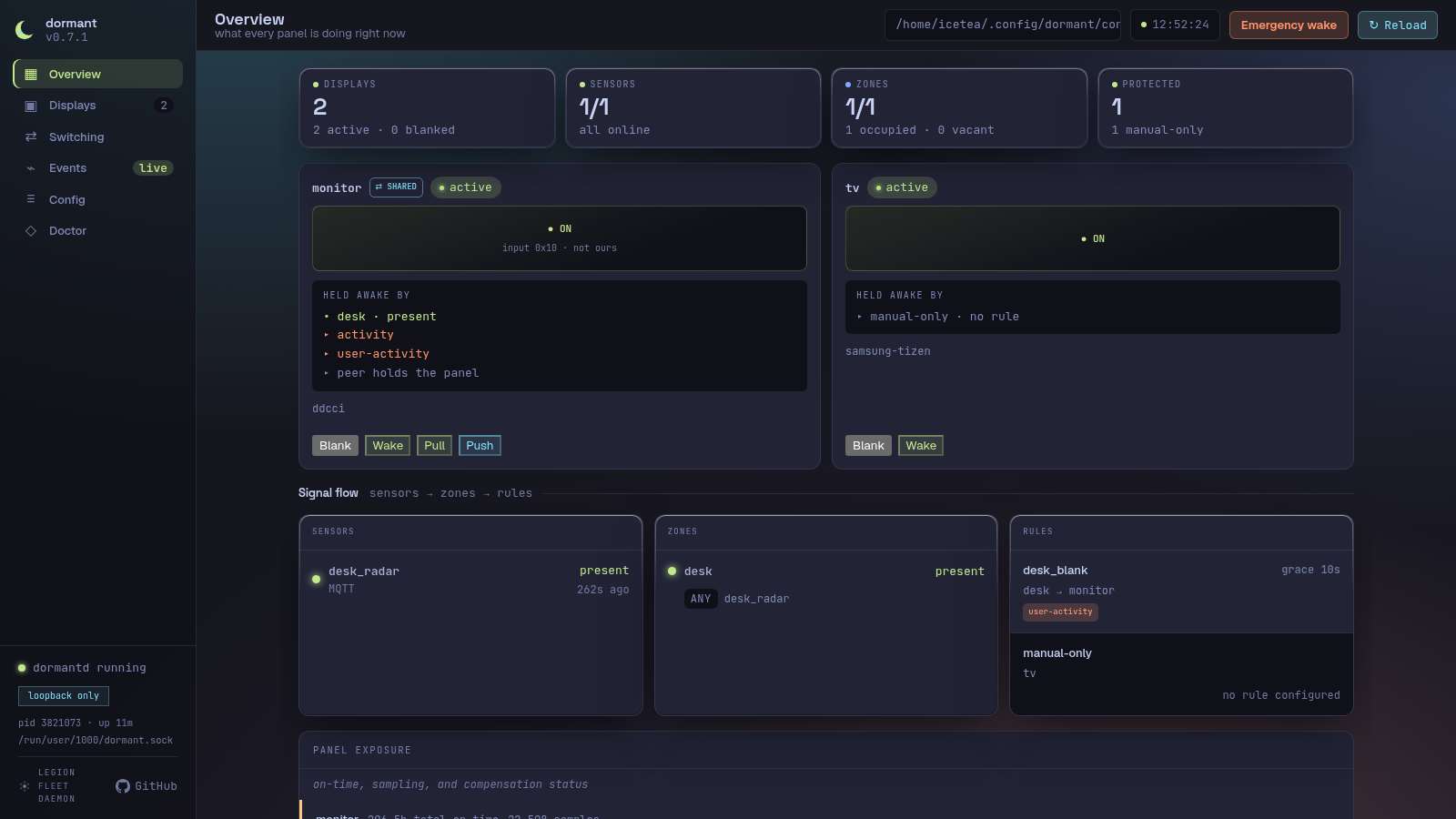
The landing page. Shows a stat row (displays count with active/blanked split, sensor online/unavailable split, zone occupied/vacant split, Protected count), a three-column signal-flow grid (Sensors → Zones → Displays), a Rules column, and a recent-activity feed.
Each sensor row shows its id, type, state, and last-seen age. An unavailable sensor that has not delivered data since daemon start is marked "no data since start" from its reported diagnostic. Zone rows show occupancy, fusion mode, and members. Display rows show phase, blank mode, controller chain, and blank/wake controls. Failing displays appear in a dashboard banner; tracked displays also get a panel-exposure card.
Displays
A per-display card list. Each card shows a screen preview glyph (ON / grace / … / OFF / wake), phase and paused/inhibited status chips, the blank mode label, the driving zone and rule, the command generation counter, and the controller chain rendered as HealthChips (each controller's name, role — primary/fallback — and health status). Action buttons let the operator force-blank, force-wake, and pause or resume the governing rule. Shared displays additionally show Switch to here (PULL — writes the local input code via POST /api/switch) and Send to peer (PUSH — writes the peer's code via POST /api/push; visible only when shared_peer_input_write_code is configured). Both routes go through the same-origin weak-origin check.
Events
A scrolling, auto-pruning event log. It shows presence changes, display phase transitions, wake retries, blank/wake failures and recoveries, panel-wear advisories, and config reloads. Timestamps use the browser's clock when each WebSocket message arrives. Reloading the page seeds the log from /api/events/recent so recent history is preserved; events that arrive while the page is loading are deduplicated.
Switching
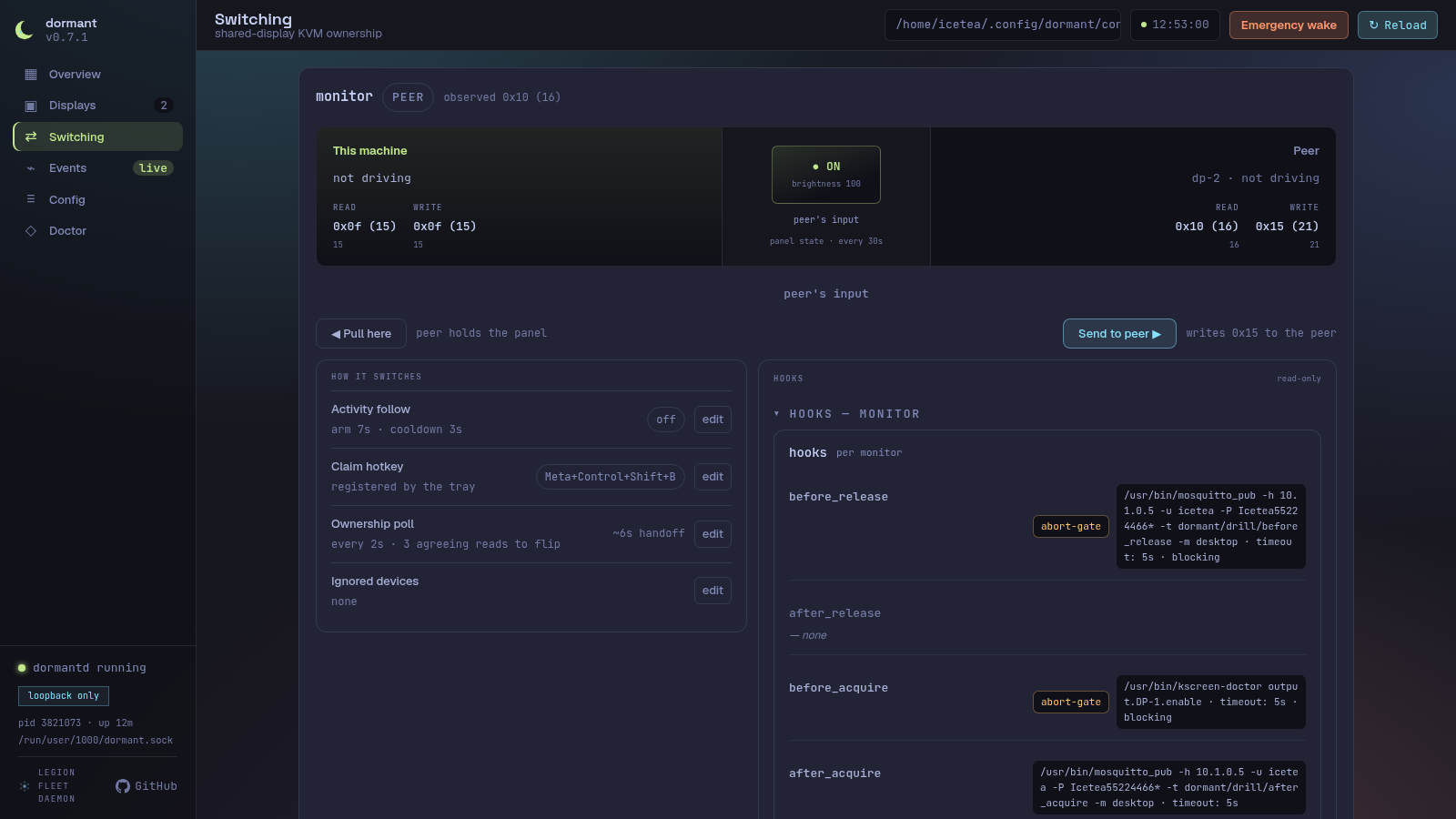
For displays configured with scope = "shared" and a [coordination] section, the Switching view shows live panel ownership — which machine currently holds the panel, the observed input code, and both machines' configured codes — updated in real time via Ownership daemon events over the WebSocket. Each display's row includes the local and peer input codes in hex, the panel state, short-press Poll button, and an agreement verdict that checks whether the observed code matches the configured local code. The view appears in the sidebar only when at least one display is configured as shared.
Display detail and panel exposure
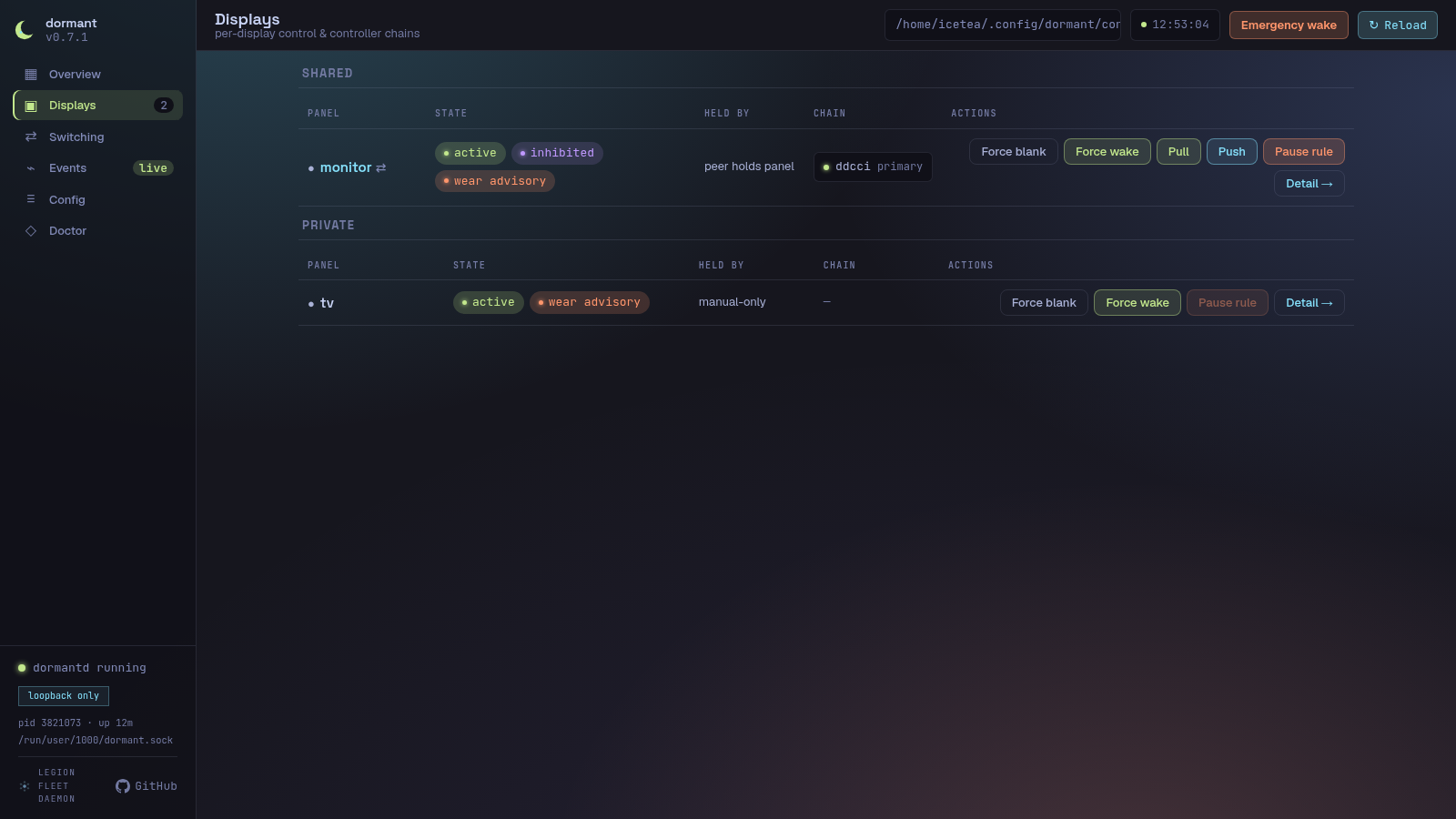
Select Open detail on any display card to inspect that display without leaving the Displays page. The detail surface combines live phase/controller health with the existing wear API:
- total panel on-time and sample count;
- average brightness-weighted hotness and current-grid uniformity;
- the compensation advisory, when no long standby window has occurred;
- a per-cell wear heat map from
GET /api/wear/:display; - the configured controller chain in fallback order.
An empty heat map means the daemon has not recorded spatial samples for that display. It is not replaced with demonstration data.
Control-path exercise
The display detail and Doctor pages can run the daemon's real control-path exercise. The sequence is blank → read → wake → read → restore. The daemon pauses affected rules for the exercise window and always owns their release; the browser does not issue a separate resume request.
The selected panel will visibly go dark and return. Run the exercise only when the panel is not in use. The report distinguishes confirmed movement, unconfirmable controllers without readback, and failures where a command returned success but the observed panel state did not move.
A 504 is a report timeout, not an operation cancellation. The exercise may still
be completing its restore and rule-release sequence; the browser keeps the action
disabled until a GET /api/operations request started after the timeout reports
that the display's server guard was released. A delayed response from a request
started before the exercise cannot clear the warning. Display phase is not used
for this decision because exercise drives the hardware directly. Do not retry
while that warning is visible.
Emergency wake
Emergency wake is a global shell action for recovery when normal control has
failed. After confirmation it pauses every rule and asks every configured display
to wake concurrently. The response is { paused, displays }; each display result
contains { display, ok, error? }. A 504 means the report did not arrive within
two seconds and the wake may still be running — it does not mean the operation was
cancelled. The global action stays disabled until a GET /api/operations
request started after the timeout reports that the emergency-wake guard was
released; delayed pre-operation responses are ignored. Emergency wake is global
by design; there is no per-display variant.
Browser requests are single-flight, but issue #71 tracks the remaining daemon-wide limitations: CLI+web overlap, reload-generation races, engine-side exercise serialization, and panic-mid-exercise restore/resume hardening.
Rollback and failure banners
A rollback banner appears above all pages when boot guard rejected a candidate configuration and the daemon is running the last-known-good configuration. It shows the failed and active fingerprints and links to Config. The banner clears only after the recovered configuration has been accepted successfully.
Blank-chain exhaustion is also global. A separate failure banner identifies the affected display and controller evidence and links directly to its detail view.
Config
Six tabs: Daemon, Sensors, Zones, Rules, Displays, and Coordination — plus the original Raw TOML tab (a read-only syntax-highlighted viewer with inventory sidebar and a reload button).
Settings tabs
The Settings form presents the running config as editable sections, one per tab. Each field shows the current value from GET /api/config; edits are accumulated in a client-side patch store and submitted together via POST /api/config/apply.
What is editable:
- Leaf string, number, and duration values across every section (e.g.
grace_period,startup_holdoff,hold_time, coordination timeouts, keymap entries, input-filter patterns). - Whole arrays (e.g. a rule's
displayslist, theladderarray-of-tables, screensaversourcelists, coordinationkeymapentries). Setting an array replaces it wholesale. - A limited set of optional keys can be removed via the Remove op:
blank_mode,degraded_mode,dwell,order,image_duration,scale_mode,transition,transition_duration,hold_time,stale_timeout,ddc_display,output,wol_mac,host. - Hook slots (
on_blank,on_wake,on_observed_loss) — editing is gated behinddaemon.hook_edit_enabled = true(default: off); when disabled, hooks are displayed read-only.
File-only:
- Display command strings (
wake_command,blank_command) are not rendered in the Settings form.
What is not editable:
- Locked leaves —
typeon an existing entity,blank_data, andwake_dataare never writable through the patch API. The form marks them locked and explains why.typeis set only when an entity is created; changing a sensor type requires delete-and-recreate so type-specific fields cannot be dropped silently. - Credentials-redacted fields — URLs carrying inline userinfo (for example an MQTT
broker_urlwithuser:pass@) are redacted before the response is sent. The form locks the redacted path and its descendants. - General credentials editing — only the Samsung pairing token write (below) goes through the web UI. HA tokens, MQTT credentials, and any other
credentials.tomlcontent stay file-only.
Apply → reload flow:
- The form computes the patch delta from the user's dirty edits.
POST /api/config/applysends the currentfingerprintplus the patches.- The server re-reads the file, checks the fingerprint, validates and applies the patches, writes the new file, backs up the old file, and subscribes to the daemon's reload outcome.
- The daemon's config-file watcher detects the write, waits through the
reload_debouncewindow, then reloads the runtime. - The reload outcome is reported back in the apply response.
Outcome banners
The apply bar displays one of four outcomes after the request completes:
| Banner | Meaning |
|---|---|
| ✓ Reloaded | The daemon accepted the new config and rebuilt the runtime successfully. The form clears its dirty state and re-fetches the new fingerprint. |
| ✕ Rejected | The config was valid at write time but the daemon's reload failed (e.g. assembly error, removed-display verified-wake failure). A detail message names the cause. The old config is still running; the patched file is on disk. |
| pending | The apply handler waited for the reload outcome but it did not arrive within the timeout (10 s). Normal when reload_debounce is large — the daemon coalesces the event and will reload shortly. The form re-fetches immediately; the file was already written. |
| superseded | Another writer (a second browser tab, dormantctl, or a direct file edit) landed after your apply wrote the file. The reload outcome belongs to their write, not yours. |
Conflict dialog (409)
If the fingerprint in the apply request does not match the on-disk file (someone else edited the config between your last GET and your POST), the server returns 409 Conflict. The Settings form shows a red conflict dialog:
Config changed on disk — your edits are against an outdated version. Reload the form to get the latest config, or keep editing (your changes will be lost).
Reload form discards your edits, re-fetches the fresh config, and refreshes the form. Keep editing dismisses the dialog and leaves your dirty edits in place — you can then re-apply (the next attempt will use the current fingerprint, not the stale one).
Unsaved-changes guard
While the form has dirty edits, a beforeunload browser guard prevents accidental navigation away from the page. Switching from the Settings tab to the Raw TOML tab also triggers a confirmation dialog: "Discard N unsaved changes?". The guard is removed once all edits are applied or discarded.
Backups
Every POST /api/config/apply that succeeds (the file is written and fsync'd) creates a backup of the previous config file before the atomic rename. Backups are stored in <config-dir>/backups/ with names derived from the current UTC time plus a random 4-hex-digit suffix:
config.toml.2026-07-07T14:22:03Z.a3f1
The directory is created with mode 0o700 (owner-only). A rotation policy keeps at most 5 newest backups (sorted by filename, which encodes an RFC 3339 timestamp); older files are deleted after each new backup.
The config-file watcher uses RecursiveMode::NonRecursive on the config directory — writes inside backups/ do not trigger a reload.
The Raw TOML tab also documents the atomic-apply backup policy: the last five
backups are retained under backups/config.toml.<timestamp>.<suffix>. The Web API
does not expose the live backup directory listing, so the UI shows the policy and
naming shape rather than fabricated filenames.
Entity create/delete
Each of the four Settings sections — Sensors, Zones, Displays, Rules — has an Add button that opens a creation form, and each entity card has a Delete button. Both ride the same apply flow as every other edit (fingerprint check, backup, atomic rename, reload-wait); there is no separate create/delete pipeline to reason about.
Creation and deletion use dedicated create_entity and delete_entity patch operations. Ordinary Set operations cannot create or replace a whole entity table, and they cannot change type on an existing entity.
Entity ids. An id must be 1–64 characters, start with a lowercase ASCII letter, and contain only [a-z0-9_-] afterward. A fixed set of names is reserved and can never be used as an entity id, because the server internals special-case them for unrelated reasons (as an array-of-tables key, a removable-leaf name, a locked-leaf name, or the config-key literal weights): type, blank_data, wake_data, source, ladder, weights, blank_mode, degraded_mode, dwell, order, image_duration, scale_mode, transition, transition_duration, hold_time, stale_timeout, ddc_display, output, wol_mac, host. The id field gives live feedback as you type; the server re-validates independently and is the real boundary. An id that collides with an existing entity in the same collection is rejected.
What each collection accepts at creation. The create form only exposes fields from a fixed, closed list per collection — there is no free-form "add any key" path:
- Sensors — a
typediscriminator (mqtt,ha, orusb-ld2410, selectable only at creation — never changeable afterward) plus the fields for the chosen type,kind,hold_time,stale_timeout. - Zones —
mode,members,unavailable_policy,weights. - Displays —
controllers,host,blank_mode,output,ddc_display,wol_mac,samsung_restore_backlight,restore_brightness,treat_unreachable_as_blanked,command_timeout.wake_command/blank_commandare deliberately not offered here (or anywhere in the create path) — they are daemon-executed shell commands, and a web-created display cannot carry an arbitrary shell command in v1. A display that needs a command controller is still authored by hand inconfig.toml, exactly as before this feature. - Rules —
zone,displays,grace_period,inhibitors, and the timing tunables.
Cross-references. Now that entities can be minted from the browser, the rule fields that name other entities — zone, displays, members, inhibitors — are editable dropdowns/multi-selects populated from the live inventory, instead of the read-only fields they were before this feature.
Delete. Deleting shows a confirmation naming anything in the currently-loaded config that references the entity (a client-side, best-effort check — it only knows what's in the form's inventory). The real reference-integrity guarantee is server-side: if a delete would orphan a reference (a rule pointing at a deleted zone or display, a zone listing a deleted sensor), the daemon-identical validation step at apply time rejects the whole request with 422 and the on-disk config is untouched. There's no separate reference-checking code path in the web layer to drift from the daemon's own rules.
The entity_crud_enabled flag. Set daemon.entity_crud_enabled = false to turn this off; the UI hides the Add/Delete affordances, but the server is the actual boundary — a create_entity/delete_entity patch sent while the flag is off is rejected with 403 feature_disabled regardless of what the UI shows. Ordinary Set/Remove edits are unaffected by this flag.
Pairing wizard
The Settings tab includes a Pair a Samsung TV card that walks through the network-pairing handshake dormantctl pair samsung performs from the command line, without leaving the browser.
- Enter the TV's hostname or IP address and click Pair. The server responds immediately (it never blocks the request on the TV) with an opaque
pair_id, and the browser starts pollingGET /api/pair/samsung/<pair_id>about once a second. - While the attempt is in flight, the wizard shows "Connecting… accept the prompt on your TV" — the daemon can't distinguish "still connecting" from "waiting for you to press Allow" (both are the same blocking network call), so this message covers both.
- Accept the "Allow dormant" prompt on the TV when it appears. If you don't, the attempt eventually times out (
daemon.pair_timeout, default120s, configurable30s–300s) and the wizard shows a timeout message with a Try again button — pairing is not automatically retried. - On success, the granted token is written to
credentials.toml(mode0600, atomic temp-file-plus-rename, same code pathdormantctl pairuses) and the wizard offers to pre-fill a new display entity for that host (controllers: ["samsung-tizen"]) using the entity create form above. Declining still leaves the token stored — an unused Samsung token in credentials is harmless.
What never leaves the daemon: the pairing token is never present in any HTTP response body, and never appears in a log line — the code represents it with a type whose Debug/Display implementations redact to ***, so even an accidental log format string can't leak it.
Concurrency. Only one pairing attempt runs at a time (server-wide). A second POST /api/pair/samsung while one is already in flight gets an immediate 409 pairing_in_progress — it never queues behind the first attempt or blocks waiting for it.
The pairing_enabled flag. Set daemon.pairing_enabled = false to turn this off; the UI hides the wizard, and the server independently rejects POST /api/pair/samsung with 403 feature_disabled if called anyway.
Security notes specific to this route. POST /api/pair/samsung carries the same strict Origin check as /api/config/apply (see Origin (CSRF) guard above) — without it, a malicious page open in the operator's browser could trigger a pairing attempt against an attacker-chosen host. Its request body is capped at 4 KiB (a hostname is tiny; there's no reason to accept more). None of this changes the underlying trust assumption: pairing connects to whatever host the operator types, with TLS certificate verification disabled (the token is what authenticates the connection, not the certificate — the same posture the CLI pairing path and the ongoing Samsung control connection already use). Pointing the wizard at the wrong device is an operator mistake, not something the wizard can detect.
Doctor
Runs the same diagnostic checks as dormantctl doctor on demand. The SPA calls POST /api/doctor, which invokes the shared DoctorService directly (the same service instance the daemon's IPC server uses — no subprocess is spawned). Results include a summary bar (passing / skipped / failing counts) and per-check rows with status chips and detail messages.
The web doctor view does not run the destructive control-path exercise. Use
dormantctl doctor exercise <display> when you need to prove that a real panel
blanked and woke.
Active wear sampling
The panel-exposure WearCard shows the sampler state. Its Enable sampling
button is available only for NeedsConsent; it starts the daemon-owned
xdg-desktop-portal ScreenCast flow and polls until consent is granted, denied,
timed out, or failed. The flow uses the configured one-display binding and
never exposes the restore token. See Active wear sampling
for the consent grant, revocation paths, and uniform fallback states.
Audio-aware blanking
The Settings form renders the [audio] section, and rule editors accept
"audio-playback" and "call" inhibitors. A rule that declares either kind
spawns a PipeWire poller (pw-dump every [audio].poll_interval): while a
matching stream is playing, the rule is inhibited and its displays stay awake
even when the room reads vacant. Deassertion is immediate when playback stops.
A rule that declares no audio inhibitor spawns no poller. See
Configuration → [audio] for the classification knobs
(call_roles, playback_roles, capture_is_call, min_active).
MQTT state publishing
Status: opt-in (issue #105). Off by default. The daemon never opens a broker connection on the publish plane unless
[publish] enabled = true.
The publisher task forwards every retained state change and Home
Assistant MQTT discovery record to a broker of your choice. The
contract, sanitizer, and discovery payload shapes are pinned in
.opencode/decisions/2026-07-27-mqtt-publish-contract.md; the daemon
implements the same contract in crates/dormantd/src/state_publisher.rs.
At a glance
- Single task per generation; reborn on every accepted reload — at
most one publisher
client_idconnected at a time. - Republishes the full discovery + current snapshot on every connect/reconnect. Broker restart loses nothing.
QoS 1,retain: truefor every state, availability, and discovery payload.- Home Assistant MQTT discovery is fully wired — entities appear in HA's MQTT integration as soon as the broker reports the discovery topics.
- Graceful teardown publishes a retained
offlineon the global availability topic; the LWT handles ungraceful loss with the same payload.
Configuration
The [publish] section in your config.toml:
[publish]
enabled        = true
broker_url     = "tcp://homeassistant.local:1883"
base_topic     = "dormant"        # default
discovery_prefix = "homeassistant" # default
instance_id    = "office-pc"      # default: $HOSTNAME
enabled is the kill-switch. When false, the daemon does not spawn
a publisher task, makes no MQTT connections on the publish plane, and
emits no discovery records.
broker_url accepts any form dormant_core::mqtt::parse_broker_url
parses — tcp://host:1883, mqtt://host:1883, or host:1883. The URL
is also the exact credential-lookup key (matching the MQTT sensor
convention in crates/dormant-sensors/src/mqtt.rs).
base_topic is the prefix every state topic is published under. The
default dormant puts sensor state at
dormant/<instance>/sensor/<id>/state. MQTT wildcards (+ / #)
are rejected at validation time so a typo can never silently match
more topics than intended.
discovery_prefix is the HA discovery prefix; the default
homeassistant matches Home Assistant's MQTT integration settings.
Change it only when your HA instance is configured to use a different
discovery prefix.
instance_id is sanitized via the
[sanitize_topic_id][crate::state_publisher::sanitize_topic_id]
helper — every character outside [a-z0-9_-] becomes _, runs are
collapsed, and empty results fall back to unnamed (a deliberate
collision-warning signal). The raw value is preserved in the config
so operators can see their actual id in the web inventory and logs.
When unset, instance_id defaults to $HOSTNAME with a deterministic
dormant fallback.
Credentials
Credentials live in the separate credentials.toml (the same file
the sensors use). Match the publish broker_url exactly:
[ha_token]
# dormant: optional HA long-lived token (not needed by the publisher)

[mqtt."tcp://homeassistant.local:1883"]
username = "dormant"
password = "..."
A missing mqtt.<url> entry allows an anonymous connect — same as the
sensors. dormant never publishes secrets; the password never appears
in any log line, traced span, or stringified form of the transport
surface.
Topics
With the defaults, instance_id = "office-pc", sensor id desk,
zone id office, display id main:
| Topic | QoS | Retain | Payload |
|---|---|---|---|
dormant/office-pc/availability | 1 | yes | online / offline (LWT + graceful cancel) |
dormant/office-pc/sensor/desk/state | 1 | yes | ON / OFF |
dormant/office-pc/sensor/desk/availability | 1 | yes | online / offline (per-sensor broker presence) |
dormant/office-pc/zone/office/state | 1 | yes | ON / OFF (zone resolved presence) |
dormant/office-pc/display/main/phase | 1 | yes | JSON {"phase":"active"} (see below) |
homeassistant/binary_sensor/office-pc/sensor_desk/config | 1 | yes | HA discovery (binary_sensor, see below) |
homeassistant/binary_sensor/office-pc/zone_office/config | 1 | yes | HA discovery |
homeassistant/sensor/office-pc/display_main/config | 1 | yes | HA discovery (sensor) |
The display/.../phase payload is a JSON object so HA's
value_template: "{{ value_json.phase }}" parses the literal phase
straight out of the published topic. Available literals:
active | grace | blanking | blanked | waking | staged.
Each HA discovery config declares availability with the global
LWT topic (dormant/<instance>/availability). Sensor entities
additionally reference their per-sensor availability topic with
availability_mode: "all" so HA marks a sensor unavailable the moment
its source goes offline, even while the global topic is still online.
Collisions
If two distinct raw ids sanitize to the same topic id, the publisher
emits a single publish_id_collision WARN per colliding pair and
publishes only the first in config order — never interleaves two
entities on one topic. The collision report also surfaces in
dormantctl validate output so an operator can rename the offending
id before deploy.
Empty / whitespace ids both sanitize to unnamed and the collision
rule fires for them — a deliberate signal, not a free pass to the
dormant default.
Reload behavior
A [publish] section edit (or any reload the validator accepts)
tears the publisher down and re-spawns it with the new config.
The old task is cancelled and awaited (producer_token.cancel(),
bounded 5s grace) so at most one client id is connected at a time
and the LWT fires offline for the old instance before the new
instance starts. This means a config typo in [publish] does not
brick the daemon — the previous generation stays online until the
new generation fails its daemon-side validation.
What is NOT published
- No secrets. The password never appears in any log, span, or stringified form of any public type.
- No operational events. Blank failures, wake retries, wear samples, ownership transitions, and compensation advisories all have their own diagnostic surfaces (logs, IPC, web UI). The publisher carries state, never operational noise.
- No
DaemonEvent::Unknown. The wire-tolerance catch-all variant publishes nothing — the publisher never speculates about events the engine did not emit.
Doctor probe — out of scope
The dormant-doctor MQTT probe subscribes to a single sensor's
topic and reports broker presence as part of the coalesced
dormant doctor output. That probe is the read-side diagnostic
and is unaffected by the publisher; this page is the write-side.
Operators can verify the publisher is healthy by running
dormant doctor and confirming the broker probe still reports the
expected presence on the configured broker_url.
Troubleshooting
Doctor command
Start with dormantctl doctor. It checks your config and live state.
# Full system check
dormantctl doctor

# Per-component checks
dormantctl doctor mqtt      # probe MQTT sensors
dormantctl doctor ha        # probe HA WebSocket sensors
dormantctl doctor usb /dev/ttyUSB0  # probe USB LD2410
dormantctl doctor ddcci     # probe DDC/CI displays (Linux and macOS)
 dormantctl doctor config    # validate configuration
 # Live-only active wear sampler check (web Doctor view or daemon IPC)
 # There is no offline dormantctl doctor wear-sampling arm.

# macOS-only, read-only checks
dormantctl doctor macos-idle            # two bounded raw idle-clock readings
dormantctl doctor macos-display-sleep   # display-sleep API availability + per-display state
dormantctl doctor macos-power           # active power assertions blocking display sleep
Each check reports status: OK, WARN, or FAIL. Warnings are non-fatal (e.g., a controller reports its last known state is stale). Failures indicate something needs fixing. The three macos-* checks exit 3 ("not yet supported") on Linux — they are read-only probes, never blanking or waking a display.
Active wear sampling
The wear-sampling probe is live-only: use the web Doctor view or the daemon's
IPC surface. There is no offline dormantctl doctor wear-sampling command
because consent, PipeWire state, and the portal session belong to the running
daemon; an offline arm would create a second capture lifecycle instead of
diagnosing the live one.
If sampling is uniform, check the sampler status age and journal for capture
or reattach warnings. Uniform attribution is expected whenever capture is
unavailable, stale, suspended, denied, timed out, the circuit is open, or the
monitor binding no longer matches. Re-enable explicitly after granting
ScreenCast consent; revoke with dormantctl wear disable-sampling --forget or
KDE System Settings → Applications → Screen Sharing permissions.
Doctor-assisted issue drafting
When something fails and you want to file it later without hand-reconstructing the context, --report-issue and --draft-feature run the full offline probe set (same as bare dormantctl doctor) and write a ready-to-paste draft to a file. The probe table and the final draft written to ... message still go to stdout:
# Bug report — pre-filled with version, environment, display inventory, and
# the probe table. Default path: ./dormant-issue-<YYYY-MM-DD>.md
dormantctl doctor --report-issue

# Feature request — same environment capture, no probe-failure framing.
# Default path: ./dormant-feature-<YYYY-MM-DD>.md
dormantctl doctor --draft-feature

# Explicit path
dormantctl doctor --report-issue /tmp/my-bug.md
Both flags mirror the field order and headings of .github/ISSUE_TEMPLATE/{bug,feature}.yml, so pasting the draft into a new GitHub issue lines up with the template. Machine-collectable fields (dormant version, OS/kernel, session type, compositor, the display inventory, config load status, and the probe table) are pre-filled; everything else is left as an <!-- fill in --> placeholder. Never overwrites an existing file — a name collision gets a -2, -3, … suffix.
Redaction is layered, not just allowlisting: display entries only ever carry id, panel type, controller list, and blank mode (never a host, token, or MAC address). On top of that, every literal secret value the loaded config and credentials actually hold — broker URLs, hosts, MAC addresses, HA/Samsung/MQTT credentials — is substituted with [redacted] across the entire draft, including probe result text, since a probe's own diagnostic detail can otherwise echo a host or broker URL verbatim (e.g. an mqtt auth-failure message). A second, cheaper pass scrubs any leftover bare IPv4 literal as defense-in-depth. Still, glance at the file before posting it publicly — redaction only catches values dormant itself knows about, not anything you type into a <!-- fill in --> section by hand.
The two flags are mutually exclusive with each other and with any doctor subcommand (ddcci, mqtt, …) — the draft always runs the full offline set. Pass the path with = (--report-issue=./ddcci) if you want a file genuinely named after a subcommand; the space form (--report-issue ddcci) is rejected because clap can't tell "PATH" from "subcommand" there.
Common errors
| Code | Meaning | Fix |
|---|---|---|
E_CONFIG_INVALID | Config file syntax or structure error | Check TOML syntax (dormantctl validate shows exactly where). Missing config_version key, wrong type for a value, invalid duration format. |
E_CONFIG_UNKNOWN_KEY | A key in the config is not recognized | Remove the key, or check for typos. Use --strictness=warn to see all unknown keys as warnings instead of errors. |
E_ZONE_CYCLE | Zone references create a dependency cycle | Zone A cannot reference Zone B if B references A. Flatten nested zone chains. |
E_ZONE_UNKNOWN_MEMBER | Zone references a sensor or zone that does not exist | Check the member name. Sensor IDs must match [sensors.<id>]. Zone references must use "zone:<id>" syntax. |
E_CREDS_PERMS | Credentials file has incorrect permissions | chmod 600 ~/.config/dormant/credentials.toml |
E_CREDS_MISSING | Required credential is missing | The config references a credential (e.g., HA token) but the credentials file does not contain it. |
E_MODE_UNSUPPORTED | Display controller does not support the configured blank mode | Run dormantctl doctor ddcci to see supported modes. Choose a different mode or add a fallback chain. |
E_BLANK_FAILED | Blank command failed | Check the controller's logs. For DDC/CI: is /dev/i2c-* accessible? For command: does the shell command work when run manually? |
E_WAKE_FAILED | Wake command failed | Same checks as blank. Verify the wake command works standalone. Check the wake_retries count. |
E_RELOAD_WAKE_FAILED | Defensive wake on config reload failed | A display was physically blanked before reload; the wake attempt to restore it failed. Check the controller and increase wake_retries. |
E_HA_AUTH | Home Assistant authentication failed | Verify the ha_token in credentials file. Check that the token is still valid in HA. |
E_SENSOR_IO | Sensor I/O error | MQTT: broker reachable? USB: port exists and has correct permissions? HA: WebSocket URL reachable? |
E_DISPLAY_IO | Display controller I/O error | Network controller: host reachable? DDC/CI: I2C bus accessible? Command: binary exists? |
E_IPC | Inter-process communication error | Check that dormantd is running. Verify the socket path matches between daemon and CLI. |
Display will not blank
Sensor is stale
Symptom: the rule stays active after the room empties.
Cause: a sensor stopped reporting. The zone treats unavailable as present by default, so dormant will not blank a room it cannot see.
Check with:
dormantctl status
Look for unavailable sensor states, then repair the broker, connection, or device.
Grace period has not elapsed
Symptom: the zone is vacant, but blanking is delayed.
Cause: rules.<id>.grace_period is still counting down. The default is 60 seconds.
[rules.office_blank]
grace_period = "30s"
Input-wake hold is active
Symptom: the display wakes on keyboard input but stays awake for longer than the configured grace period even though the zone is vacant.
Cause: rules.<id>.input_wake_hold is deferring the re-blank after
a render-surface input wake (issue #125). The default is 120 seconds.
Set to "0s" to disable and restore the immediate-grace behaviour.
[rules.office_blank]
input_wake_hold = "30s"
Inhibitor is active
Symptom: the sensor and zone are vacant, but the rule remains inhibited.
Cause: "user-activity" is active, or the rule was paused manually.
dormantctl status
Resume manual pauses with:
dormantctl resume
"audio-playback" and "call" are backed by the PipeWire poller in the
[audio] section, which is opt-in and off by default. If a rule declares
either kind but never holds a blank during playback, check that audio.enabled
is true — see Configuration.
Min-wake-time floor
Symptom: a just-woken display stays on despite vacancy.
Cause: rules.<id>.min_wake_time has not elapsed. The default is 10 seconds.
dormantctl status
Emergency wake
If a display stays blank and a presence-mapped keyboard shortcut does not help — for example, no sensor is in the room or someone manually blanked the panel — run dormantctl emergency-wake. It force-wakes every configured display regardless of the rules engine's state.
dormantctl emergency-wake
The command tries the daemon's IPC first (2-second timeout). If the daemon is healthy, it pauses every rule indefinitely alongside the wake so nothing re-blanks until you run dormantctl resume. If the daemon is wedged or unreachable (the very failure mode this command exists for), dormantctl falls back to constructing display controllers directly from your config.toml + credentials.toml and sending the wake command itself — best-effort, one attempt per display.
For a one-keystroke recovery, bind the command to a global shortcut:
- KDE Plasma: System Settings → Shortcuts → Custom Shortcuts → Edit → New → Global Shortcut → Command. Command:
dormantctl emergency-wake. Trigger: your key. - GNOME: Settings → Keyboard → View and Customise Shortcuts → Custom Shortcuts. Command:
dormantctl emergency-wake. - Sway / wlroots: bind in
~/.config/sway/config:bindsym $mod+grave exec dormantctl emergency-wake.
First-class daemon-registered shortcuts (no compositor setup) are a separate roadmap item.
macOS: gamma emergency restore
macos-gamma-black (see Displays) blanks
by writing an all-black Quartz gamma table — there is no periodic
reassertion and no restore-on-drop, so a dead daemon does not strand the
panel any more black than it already is, but it also does nothing to fix
it. dormantctl emergency-wake restores gamma through a dedicated,
daemon-independent path:
- Before writing a black table, dormant records a breadcrumb file
(
$XDG_STATE_HOME/dormant/gamma-blank.jsonor the~/.local/statefallback) listing every display currently gamma-blanked, cleared again after a confirmed wake. emergency-wakerestores from that breadcrumb viaCGDisplayRestoreColorSyncSettings()— a system-wide restore, not a per-panel replay of the exact pre-blank table — and does this independently of whether the daemon's IPC call succeeds, fails, or times out. It also runs on the next dormantd startup if a stale breadcrumb is found, so a crash never leaves gamma permanently black either.- Wedged-daemon caveat: if
emergency-wake's IPC call times out (daemon alive but hung, not merely unreachable) rather than being refused, the command prints a warning that the daemon may still complete a queued blank write after the fallback restore already fixed the display — re-blanking it. If you see the display go black again shortly after an emergency wake, stopdormantd(orlaunchctl kickstart -k/systemctl --user restart app-dormantit) before rerunningemergency-wake.
Control-path verification — dormantctl doctor exercise <display>
Confirms that a blank/wake actually moved the panel — the systemic guard against the failure mode where a controller logs blank_succeeded while the panel never changed (the samsung stale-socket + port-1516 400s both did exactly this).
dormantctl doctor exercise mon
The command routes through the daemon over IPC: the daemon pauses the target's rule(s) for the exercise window, runs blank → read → wake → read → restore on its live controllers, and replies with a per-step report. Exit code is non-zero only when at least one step verdict is Failed — a confirmable panel that did not move despite the controller returning Ok. The wake path is sacred: the restore step guarantees a final wake regardless of any earlier failure, so an exercise can never leave a display dark.
Verdicts
Confirmed(✓, green) — the panel state moved as expected (blank step: state changed from baseline; wake step: state returned to baseline).Unconfirmable(~, yellow) — the controller has no readback for the panel. The command was issued but the panel could not be observed. Exit 0 (honest, not a fake pass).Failed(✗, red) — the controller can read the panel but the state did NOT move as expected. Exit non-zero.
Confirmability by controller
| Controller | Confirms via |
|---|---|
ddcci | VCP 0x10 (brightness, 0–100) + VCP 0xD6 (power: 0x01 → On, otherwise → Standby) |
samsung-tizen | REST PowerState ("on" / "standby"); port-1516 backlight when configured for BrightnessZero |
command / kwin-dpms / ha-passthrough | none — every step is Unconfirmable |
Operational notes
- The exercise causes a brief blank → wake blink on a display currently in use (the wake step + the defensive restore wake).
- The command is per-display only (
--exercise <name>); there is no--allor default target. command/kwin-dpms/ha-passthroughcontrollers reportUnconfirmablefor every step because they cannot observe the panel — exit 0, but no verification was possible.
Failure notification does not appear
Symptom: the tray or web dashboard marks a display failed, but no desktop notification appears.
Cause: wake failures notify only after
notifications.wake_attempt_threshold consecutive attempts; repeats are
limited by notifications.cooldown. Desktop notices may also be disabled.
journalctl --user -u app-dormant -f
Check notifications.enabled, the session D-Bus, and notify_suppressed /
notify_unreachable events. Blank failures notify on the first exhausted
controller chain. See Failure notifications.
Daemon booted from last-known-good config
Symptom: dormantctl status or the web UI says the current config was
rolled back, and edits to the original config do not take effect after reload.
Cause: the daemon booted from last-known-good.toml because the operator
config failed validation during a crash loop.
Fix the intended config, then reload — the daemon watches the operator config
even after a rollback boot, so the watcher picks the fix up on save (or run
dormantctl reload explicitly):
dormantctl validate
dormantctl reload
A successful reload of the fixed config clears the rollback state and the
banner (config_rollback_recovered in the journal). A service restart also
works, as the fallback path. See
Watchdog + last-known-good rollback.
Logging
Set log_level = "debug" in the daemon config for detailed logs:
[daemon]
log_level = "debug"
Key log events to search for:
sensor_event— each presence update with source, value, and timestampzone_transition— when a zone changes between occupied and vacantrule_blank/rule_wake— when a rule fires a blank or wake commandwake_failed— wake attempt failures with controller and retry countreload_complete— config reload finishedreload_defensive_wake— display woken because it was blanked before the reload
Logs are written to stderr by default. When running under systemd, view them with:
journalctl --user -u app-dormant -f