Web UI
What this gives you. Live state, blank/wake controls, config editor, panel-wear tracking, doctor diagnostics, and Samsung pairing — all on a loopback-only HTTP/WS bridge with a built-in SPA. No separate web server or static-file host is needed.
When to use it. You want to drive the daemon from a browser instead of a CLI, or change config without editing the TOML file. Not for remote access — the web server binds loopback-only by default and has no authentication layer.
Quick setup. Build with --features web-ui, set daemon.web_port, and
open the bound address:
[daemon]
web_port = 8080
web_bind = "127.0.0.1"
dormantctl status # confirms the daemon is running with the web UI enabled
dormant serves an optional web dashboard for live state, controls, config editing, panel-wear tracking, failure state, and doctor reports. The SPA is embedded in dormantd; it needs no separate static-file server.
Enabling
The web UI is gated behind the Cargo feature web-ui:
cargo build --release --features web-ui
When the feature is enabled, these daemon config keys control the web server:
| Key | Default | Description |
|---|---|---|
daemon.web_port | (unset) | TCP port. Set to a port number to enable the web UI; unset (the default) leaves it disabled. |
daemon.web_bind | "127.0.0.1" | Bind address — 127.0.0.1 or 0.0.0.0 |
daemon.web_allow_nonloopback | false | Require explicit opt-in before binding to a non-loopback address |
daemon.entity_crud_enabled | true | Allow creating/deleting sensors, zones, displays, and rules from the Settings form (Entity create/delete) |
daemon.pairing_enabled | true | Allow the Samsung pairing wizard (Pairing wizard) |
daemon.pair_timeout | "120s" | How long the pairing wizard waits for the TV to accept before giving up (30s..300s) |
daemon.hook_edit_enabled | false | Allow editing hook slots (on_blank, on_wake, on_observed_loss) in the Settings form. When false hooks are always read-only. |
Example:
[daemon]
web_port = 8080
web_bind = "127.0.0.1"
If daemon.web_port is not set (the default), no HTTP server starts — even when the binary was compiled with the web-ui feature. The keys live under [daemon], not a separate [web] section.
Security posture
The web UI is for single-user, loopback-only use. It has no authentication, user sessions, or TLS. Run it on the same machine as dormantd and open it from that host.
Loopback guard
By default the server binds to 127.0.0.1 only. Setting daemon.web_bind = "0.0.0.0" (or any non-loopback address) is rejected at startup unless daemon.web_allow_nonloopback = true. The daemon logs a prominent warning when this override is active, because it makes the dashboard reachable from the local network without authentication — anyone on the LAN could issue blank/wake commands or change zone config.
Host guard
The server validates the Host header on every request. Requests with a Host that does not match the configured bind address are rejected with 403 Forbidden (the daemon logs a web_reject_host event). This blocks DNS-rebinding attacks even when bound to loopback only.
Origin (CSRF) guard
Every POST must carry Content-Type: application/json. Beyond that, two different Origin checks apply depending on the route. Most write routes (POST /api/blank, POST /api/wake, POST /api/switch, POST /api/push, POST /api/pause, POST /api/resume, POST /api/reload, POST /api/doctor) accept a same-origin request or one with no Origin header at all — a deliberately narrower posture, acceptable for routes that toggle running state rather than write config or credentials. Two routes carry a strict check instead: POST /api/config/apply and POST /api/pair/samsung. On these, the Origin header must be present and must match the bound loopback address and port exactly; an absent Origin is rejected. This closes the classic form-POST/no-Origin CSRF gap for the two routes that write to disk. A residual, honestly stated: a browser extension holding a loopback host permission isn't necessarily bound by page-Origin rules the same way ordinary page script is — a known gap, not claimed defended.
What this defends, and what it doesn't
The Host and Origin guards defend against DNS rebinding and cross-origin browser CSRF (a malicious page open in the same browser as the dashboard) — the realistic threat for a loopback tool with no login. They do not defend against another local process running as the same OS user: anything that can already execute code as the operator can forge Host/Origin headers and drive every route, including entity creation/deletion and the pairing wizard. This was never in scope for a single-user loopback tool — if an attacker already has code execution as the operator, the config and credentials are theirs regardless of any header check.
A config that passes validation but is functionally unwise (contradictory inhibitors, a rule that can never fire, an absurd grace period) is a misconfiguration, not a security hole. Validation checks that a config is structurally and referentially correct, never whether it embodies a sane blanking policy — entity CRUD is the first web surface that lets an operator author such a config from a browser, but the boundary this UI holds is "no invalid or dangling config reaches the running daemon," not "no unwise-but-valid config."
No upstream exposure
Do not reverse-proxy the dashboard onto the public internet. If remote visibility is needed, use an SSH tunnel (ssh -L 9100:localhost:9100 user@host) or a VPN. The dashboard was not designed for hostile-network exposure.
Views
The SPA has five views — plus a sixth (Switching) when shared displays are configured — selected from a left-hand navigation sidebar.
Overview
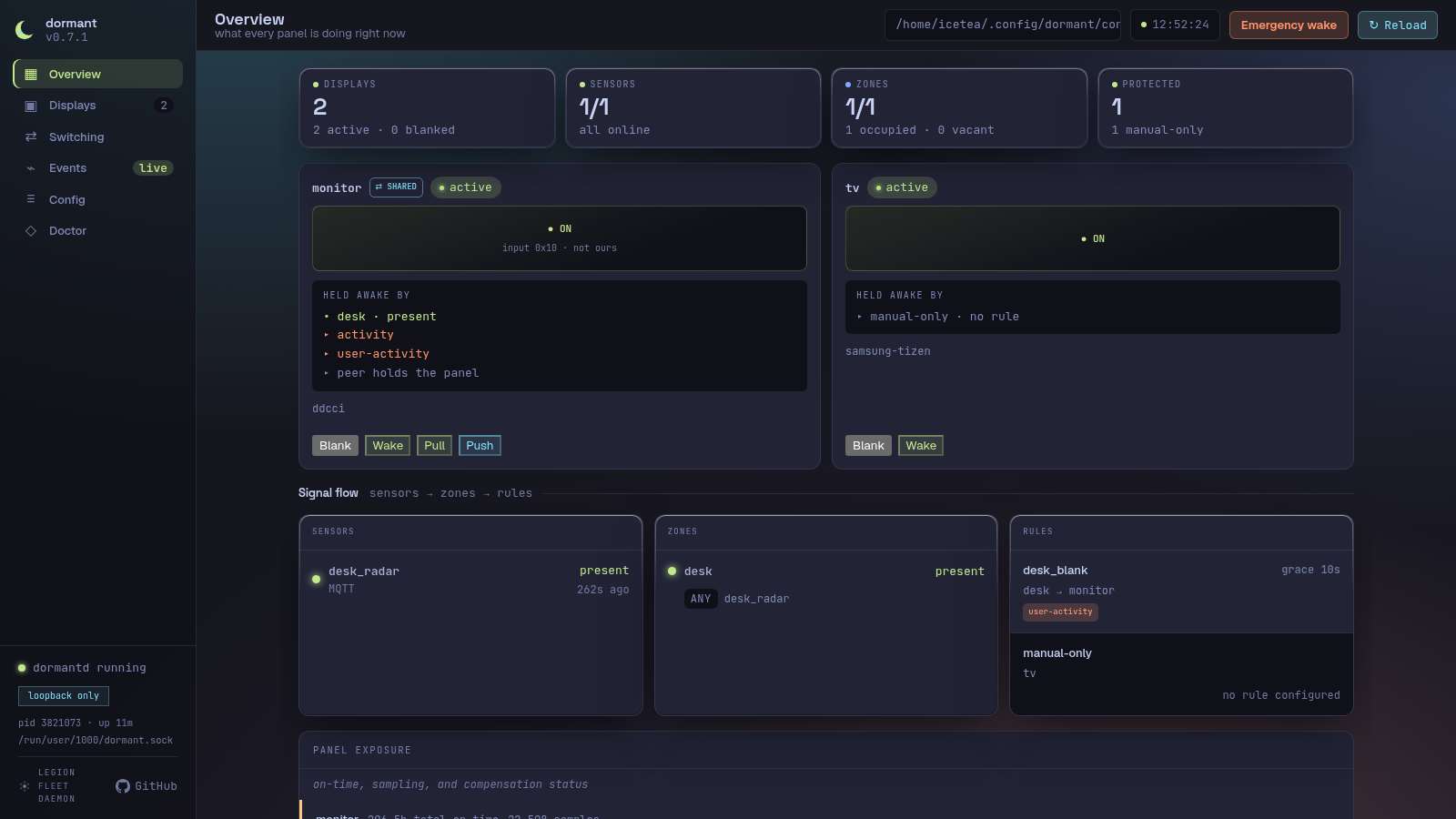
The landing page. Shows a stat row (displays count with active/blanked split, sensor online/unavailable split, zone occupied/vacant split, Protected count), a three-column signal-flow grid (Sensors → Zones → Displays), a Rules column, and a recent-activity feed.
Each sensor row shows its id, type, state, and last-seen age. An unavailable sensor that has not delivered data since daemon start is marked "no data since start" from its reported diagnostic. Zone rows show occupancy, fusion mode, and members. Display rows show phase, blank mode, controller chain, and blank/wake controls. Failing displays appear in a dashboard banner; tracked displays also get a panel-exposure card.
Displays
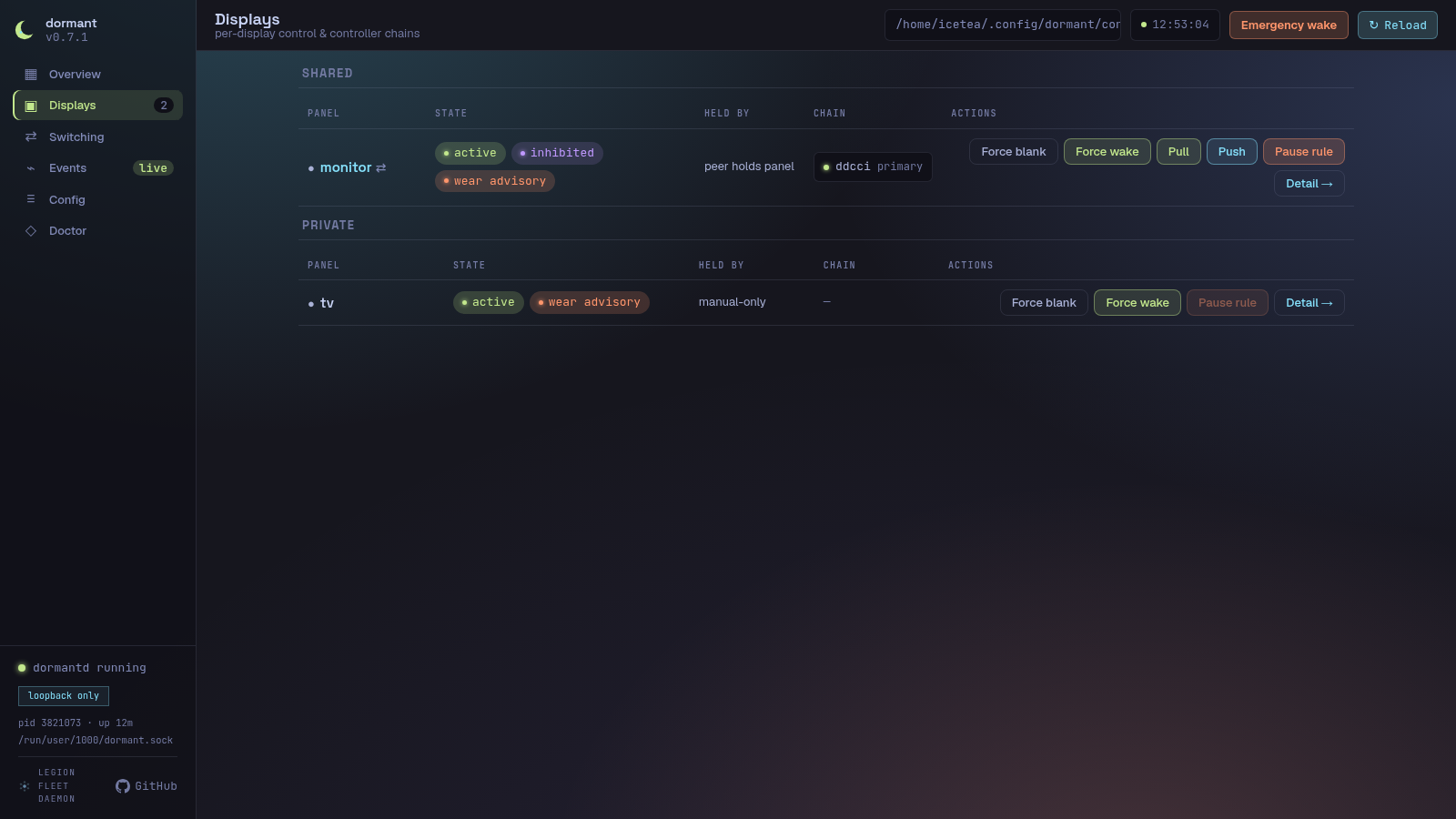
A per-display card list. Each card shows a screen preview glyph (ON / grace / … / OFF / wake), phase and paused/inhibited status chips, the blank mode label, the driving zone and rule, the command generation counter, and the controller chain rendered as HealthChips (each controller's name, role — primary/fallback — and health status). Action buttons let the operator force-blank, force-wake, and pause or resume the governing rule. Shared displays additionally show Switch to here (PULL — writes the local input code via POST /api/switch) and Send to peer (PUSH — writes the peer's code via POST /api/push; visible only when shared_peer_input_write_code is configured). Both routes go through the same-origin weak-origin check.
Events
A scrolling, auto-pruning event log. It shows presence changes, display phase transitions, wake retries, blank/wake failures and recoveries, panel-wear advisories, and config reloads. Timestamps use the browser's clock when each WebSocket message arrives. Reloading the page seeds the log from /api/events/recent so recent history is preserved; events that arrive while the page is loading are deduplicated.
Switching
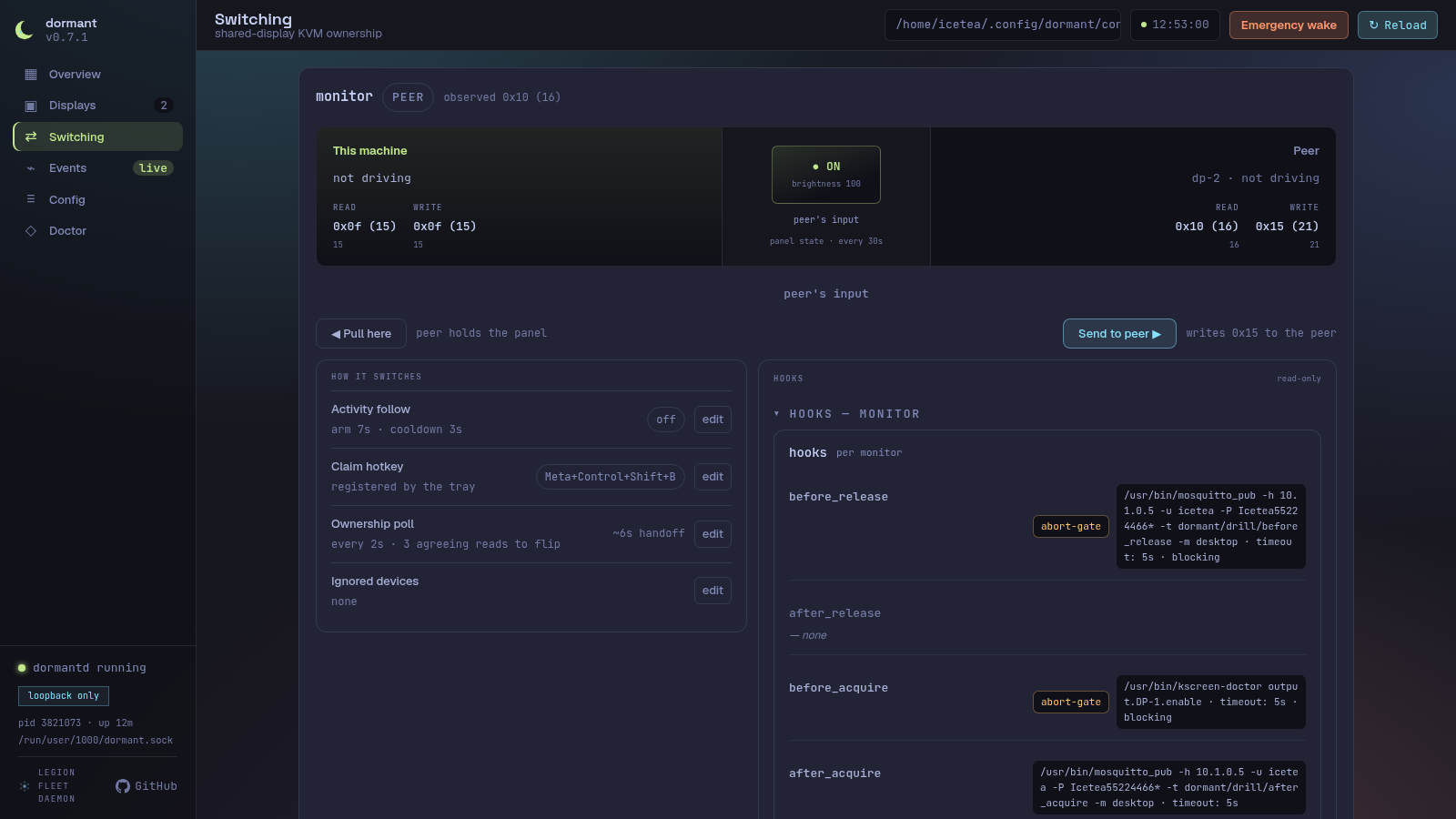
For displays configured with scope = "shared" and a [coordination] section, the Switching view shows live panel ownership — which machine currently holds the panel, the observed input code, and both machines' configured codes — updated in real time via Ownership daemon events over the WebSocket. Each display's row includes the local and peer input codes in hex, the panel state, short-press Poll button, and an agreement verdict that checks whether the observed code matches the configured local code. The view appears in the sidebar only when at least one display is configured as shared.
Display detail and panel exposure
Select Open detail on any display card to inspect that display without leaving the Displays page. The detail surface combines live phase/controller health with the existing wear API:
- total panel on-time and sample count;
- average brightness-weighted hotness and current-grid uniformity;
- the compensation advisory, when no long standby window has occurred;
- a per-cell wear heat map from
GET /api/wear/:display; - the configured controller chain in fallback order.
An empty heat map means the daemon has not recorded spatial samples for that display. It is not replaced with demonstration data.
Control-path exercise
The display detail and Doctor pages can run the daemon's real control-path exercise. The sequence is blank → read → wake → read → restore. The daemon pauses affected rules for the exercise window and always owns their release; the browser does not issue a separate resume request.
The selected panel will visibly go dark and return. Run the exercise only when the panel is not in use. The report distinguishes confirmed movement, unconfirmable controllers without readback, and failures where a command returned success but the observed panel state did not move.
A 504 is a report timeout, not an operation cancellation. The exercise may still
be completing its restore and rule-release sequence; the browser keeps the action
disabled until a GET /api/operations request started after the timeout reports
that the display's server guard was released. A delayed response from a request
started before the exercise cannot clear the warning. Display phase is not used
for this decision because exercise drives the hardware directly. Do not retry
while that warning is visible.
Emergency wake
Emergency wake is a global shell action for recovery when normal control has
failed. After confirmation it pauses every rule and asks every configured display
to wake concurrently. The response is { paused, displays }; each display result
contains { display, ok, error? }. A 504 means the report did not arrive within
two seconds and the wake may still be running — it does not mean the operation was
cancelled. The global action stays disabled until a GET /api/operations
request started after the timeout reports that the emergency-wake guard was
released; delayed pre-operation responses are ignored. Emergency wake is global
by design; there is no per-display variant.
Browser requests are single-flight, but issue #71 tracks the remaining daemon-wide limitations: CLI+web overlap, reload-generation races, engine-side exercise serialization, and panic-mid-exercise restore/resume hardening.
Rollback and failure banners
A rollback banner appears above all pages when boot guard rejected a candidate configuration and the daemon is running the last-known-good configuration. It shows the failed and active fingerprints and links to Config. The banner clears only after the recovered configuration has been accepted successfully.
Blank-chain exhaustion is also global. A separate failure banner identifies the affected display and controller evidence and links directly to its detail view.
Config
Six tabs: Daemon, Sensors, Zones, Rules, Displays, and Coordination — plus the original Raw TOML tab (a read-only syntax-highlighted viewer with inventory sidebar and a reload button).
Settings tabs
The Settings form presents the running config as editable sections, one per tab. Each field shows the current value from GET /api/config; edits are accumulated in a client-side patch store and submitted together via POST /api/config/apply.
What is editable:
- Leaf string, number, and duration values across every section (e.g.
grace_period,startup_holdoff,hold_time, coordination timeouts, keymap entries, input-filter patterns). - Whole arrays (e.g. a rule's
displayslist, theladderarray-of-tables, screensaversourcelists, coordinationkeymapentries). Setting an array replaces it wholesale. - A limited set of optional keys can be removed via the Remove op:
blank_mode,degraded_mode,dwell,order,image_duration,scale_mode,transition,transition_duration,hold_time,stale_timeout,ddc_display,output,wol_mac,host. - Hook slots (
on_blank,on_wake,on_observed_loss) — editing is gated behinddaemon.hook_edit_enabled = true(default: off); when disabled, hooks are displayed read-only.
File-only:
- Display command strings (
wake_command,blank_command) are not rendered in the Settings form.
What is not editable:
- Locked leaves —
typeon an existing entity,blank_data, andwake_dataare never writable through the patch API. The form marks them locked and explains why.typeis set only when an entity is created; changing a sensor type requires delete-and-recreate so type-specific fields cannot be dropped silently. - Credentials-redacted fields — URLs carrying inline userinfo (for example an MQTT
broker_urlwithuser:pass@) are redacted before the response is sent. The form locks the redacted path and its descendants. - General credentials editing — only the Samsung pairing token write (below) goes through the web UI. HA tokens, MQTT credentials, and any other
credentials.tomlcontent stay file-only.
Apply → reload flow:
- The form computes the patch delta from the user's dirty edits.
POST /api/config/applysends the currentfingerprintplus the patches.- The server re-reads the file, checks the fingerprint, validates and applies the patches, writes the new file, backs up the old file, and subscribes to the daemon's reload outcome.
- The daemon's config-file watcher detects the write, waits through the
reload_debouncewindow, then reloads the runtime. - The reload outcome is reported back in the apply response.
Outcome banners
The apply bar displays one of four outcomes after the request completes:
| Banner | Meaning |
|---|---|
| ✓ Reloaded | The daemon accepted the new config and rebuilt the runtime successfully. The form clears its dirty state and re-fetches the new fingerprint. |
| ✕ Rejected | The config was valid at write time but the daemon's reload failed (e.g. assembly error, removed-display verified-wake failure). A detail message names the cause. The old config is still running; the patched file is on disk. |
| pending | The apply handler waited for the reload outcome but it did not arrive within the timeout (10 s). Normal when reload_debounce is large — the daemon coalesces the event and will reload shortly. The form re-fetches immediately; the file was already written. |
| superseded | Another writer (a second browser tab, dormantctl, or a direct file edit) landed after your apply wrote the file. The reload outcome belongs to their write, not yours. |
Conflict dialog (409)
If the fingerprint in the apply request does not match the on-disk file (someone else edited the config between your last GET and your POST), the server returns 409 Conflict. The Settings form shows a red conflict dialog:
Config changed on disk — your edits are against an outdated version. Reload the form to get the latest config, or keep editing (your changes will be lost).
Reload form discards your edits, re-fetches the fresh config, and refreshes the form. Keep editing dismisses the dialog and leaves your dirty edits in place — you can then re-apply (the next attempt will use the current fingerprint, not the stale one).
Unsaved-changes guard
While the form has dirty edits, a beforeunload browser guard prevents accidental navigation away from the page. Switching from the Settings tab to the Raw TOML tab also triggers a confirmation dialog: "Discard N unsaved changes?". The guard is removed once all edits are applied or discarded.
Backups
Every POST /api/config/apply that succeeds (the file is written and fsync'd) creates a backup of the previous config file before the atomic rename. Backups are stored in <config-dir>/backups/ with names derived from the current UTC time plus a random 4-hex-digit suffix:
config.toml.2026-07-07T14:22:03Z.a3f1
The directory is created with mode 0o700 (owner-only). A rotation policy keeps at most 5 newest backups (sorted by filename, which encodes an RFC 3339 timestamp); older files are deleted after each new backup.
The config-file watcher uses RecursiveMode::NonRecursive on the config directory — writes inside backups/ do not trigger a reload.
The Raw TOML tab also documents the atomic-apply backup policy: the last five
backups are retained under backups/config.toml.<timestamp>.<suffix>. The Web API
does not expose the live backup directory listing, so the UI shows the policy and
naming shape rather than fabricated filenames.
Entity create/delete
Each of the four Settings sections — Sensors, Zones, Displays, Rules — has an Add button that opens a creation form, and each entity card has a Delete button. Both ride the same apply flow as every other edit (fingerprint check, backup, atomic rename, reload-wait); there is no separate create/delete pipeline to reason about.
Creation and deletion use dedicated create_entity and delete_entity patch operations. Ordinary Set operations cannot create or replace a whole entity table, and they cannot change type on an existing entity.
Entity ids. An id must be 1–64 characters, start with a lowercase ASCII letter, and contain only [a-z0-9_-] afterward. A fixed set of names is reserved and can never be used as an entity id, because the server internals special-case them for unrelated reasons (as an array-of-tables key, a removable-leaf name, a locked-leaf name, or the config-key literal weights): type, blank_data, wake_data, source, ladder, weights, blank_mode, degraded_mode, dwell, order, image_duration, scale_mode, transition, transition_duration, hold_time, stale_timeout, ddc_display, output, wol_mac, host. The id field gives live feedback as you type; the server re-validates independently and is the real boundary. An id that collides with an existing entity in the same collection is rejected.
What each collection accepts at creation. The create form only exposes fields from a fixed, closed list per collection — there is no free-form "add any key" path:
- Sensors — a
typediscriminator (mqtt,ha, orusb-ld2410, selectable only at creation — never changeable afterward) plus the fields for the chosen type,kind,hold_time,stale_timeout. - Zones —
mode,members,unavailable_policy,weights. - Displays —
controllers,host,blank_mode,output,ddc_display,wol_mac,samsung_restore_backlight,restore_brightness,treat_unreachable_as_blanked,command_timeout.wake_command/blank_commandare deliberately not offered here (or anywhere in the create path) — they are daemon-executed shell commands, and a web-created display cannot carry an arbitrary shell command in v1. A display that needs a command controller is still authored by hand inconfig.toml, exactly as before this feature. - Rules —
zone,displays,grace_period,inhibitors, and the timing tunables.
Cross-references. Now that entities can be minted from the browser, the rule fields that name other entities — zone, displays, members, inhibitors — are editable dropdowns/multi-selects populated from the live inventory, instead of the read-only fields they were before this feature.
Delete. Deleting shows a confirmation naming anything in the currently-loaded config that references the entity (a client-side, best-effort check — it only knows what's in the form's inventory). The real reference-integrity guarantee is server-side: if a delete would orphan a reference (a rule pointing at a deleted zone or display, a zone listing a deleted sensor), the daemon-identical validation step at apply time rejects the whole request with 422 and the on-disk config is untouched. There's no separate reference-checking code path in the web layer to drift from the daemon's own rules.
The entity_crud_enabled flag. Set daemon.entity_crud_enabled = false to turn this off; the UI hides the Add/Delete affordances, but the server is the actual boundary — a create_entity/delete_entity patch sent while the flag is off is rejected with 403 feature_disabled regardless of what the UI shows. Ordinary Set/Remove edits are unaffected by this flag.
Pairing wizard
The Settings tab includes a Pair a Samsung TV card that walks through the network-pairing handshake dormantctl pair samsung performs from the command line, without leaving the browser.
- Enter the TV's hostname or IP address and click Pair. The server responds immediately (it never blocks the request on the TV) with an opaque
pair_id, and the browser starts pollingGET /api/pair/samsung/<pair_id>about once a second. - While the attempt is in flight, the wizard shows "Connecting… accept the prompt on your TV" — the daemon can't distinguish "still connecting" from "waiting for you to press Allow" (both are the same blocking network call), so this message covers both.
- Accept the "Allow dormant" prompt on the TV when it appears. If you don't, the attempt eventually times out (
daemon.pair_timeout, default120s, configurable30s–300s) and the wizard shows a timeout message with a Try again button — pairing is not automatically retried. - On success, the granted token is written to
credentials.toml(mode0600, atomic temp-file-plus-rename, same code pathdormantctl pairuses) and the wizard offers to pre-fill a new display entity for that host (controllers: ["samsung-tizen"]) using the entity create form above. Declining still leaves the token stored — an unused Samsung token in credentials is harmless.
What never leaves the daemon: the pairing token is never present in any HTTP response body, and never appears in a log line — the code represents it with a type whose Debug/Display implementations redact to ***, so even an accidental log format string can't leak it.
Concurrency. Only one pairing attempt runs at a time (server-wide). A second POST /api/pair/samsung while one is already in flight gets an immediate 409 pairing_in_progress — it never queues behind the first attempt or blocks waiting for it.
The pairing_enabled flag. Set daemon.pairing_enabled = false to turn this off; the UI hides the wizard, and the server independently rejects POST /api/pair/samsung with 403 feature_disabled if called anyway.
Security notes specific to this route. POST /api/pair/samsung carries the same strict Origin check as /api/config/apply (see Origin (CSRF) guard above) — without it, a malicious page open in the operator's browser could trigger a pairing attempt against an attacker-chosen host. Its request body is capped at 4 KiB (a hostname is tiny; there's no reason to accept more). None of this changes the underlying trust assumption: pairing connects to whatever host the operator types, with TLS certificate verification disabled (the token is what authenticates the connection, not the certificate — the same posture the CLI pairing path and the ongoing Samsung control connection already use). Pointing the wizard at the wrong device is an operator mistake, not something the wizard can detect.
Doctor
Runs the same diagnostic checks as dormantctl doctor on demand. The SPA calls POST /api/doctor, which invokes the shared DoctorService directly (the same service instance the daemon's IPC server uses — no subprocess is spawned). Results include a summary bar (passing / skipped / failing counts) and per-check rows with status chips and detail messages.
The web doctor view does not run the destructive control-path exercise. Use
dormantctl doctor exercise <display> when you need to prove that a real panel
blanked and woke.
Active wear sampling
The panel-exposure WearCard shows the sampler state. Its Enable sampling
button is available only for NeedsConsent; it starts the daemon-owned
xdg-desktop-portal ScreenCast flow and polls until consent is granted, denied,
timed out, or failed. The flow uses the configured one-display binding and
never exposes the restore token. See Active wear sampling
for the consent grant, revocation paths, and uniform fallback states.
Audio-aware blanking
The Settings form renders the [audio] section, and rule editors accept
"audio-playback" and "call" inhibitors. A rule that declares either kind
spawns a PipeWire poller (pw-dump every [audio].poll_interval): while a
matching stream is playing, the rule is inhibited and its displays stay awake
even when the room reads vacant. Deassertion is immediate when playback stops.
A rule that declares no audio inhibitor spawns no poller. See
Configuration → [audio] for the classification knobs
(call_roles, playback_roles, capture_is_call, min_active).